To update IEC certificate details on the DGFT portal is a mandatory annual compliance requirement for every importer and exporter in India. Whether or not anything has changed in your Importer Exporter Code (IEC) profile, you must confirm or update it online between 1 April and 30 June every year or your IEC will be deactivated.
This guide explains exactly how to update your IEC certificate online on the DGFT portal in 2026, the documents required, the fees, the deadline, and what happens if you miss it. If you are applying for the first time, see our IEC Registration service, and if your code has already lapsed, our IEC Renewal service handles reactivation end to end.
IEC certificate updation is the process of electronically confirming or modifying your Importer Exporter Code details on the DGFT (Directorate General of Foreign Trade) portal. It was made mandatory by DGFT vide Notification No. 58/2015 2020 dated 12 February 2021, which requires every IEC holder to update or confirm their details once each financial year, between April and June.
Even if there are no changes to your IEC profile, where your address, bank, directors, and contact details all remain the same, you still need to log in and confirm your details to keep your IEC active. Silence is treated as non compliance, so to update IEC certificate records every year is compulsory for all importers and exporters.
DGFT introduced annual IEC updation to:
Failure to update results in automatic deactivation of your IEC, which blocks your ability to import or export goods from India.
| Situation | Action Required |
|---|---|
| Annual compliance (1 April to 30 June 2026) | Update or confirm IEC every year |
| Change in business address | Update immediately |
| Change in bank account | Update immediately |
| Change in directors or partners | Update within 30 days |
| Change in firm name or PAN | Update immediately |
| Addition of a branch office | Update immediately |
The annual update window for FY 2025-26 is 1 April to 30 June 2026. After 30 June, DGFT deactivates every IEC that has not been updated.
Before you start the IEC update process on the DGFT portal, keep these documents ready:
Recent electricity bill, rent agreement, or sale deed (not older than 2 months).
Cancelled cheque OR bank certificate on bank letterhead.
Amended Certificate of Incorporation or the relevant MCA document.
Through the DGFT IEC Profile Management portal, you can update the following information when you update IEC certificate details:
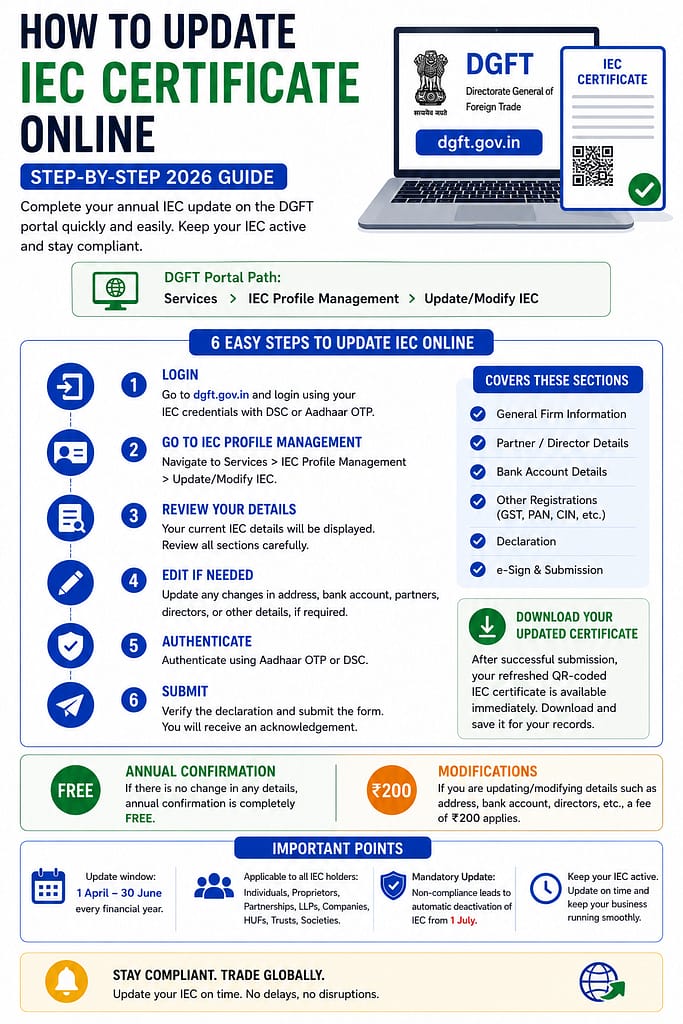
Follow these 7 steps to update your IEC certificate on the official DGFT portal:
Go to https://www.dgft.gov.in, the official website of the Directorate General of Foreign Trade, Ministry of Commerce and Industry, Government of India.
Important: Only use the official DGFT portal. Do not use any third party website that claims to update your IEC directly.
Click on Login in the top right corner. Enter your registered username (email ID) and password.
First time user? Click on Register and create your account using your IEC linked mobile number and email ID. Then link your IEC to your new profile before you proceed.
After logging in, go to the top menu and click on Services. From the dropdown, select IEC Profile Management.
Inside IEC Profile Management, click on Update IEC. Your current IEC details will be displayed, including firm name, address, bank details, directors, and contact information.
Review all details carefully.
If details are correct and unchanged, proceed directly to Step 6. No edits are needed for annual compliance.
If details need to be changed, edit the relevant fields, such as address, bank info, or directors, and upload the supporting documents.
Once you have reviewed and edited (if needed) your details:
Click Submit.
Choose your authentication method:
After successful submission, you receive an acknowledgement on screen and by email, and a fresh acknowledgement is generated that resets your annual update cycle. Your IEC status is marked as Updated in the DGFT system.
You can download your updated, digitally signed IEC certificate from the DGFT portal by going to: Services, then IEC Profile Management, then Print IEC.
Yes, the annual IEC updation is completely free of cost.
As per current DGFT norms, there is no government fee to confirm or update your IEC details during the April to June annual window when there are no changes.
If you are making modifications to your IEC (such as changing the address, bank, directors, or constitution), a nominal fee of Rs. 200 applies on the DGFT portal. Always check the portal for the live fee at the time of update.
Professional assistance fees (charged by consultants like JPARKS) are separate and cover preparation, document review, portal submission, and follow up. They are not a government fee.
Non compliance with annual IEC updation has serious consequences:
| Consequence | Impact |
|---|---|
| IEC Deactivation | IEC is automatically deactivated after 30 June |
| Customs Clearance Blocked | You cannot file shipping bills or bills of entry on ICEGATE |
| Export or Import Blocked | All trade operations come to a halt |
| Export Incentives Frozen | RoDTEP and other claims linked to the IEC are blocked |
| Bank Transactions Affected | Foreign currency transactions may get flagged or held |
If your IEC was deactivated for non updation, you can reactivate it online without visiting any DGFT Regional Authority office. The process is fully automatic:
Note that after reactivation there is usually a technical hold of about five working days before operations resume, so high volume exporters should plan for this window. If you would rather have it handled for you, our IEC Renewal service takes care of reactivation from start to finish.
Yes. As per DGFT Notification No. 58/2015 2020, every IEC holder must update or confirm their details electronically each year between 1 April and 30 June. Even if no details have changed, the annual confirmation is compulsory.
The deadline for annual IEC updation is 30 June every year. For FY 2025-26 the window runs from 1 April to 30 June 2026. IECs not updated by this date are automatically deactivated by DGFT.
No. The annual IEC update is free of charge when there are no changes. A fee of Rs. 200 applies only if you make modifications to your IEC details on the DGFT portal.
Your IEC is automatically deactivated. A deactivated IEC means you cannot file shipping bills, clear customs, claim export incentives, or process trade related foreign remittances until it is reactivated.
Log in to the DGFT portal, go to IEC Profile Management, update or confirm your details, and authenticate. Your IEC is automatically reactivated with no office visit required, though a short technical hold of around five working days may follow.
Yes. You can authenticate your IEC update using Aadhaar OTP linked to your registered mobile number instead of a Digital Signature Certificate (DSC). Both methods are accepted on the DGFT portal.
If you authenticate with Aadhaar OTP and need no major changes, the update is usually processed immediately or within the same day. If document verification is required for modifications, it may take 2 to 3 working days.
For annual confirmation with no changes, Aadhaar OTP or a DSC is sufficient. For changes to address, bank, or directors, you need the relevant supporting documents such as address proof, a cancelled cheque, or an updated incorporation certificate.
Yes. You can modify your IEC multiple times in a year. The annual updation window of April to June is for mandatory confirmation, but you can update details at any time when your business information changes.
After a successful update, go to the DGFT portal, then Services, then IEC Profile Management, then Print IEC. Your digitally signed updated IEC certificate is available to download in PDF format, and you also receive it by email.