ICEGATE PKI is the client side component that lets the customs portal see the Digital Signature Certificate in your USB token. It runs on your own machine, not on icegate.gov.in. When it is missing, blocked by the browser or installed the wrong way, signing fails and Bill of Entry filing, Shipping Bill submission, e-Sanchit uploads and DSC registration all stop with it.
This guide covers the install sequence, the browser settings most guides leave out, and what each error means. If the certificate still will not register, our ICEGATE registration process service handles it end to end.
What Is ICEGATE PKI and What Installs It
PKI stands for Public Key Infrastructure. On ICEGATE it means something narrower: a small Java based service on your laptop that bridges your browser, your DSC token and the portal. Signing happens locally, and ICEGATE PKI is what lets the browser reach the private key on your token.
The component and the Common Signer Utility are one download, not two. On icegate.gov.in go to Services, then Digital Signature Certificate, then Common Signer Utility. The link labelled Download Signer utility delivers PKIComponent.zip, which installs nCodePKIComponent.
ICEGATE PKI Prerequisites
Requirement
Detail
DSC
Class 3 signing certificate from a CA licensed under CCA India. Encryption only certificates fail validation
Name match
Holder must be the authorised signatory on the ICEGATE profile
Java
Java 1.8 only, 32 or 64 bit. No other version is supported
Windows account
Local administrator rights, with read and write permission
Token drivers
ePass, ProxKey, mToken, WatchData or whichever your CA issued
Browser
Chrome, Edge or Firefox
Java is the row people get wrong. Being applet free is why the component runs outside Internet Explorer, but it is still a Java application. If more than one version is installed, remove the rest and keep only 1.8. No certificate yet? Start with a Class 3 DSC.
How to Install the ICEGATE PKI Component in 7 Steps
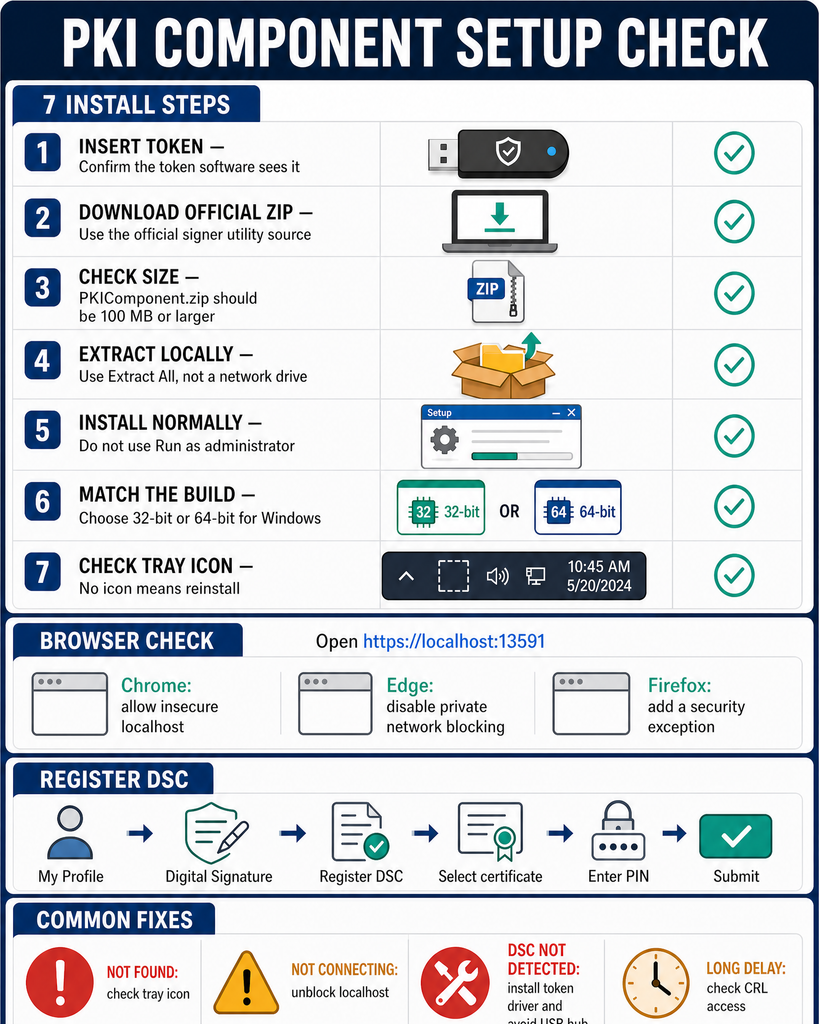
Step 1. Insert the DSC token.
Plug it in first and confirm the token software sees it.
Step 2. Download from the official source only.
Use the Common Signer Utility page on icegate.gov.in or filesign.icegate.gov.in. Third party installers circulate widely and some carry adware.
Step 3. Check the file size.
A PKIComponent.zip smaller than 100 MB means the bundled Java payload is missing. Install Java 1.8 manually first, or the component will not start.
Step 4. Extract the archive.
Right click the ZIP, choose Extract All, and extract locally rather than to a network drive.
Step 5. Run the setup normally.
Double click the installer. Do not right click and choose Run as administrator. Your account needs administrator rights, but running the setup elevated is the most common cause of an ICEGATE PKI component that installs and then refuses to connect.
Step 6. Pick the correct build.
Choose 32 bit or 64 bit to match your operating system, not your browser.
Step 7. Confirm the tray icon.
The component starts automatically and an icon appears in the Windows system tray. No icon means the install did not complete. Reinstall before testing anything else.
Browser Settings ICEGATE PKI Needs
The component listens on your own machine at https://localhost:13591, and on http://localhost:12951 in some builds. Browsers block that by default, producing a connection error even when the install is perfect. Open the address first. If it loads, ICEGATE PKI is running and the fault lies elsewhere.
edge://flags/#block-insecure-private-network-requests, set to Disabled
Firefox
Open https://localhost:13591 and add a security exception
Registering Your DSC on ICEGATE
Installing the component does not authorise you to file. Log in, open My Profile or Services then Digital Signature, select Register DSC, pick the certificate, enter the token PIN and submit.
No documents are needed, but consistency is essential. The registered email and mobile must match GSTN and, for importers and exporters, DGFT records. Unsure which identifier goes where? See ICEGATE ID vs IEC. DGFT side signing needs a separate DGFT digital signature. When a certificate expires, register the replacement the same way. There is no grace period.
ICEGATE PKI Errors and Fixes
Error
Cause
Fix
PKI component not found
Not installed, not running, or installed with Run as administrator
Confirm the tray icon, reinstall without elevating the setup
Error connecting to PKI component
Browser blocking localhost, or antivirus intercepting the request
Apply the browser settings above, then whitelist the component
Still not connecting after reinstall
Stale certificate configuration
Exit from the tray icon, run installCert.bat as administrator from the install folder, then run_32.bat or run_64.bat
DSC not detected
Token drivers missing, or a USB hub in the way
Install CA drivers, plug directly into the machine, try another port
Long delay after selecting the certificate
CRL check timing out
Check the CRL URL in the certificate opens and is not blocked by a proxy
Works on one machine, not another
The component is per machine, not per account
Install on every workstation used for signing
Reading the Validation Screen
When the component rejects a certificate it shows a list of checks marked true or false. Each false has one meaning.
Check reading false
What it means
Date validation
Certificate expired, or the system clock is wrong
Has private key
You picked an installed .cer file, not the certificate on the token
Certificate chain installed
Root and intermediate certificates missing from the machine
CA validation
Issuing CA is not licensed under CCA India
Class validation
Wrong DSC class for the portal
Is signing allowed
You are signing with an encryption certificate
CRL validation
Certificate revoked, or the CRL URL is unreachable
Conclusion
ICEGATE PKI is software on your own machine, and that single fact explains almost every error users hit. Install it with Java 1.8 present, without elevating the setup, confirm the tray icon, unblock localhost, and register a valid Class 3 signing certificate. When something breaks, check localhost:13591 first, then the validation screen.
If the certificate still will not register, the details usually conflict with your PAN, GSTN or DGFT records.
Q1. Is the ICEGATE PKI component the same as the signer utility?
In practice, yes. The Download Signer utility link delivers PKIComponent.zip, which installs the component. There is no separate download.
Q2. Do I still need Java?
Yes. Java 1.8 is required and no other version is supported. Being applet free is why it works in Chrome and Edge, but it is still a Java application.
Q3. Should I run the installer as administrator?
No. Your account needs administrator rights, but do not right click and choose Run as administrator. That causes connection failures afterwards.
Q4. Why does ICEGATE say PKI component not found?
Either it is not running, or the browser is blocking localhost. Check the tray icon, then open https://localhost:13591.
Q5. Do I need to install it on every computer?
Yes. It is machine specific, not account specific.
Q6. Why does my DSC work on the GST portal but not ICEGATE?
GST uses emSigner. ICEGATE uses its own PKI component. One certificate can be valid on both while only one utility is installed.
Q7. Who do I contact for errors?
The ICEGATE helpdesk on 1800-3010-1000 or [email protected], available 24×7. Have your ICEGATE ID, component version and exact error text ready.
Need this handled for you?
Tell us where you are stuck. We usually reply the same business day.
5.0 ★ · 123 Google reviews · Since 1990
Posted on Google
Vandana Bajaj
Trustindex verifies that the original source of the review is Google.
Very prompt and reliable service by Rahul Kolge and his team. Exceptional and happy experience.
Posted on Google
Supriya Shetye
Trustindex verifies that the original source of the review is Google.
Had a really good experience with JParks India. Rahul sir helped me a lot with my import work and were always active and responsive. Whatever documents or guidance was needed, they handled everything smoothly and explained things clearly. Felt stress-free throughout the process. Very helpful team, definitely recommend them if you’re doing import or export.
Posted on Google
dipali sakpal
Trustindex verifies that the original source of the review is Google.
Very nice people, get the work done in a very short time.
Posted on Google
Satish Bajaj
Trustindex verifies that the original source of the review is Google.
Excellent & Prompt services in all Import Export matters.
Great to work with you
Posted on Google
Bajaj VCPL
Trustindex verifies that the original source of the review is Google.
It was a great experience having work with you.
Posted on Google
Satish Bajaj
Trustindex verifies that the original source of the review is Google.
"Outstanding professiona services, efficient, and gets things done incredibly fast. Highly recommended for anyone needing reliable and prompt assistance
Posted on Google
Nishat fatima
Trustindex verifies that the original source of the review is Google.
excellent service
Posted on Google
farhan sayed
Trustindex verifies that the original source of the review is Google.
JParks Team is Super helpful! Thanks to Rahul and team!
Posted on Google
Sadik Inamdar
Trustindex verifies that the original source of the review is Google.
Good and personal service for import export code
Posted on Google
Maheshwar
Trustindex verifies that the original source of the review is Google.
Had a really good experience with JParks India. Rahul sir helped me a lot with my import work and were always active and responsive. Whatever documents or guidance was needed, they handled everything smoothly and explained things clearly. Felt stress-free throughout the process. Very helpful team, definitely recommend them if you’re doing import or export.
Verified by Trustindex
Trustindex verified badge is the Universal Symbol of Trust. Only the greatest companies can get the verified badge who has a review score above 4.5, based on customer reviews over the past 12 months. Read more
We use cookies to run this site, measure traffic, and track our ads. Essential cookies are always on. Accept all, reject non-essential, or set your preferences.
Cookie Preferences
Manage your cookie preferences below:
Essential cookies enable basic functions and are necessary for the proper function of the website.
Name
Description
Duration
Cookie Preferences
This cookie is used to store the user's cookie consent preferences.
30 days
Google reCAPTCHA helps protect websites from spam and abuse by verifying user interactions through challenges.
Name
Description
Duration
_GRECAPTCHA
Google reCAPTCHA sets a necessary cookie (_GRECAPTCHA) when executed for the purpose of providing its risk analysis.
179 days
Google Tag Manager simplifies the management of marketing tags on your website without code changes.
Name
Description
Duration
cookiePreferences
Registers cookie preferences of a user
2 years
td
Registers statistical data on users' behaviour on the website. Used for internal analytics by the website operator.
session
Statistics cookies collect information anonymously. This information helps us understand how visitors use our website.
Google Analytics is a web analytics service that tracks and reports website traffic. It collects anonymized data on how visitors use the site to help us understand and improve performance.