ICEGATE Registration Time: 4 Stages to a Perfect Approval
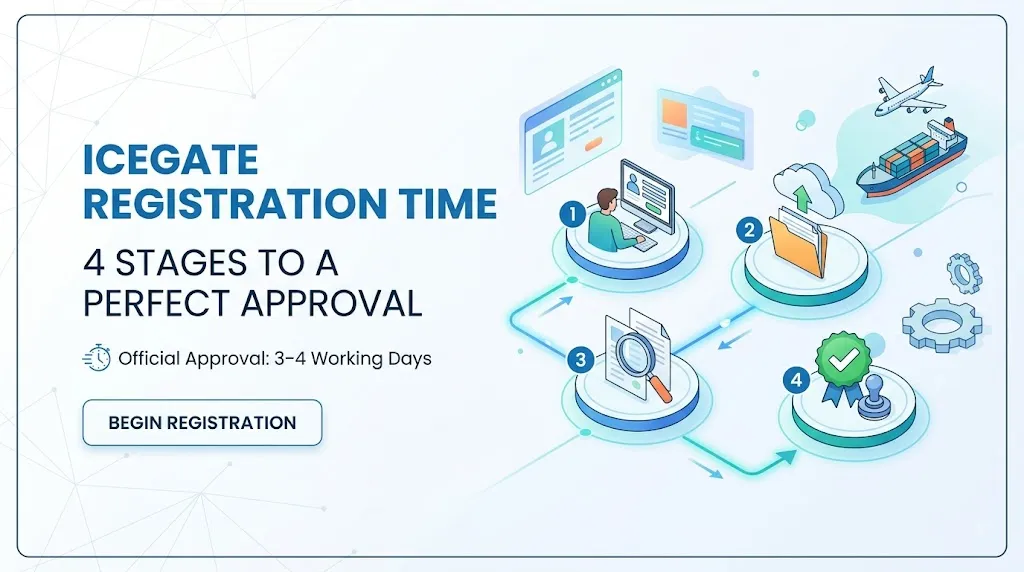
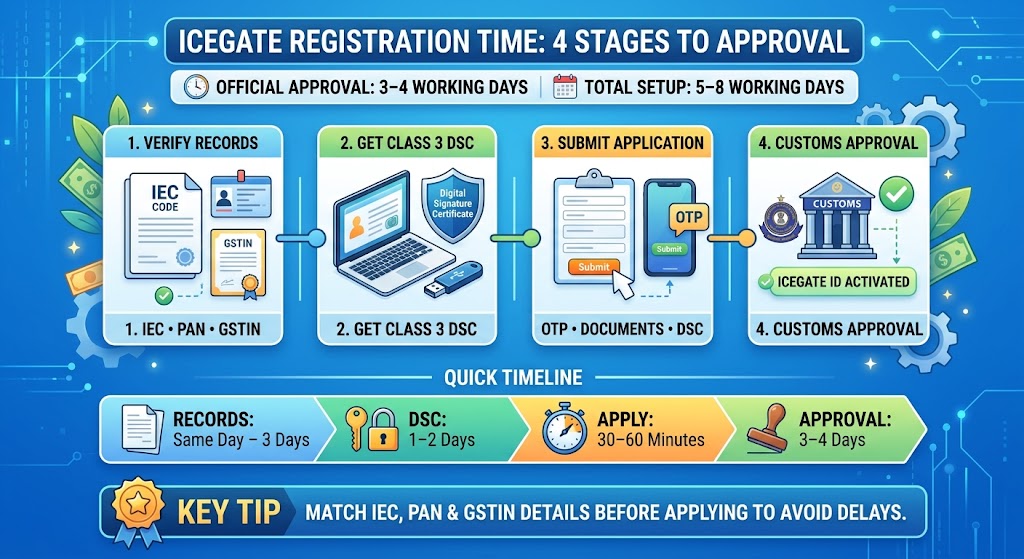
ICEGATE registration time is 3 to 4 working days from submission to approval, according to the official ICEGATE 2.0 FAQ published by the Directorate General of Systems and Data Management. That figure covers only the customs approval stage. The full journey, from arranging your Class 3 DSC to holding a live ICEGATE ID, usually runs 5 to 8 working days.
This guide sets out the four stages that make up the real ICEGATE registration time, what stretches each one, and how to check where your application stands.
How Long ICEGATE Approval Actually Takes
The official figure is 3 to 4 working days after submission, published in the ICEGATE 2.0 FAQ by the Directorate General of Systems and Data Management. On approval, your user ID and password arrive at the registered email address.
That window assumes a clean application. Approval sits with your jurisdictional customs office, so files needing record corrections or filed during peak load can run to 2 to 5 working days. Plan against the official figure, budget for the wider one.
Everything before submission is preparation you control, and it is where most of the real waiting happens.
ICEGATE Registration Time: The 4 Stages
Stage
What Happens
Typical Duration
1. Record reconciliation
Match your legal name, address and identifiers across IEC, PAN and GSTIN
1 to 3 working days if amendments are needed, otherwise same day
2. Class 3 DSC procurement
Buy and receive a Class 3 Digital Signature Certificate on a USB token
1 to 2 working days
3. Application submission
Fill the role registration form, verify OTPs, upload documents, sign with DSC
30 to 60 minutes in one sitting
4. Customs approval
Jurisdictional customs cross checks and approves
3 to 4 working days
Total, working from a clean starting position: 5 to 8 working days.
If your IEC, PAN and GSTIN records already agree and you hold a valid Class 3 DSC, the honest ICEGATE registration time is 3 to 4 working days. Everything above stage 4 is preparation you control. The full sequence is covered in our guide on how to register on ICEGATE.
What Makes It Faster
Reconcile records before you start. The portal validates against live DGFT and GSTN data. A name differing by a comma fails validation.
Buy the DSC first. Order it before you open the registration form, not when you reach the signing screen.
Install and test emSigner in advance. The DSC not detected error is the single most common blocker, and it costs a day every time it appears.
Submit early in the week. A Thursday submission puts the approval window across a weekend.
Complete the form in one sitting. OTPs expire after 600 seconds and abandoned applications need a Reference ID to resume.
What Makes It Slower
Name or address mismatch between DGFT, PAN and GSTN records. This is the leading cause of rejection, and a rejection restarts the clock.
Selecting the wrong role. A customs broker registered as an importer hits access limits and has to reapply from the beginning.
Stale contact details. The portal only offers the email and mobile already held in GSTN or DGFT records. If neither is current, you must amend at source and start again.
Applying without an IEC. There is nothing to measure if you have no code to register against. Get the IEC first.
Peak filing periods. Approval sits with your jurisdictional customs office, and volume affects the queue.
Following an outdated guide. CBIC has been rolling out ICEGATE 2.0 in phases since 16 November 2022. Walkthroughs showing the pre 2.0 registration screens will send you looking for fields that no longer exist.
How to Check Where Your Application Stands
Use the ICEGATE Registration Verification page on the portal. Enter your PAN and the security characters, then submit.
An approved application returns your ICEGATE ID, registration date and role. A rejected one triggers an email to your registered address setting out the reason, and you can correct the issue and resubmit the role registration form.
If nothing has moved after 4 working days, raise a ticket on the ICEGATE helpdesk rather than submitting a second application. Duplicate submissions confuse the queue and add delay.
How This Compares to Your Other Registrations
Registration
Issuing Body
Typical Time
IEC
DGFT
24 to 48 hours
Class 3 DSC
Licensed certifying authority
1 to 2 working days
ICEGATE registration
CBIC
3 to 4 working days
AD Code registration
Bank, verified by Customs
1 to 3 working days
These run in sequence, not in parallel. You cannot register on the portal without an active IEC, and you cannot complete AD Code registration until your ICEGATE ID is live. Budget roughly two weeks from a standing start to a fully filing ready setup.
One saving worth knowing: under CBIC Instruction No. 25/2023-Customs, AD Code registration is a single registration valid across all Indian customs ports under the same IEC. You no longer repeat it port by port.
How JPARKS India Helps
JPARKS INDIA handles IEC, ICEGATE, DSC and AD Code registrations end to end, serving 500+ importers and exporters with a 5.0 Google rating.
We reconcile DGFT and GSTN records before touching the portal, which is where the rejections that double your wait get prevented. If cargo is arriving and your account is not live yet, see our ICEGATE registration service or contact us.
Frequently Asked Questions
Q1. What is the official ICEGATE registration time?
Three to four working days after successful submission, per the ICEGATE 2.0 FAQ published by the Directorate General of Systems and Data Management. Your user ID and password arrive by email on approval.
Q2. Can ICEGATE registration be done in one day?
The approval itself cannot be fast tracked. What you can compress is the preparation. With reconciled records and a Class 3 DSC already in hand, you can submit within an hour and wait only the standard approval window.
Q3. Why is my ICEGATE registration taking longer than 4 working days?
The most common causes are a record mismatch against DGFT or GSTN data, an incorrect role selection, or a document that failed verification. Check the ICEGATE Registration Verification page with your PAN, and look for a rejection email at your registered address.
Q4. Does ICEGATE registration time include getting the DSC?
No. The official figure covers customs approval only. Add 1 to 2 working days for Class 3 DSC procurement if you do not already hold one.
Q5. Is there a fee that speeds up approval?
No. CBIC charges no government fee for registration and there is no priority processing. Your only real costs are the Class 3 DSC and, if you use one, a consultant’s service charge.
Need this handled for you?
Tell us where you are stuck. We usually reply the same business day.
5.0 ★ · 123 Google reviews · Since 1990
Posted on Google
Vandana Bajaj
Trustindex verifies that the original source of the review is Google.
Very prompt and reliable service by Rahul Kolge and his team. Exceptional and happy experience.
Posted on Google
Supriya Shetye
Trustindex verifies that the original source of the review is Google.
Had a really good experience with JParks India. Rahul sir helped me a lot with my import work and were always active and responsive. Whatever documents or guidance was needed, they handled everything smoothly and explained things clearly. Felt stress-free throughout the process. Very helpful team, definitely recommend them if you’re doing import or export.
Posted on Google
dipali sakpal
Trustindex verifies that the original source of the review is Google.
Very nice people, get the work done in a very short time.
Posted on Google
Satish Bajaj
Trustindex verifies that the original source of the review is Google.
Excellent & Prompt services in all Import Export matters.
Great to work with you
Posted on Google
Bajaj VCPL
Trustindex verifies that the original source of the review is Google.
It was a great experience having work with you.
Posted on Google
Satish Bajaj
Trustindex verifies that the original source of the review is Google.
"Outstanding professiona services, efficient, and gets things done incredibly fast. Highly recommended for anyone needing reliable and prompt assistance
Posted on Google
Nishat fatima
Trustindex verifies that the original source of the review is Google.
excellent service
Posted on Google
farhan sayed
Trustindex verifies that the original source of the review is Google.
JParks Team is Super helpful! Thanks to Rahul and team!
Posted on Google
Sadik Inamdar
Trustindex verifies that the original source of the review is Google.
Good and personal service for import export code
Posted on Google
Maheshwar
Trustindex verifies that the original source of the review is Google.
Had a really good experience with JParks India. Rahul sir helped me a lot with my import work and were always active and responsive. Whatever documents or guidance was needed, they handled everything smoothly and explained things clearly. Felt stress-free throughout the process. Very helpful team, definitely recommend them if you’re doing import or export.
Verified by Trustindex
Trustindex verified badge is the Universal Symbol of Trust. Only the greatest companies can get the verified badge who has a review score above 4.5, based on customer reviews over the past 12 months. Read more
We use cookies to run this site, measure traffic, and track our ads. Essential cookies are always on. Accept all, reject non-essential, or set your preferences.
Cookie Preferences
Manage your cookie preferences below:
Essential cookies enable basic functions and are necessary for the proper function of the website.
Name
Description
Duration
Cookie Preferences
This cookie is used to store the user's cookie consent preferences.
30 days
Google reCAPTCHA helps protect websites from spam and abuse by verifying user interactions through challenges.
Name
Description
Duration
_GRECAPTCHA
Google reCAPTCHA sets a necessary cookie (_GRECAPTCHA) when executed for the purpose of providing its risk analysis.
179 days
Google Tag Manager simplifies the management of marketing tags on your website without code changes.
Name
Description
Duration
cookiePreferences
Registers cookie preferences of a user
2 years
td
Registers statistical data on users' behaviour on the website. Used for internal analytics by the website operator.
session
Statistics cookies collect information anonymously. This information helps us understand how visitors use our website.
Google Analytics is a web analytics service that tracks and reports website traffic. It collects anonymized data on how visitors use the site to help us understand and improve performance.