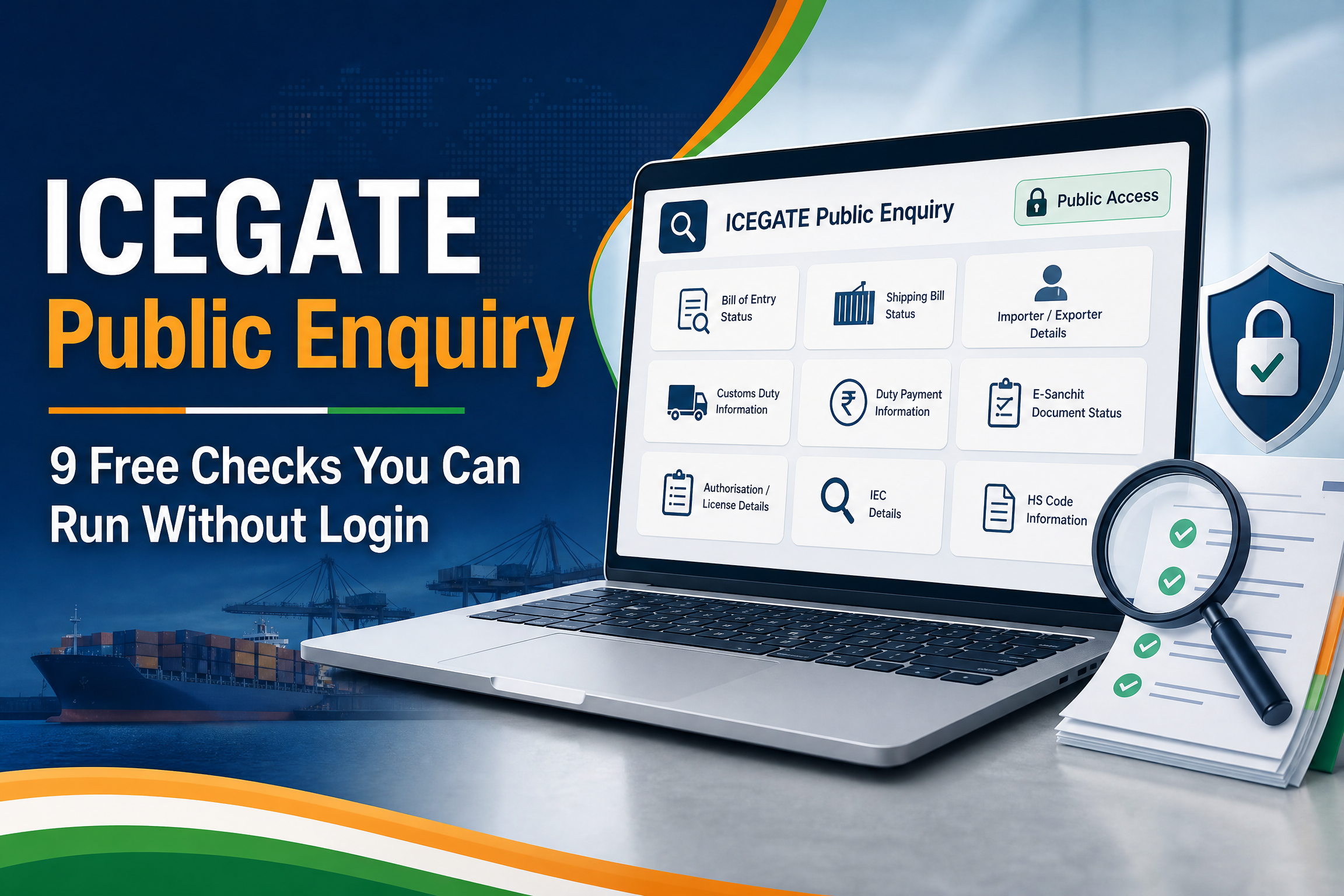
ICEGATE Public Enquiry: 9 Free Checks You Can Run Without Login
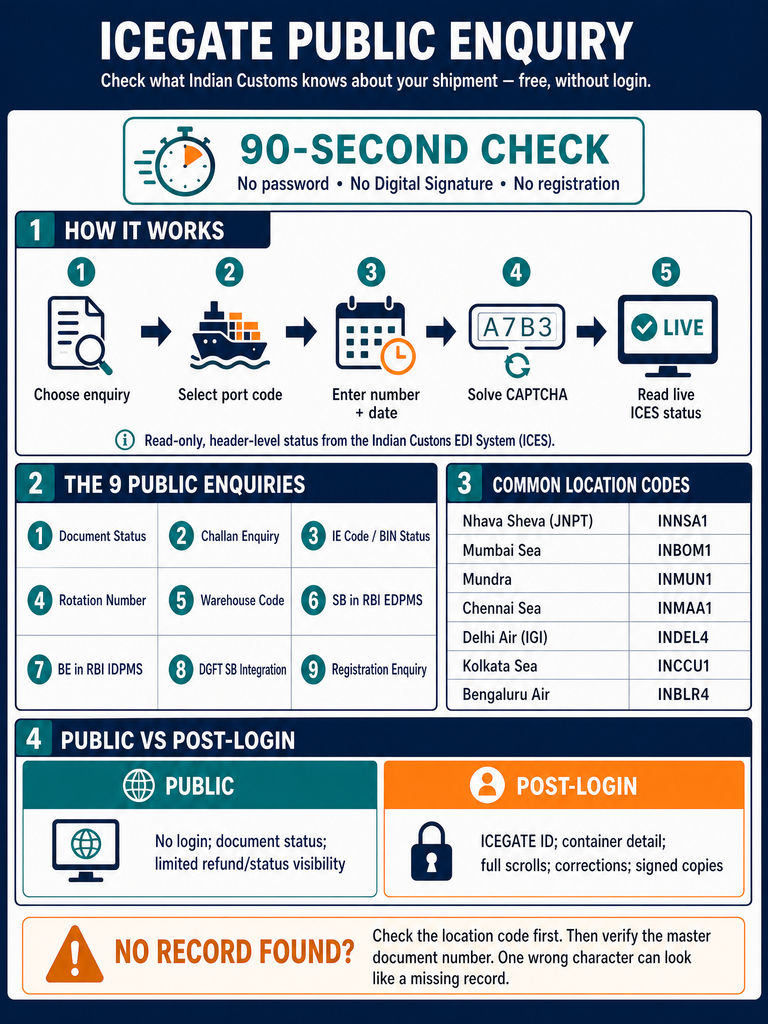
ICEGATE public enquiry is the fastest way to find out what Indian Customs actually knows about your shipment. It needs no password, no digital signature and no registration. You enter a document number and a port code, and the system returns the live status held in the Indian Customs EDI System.
Most importers only discover this after paying a broker to answer a question they could have answered themselves in ninety seconds. That is the real cost of not knowing the tool exists.
This guide covers every public enquiry available in 2026, what each one is genuinely useful for, and the exact inputs each screen demands. It also explains why your old bookmarks stopped working after the ICEGATE 2.0 rollout. You will see how to read the results, and what to do when a search returns nothing.
You will learn which checks are public and which need a login. You will also learn which port codes to use, and how to escalate when the data is wrong. If you import or export from India, treat this as the diagnostic layer you run before calling anyone. At JPARKS, this is the first screen we run before any escalation call, which is why we are walking you through it here.
ICEGATE public enquiry is a set of read-only status screens on the Indian Customs national portal. It is open to anyone. You do not need an ICEGATE ID, a Digital Signature Certificate or an IEC.
The screens pull live data from the Indian Customs EDI System, known as ICES. That is the same backend your customs broker sees. The difference is that ICEGATE public enquiry shows status only, never the full document.
Think of it as the customs equivalent of a courier tracking page. It confirms what stage a document has reached and flags where it is stuck.
The service sits at icegate.gov.in under Services, then Enquiry, then Public Enquiries 2.0.
Who Can Use It
Anyone with a document number can run an ICEGATE public enquiry. In practice the regular users are:
Importers verifying Bill of Entry progress before paying duty
Exporters checking whether the carrier has filed the manifest
Freight forwarders confirming a rotation number before gate-in
Accounts teams reconciling unpaid challans
Buyers verifying that a supplier’s IE code is genuinely active
Why ICEGATE Public Enquiry Matters
Every day a container sits at the terminal, demurrage accrues. Detention on the shipping line’s box accrues separately. Both clocks run whether or not anyone is watching the manifest.
ICEGATE public enquiry lets you watch the manifest yourself. When you spot a missing IGM entry on day one instead of day six, you save five days of storage.
The second benefit is evidence. A dated screenshot of an ICEGATE status page is the single most useful attachment when you escalate to a shipping line or a Customs officer.
The third benefit is refund protection. IGST refunds and RoDTEP credits only release when the Shipping Bill, the EGM and your GST returns all agree. ICEGATE public enquiry shows you two of those three, free.
How ICEGATE Public Enquiry Works
The flow is simple and identical across every screen.
You choose a document type
You select the Customs location code
You enter a document number and date
You solve a captcha
ICEGATE queries ICES and returns the record
There is no queue and no processing delay. The response reflects the state of the ICES database at that moment.
Two things limit what you see. ICEGATE public enquiry returns header-level status, not line items. It also returns nothing at all if the location code is wrong, even when the document exists.
The Role of the Location Code
Every EDI Customs station in India has a six-character code. Your document is filed against exactly one of them.
Common codes worth memorising:
Port
Code
Nhava Sheva (JNPT)
INNSA1
Mumbai Sea
INBOM1
Mundra
INMUN1
Chennai Sea
INMAA1
Kolkata Sea
INCCU1
Delhi Air (IGI)
INDEL4
Bengaluru Air
INBLR4
Confirm your exact code from the Customs Online Directory rather than assuming. A single wrong character produces a “no record found” message that looks identical to a genuinely missing document.
What You Need Before You Search
Keep these ready. Missing any one of them turns a ninety-second check into a twenty-minute hunt.
If you are not sure whether you need a full ICEGATE ID or just an IEC to run these checks, see ICEGATE ID vs IEC for the distinction.
You will land on a workspace of tiles. Each tile is one enquiry type.
Step 2: Pick the right document type
Click Document Status for Shipping Bill, SAM/IGM, New SAM/IGM, Air-IGM, Air Consol or ICD BL Status. Challan, warehouse code and EDPMS checks have their own tiles, and Bill of Entry status sits behind login.
Step 3: Enter the location and document details
Select the port code first, then the number and date. Type the number without spaces, dashes or prefixes.
Step 4: Solve the captcha and submit
The captcha is case sensitive. If it loops repeatedly, clear your browser cache and try a different browser.
Step 5: Read and record the result
Screenshot the result with the date visible. Note the exact status wording and any error code shown.
The Nine ICEGATE Public Enquiries Explained
1. Document Status
The workhorse. Covers Shipping Bill, Manual/Courier/Postal Shipping Bill, SAM/IGM, New SAM/IGM, Air-IGM, Air Consol, ICD BL Status, Custom Transit Declaration and Other Govt Agencies from one modal window. Use it to confirm filing and, on the export side, Let Export Order. Bill of Entry status is not in this panel.
2. Challan Enquiry
Shows generated and unpaid duty challans. Use it when a payment has left your bank but the portal still shows dues.
If the challan does not appear at either the bank or ICEGATE e-payment, that is a helpdesk matter, not a broker matter.
3. IE Code and BIN Status
Confirms whether an IEC is registered and transmitted to Customs. Run this before onboarding any new supplier or buyer.
Onboarding a new IEC from scratch instead? See Apply for IEC online for the DGFT process end to end.
An IEC that exists at DGFT but has not reached Customs will block filing at the port.
4. Rotation Number Enquiry
Takes an IMO number and a shipping line code. Returns rotation numbers with dates and any error code.
Useful for forwarders confirming vessel registration before planning gate-in.
5. Warehouse Code Enquiry
Validates a bonded warehouse code before you file an into-bond Bill of Entry. Relevant to MOOWR and Section 58 warehouse operators.
6. SB in RBI EDPMS
Shows whether your Shipping Bill has been transmitted to the Export Data Processing and Monitoring System. EDPMS closure depends on it.
If an SB is missing here, your AD bank cannot close the export obligation.
7. Status of BE in RBI IDPMS
The import equivalent. Confirms Bill of Entry transmission to the Import Data Processing and Monitoring System.
Banks demand this when reconciling outward remittances against imports.
8. DGFT Shipping Bill Integration Status
Returns each Shipping Bill, its EGM date and an integration error code. Error code 0 means the SB integrated successfully at the DGFT end.
Any other code identifies the exact defect blocking licence utilisation or incentive claims.
9. Registration Enquiry
Checks whether a given PAN is already registered on ICEGATE. Run it before starting a fresh registration to avoid a duplicate-account rejection.
ICEGATE Public Enquiry vs Post-Login Enquiry
Not everything is public. The split is deliberate.
Feature
Public enquiry
Post-login enquiry
Login required
No
Yes, ICEGATE ID
DSC required
No
For some modules
Document status
Yes
Yes
Container-level detail
No
Yes
Drawback and IGST scroll
Limited
Full
Deferred duty
No
Yes
Overdue containers list
No
Yes
Rectification of EDPMS data
No
Yes
Download signed copies
No
Yes
The practical rule is that anything which merely reports status tends to be public. Anything which reveals commercial detail or allows correction sits behind login.
Registration itself is quick once you have the documents ready; see ICEGATE registration time for a realistic turnaround before you plan around it.
If you need the second column, you need an ICEGATE account. That is a one-time setup handled through the ICEGATE registration process.
What Changed With ICEGATE 2.0
The Directorate General of Systems began the ICEGATE 2.0 rollout in phases and completed the transition through 2026. Legacy enquiry pages on the old domain were retired.
Three practical consequences follow.
Old bookmarks fail. Every enquiry now lives under the single Public Enquiries 2.0 workspace rather than on separate legacy URLs.
Naming changed. Under the Sea Cargo Manifest and Transhipment Regulations, 2018, the arrival manifest is increasingly labelled SAM and the departure manifest SDM. IGM and EGM remain in common use.
New enquiries appeared. The Overdue Containers List enquiry, covering containers not re-exported within the prescribed timeline, is available post-login.
Filing routes changed too. The MFTP mode for SCMTR message filing was discontinued with effect from 14 July 2026, and stakeholders now use API mode.
Conclusion
ICEGATE public enquiry gives every importer and exporter in India direct, free visibility into what Customs holds on their shipments. Nine distinct checks cover manifests, declarations, challans, code validity and bank reporting.
The skill is not in finding the screens. It is in knowing which one answers your actual question, and in reading the result correctly enough to act on it.
Run the manifest check early, capture the evidence, and escalate to the right party. That habit alone removes most avoidable demurrage.
If your enquiries keep returning gaps, the problem is usually upstream in registration, AD Code mapping or manifest data quality. JPARKS INDIA has handled EXIM compliance for 500+ importers and exporters. Talk to our team at [email protected] or start with the ICEGATE registration process.
Frequently Asked Questions
Q1. Is ICEGATE public enquiry free?
Yes. Every ICEGATE public enquiry is free and requires no registration, no login and no Digital Signature Certificate.
Q2. Where exactly is ICEGATE public enquiry on the new portal?
Open icegate.gov.in, find the Services widget, click Enquiry, then Public Enquiries 2.0. Legacy enquiry links have been retired.
Q3. Can I check Bill of Entry status without an ICEGATE login?
Yes. Use Document Status and enter the BE number, BE date and location code. Container-level detail still needs a login.
Q4. Why does ICEGATE public enquiry say no record found?
The most frequent cause is a wrong Customs location code. Second most frequent is using a house Bill of Lading instead of the master.
Q5. What is the difference between SAM and IGM?
SAM stands for Sea Arrival Manifest, the SCMTR term for what the trade still calls the Import General Manifest. Both refer to the carrier’s arrival declaration.
Q6. Can I track a container number directly on ICEGATE public enquiry?
No. ICEGATE public enquiry works on document numbers such as Bill of Lading, Bill of Entry and Shipping Bill. Container-level data appears post-login.
It reflects the ICES database at the moment of your query. Carrier filings typically appear within a few minutes to a few hours of submission.
Q8. What does error code 0 mean on the DGFT integration enquiry?
It confirms the Shipping Bill integrated successfully at the DGFT end. Any other code identifies a specific defect requiring correction.
Q9. Can I check whether a supplier’s IEC is active?
Yes. Use the IE Code and BIN status enquiry. It confirms registration and transmission to Customs.
Need this handled for you?
Tell us where you are stuck. We usually reply the same business day.
5.0 ★ · 123 Google reviews · Since 1990
Posted on Google
Vandana Bajaj
Trustindex verifies that the original source of the review is Google.
Very prompt and reliable service by Rahul Kolge and his team. Exceptional and happy experience.
Posted on Google
Supriya Shetye
Trustindex verifies that the original source of the review is Google.
Had a really good experience with JParks India. Rahul sir helped me a lot with my import work and were always active and responsive. Whatever documents or guidance was needed, they handled everything smoothly and explained things clearly. Felt stress-free throughout the process. Very helpful team, definitely recommend them if you’re doing import or export.
Posted on Google
dipali sakpal
Trustindex verifies that the original source of the review is Google.
Very nice people, get the work done in a very short time.
Posted on Google
Satish Bajaj
Trustindex verifies that the original source of the review is Google.
Excellent & Prompt services in all Import Export matters.
Great to work with you
Posted on Google
Bajaj VCPL
Trustindex verifies that the original source of the review is Google.
It was a great experience having work with you.
Posted on Google
Satish Bajaj
Trustindex verifies that the original source of the review is Google.
"Outstanding professiona services, efficient, and gets things done incredibly fast. Highly recommended for anyone needing reliable and prompt assistance
Posted on Google
Nishat fatima
Trustindex verifies that the original source of the review is Google.
excellent service
Posted on Google
farhan sayed
Trustindex verifies that the original source of the review is Google.
JParks Team is Super helpful! Thanks to Rahul and team!
Posted on Google
Sadik Inamdar
Trustindex verifies that the original source of the review is Google.
Good and personal service for import export code
Posted on Google
Maheshwar
Trustindex verifies that the original source of the review is Google.
Had a really good experience with JParks India. Rahul sir helped me a lot with my import work and were always active and responsive. Whatever documents or guidance was needed, they handled everything smoothly and explained things clearly. Felt stress-free throughout the process. Very helpful team, definitely recommend them if you’re doing import or export.
Verified by Trustindex
Trustindex verified badge is the Universal Symbol of Trust. Only the greatest companies can get the verified badge who has a review score above 4.5, based on customer reviews over the past 12 months. Read more
We use cookies to run this site, measure traffic, and track our ads. Essential cookies are always on. Accept all, reject non-essential, or set your preferences.
Cookie Preferences
Manage your cookie preferences below:
Essential cookies enable basic functions and are necessary for the proper function of the website.
Name
Description
Duration
Cookie Preferences
This cookie is used to store the user's cookie consent preferences.
30 days
Google reCAPTCHA helps protect websites from spam and abuse by verifying user interactions through challenges.
Name
Description
Duration
_GRECAPTCHA
Google reCAPTCHA sets a necessary cookie (_GRECAPTCHA) when executed for the purpose of providing its risk analysis.
179 days
Google Tag Manager simplifies the management of marketing tags on your website without code changes.
Name
Description
Duration
cookiePreferences
Registers cookie preferences of a user
2 years
td
Registers statistical data on users' behaviour on the website. Used for internal analytics by the website operator.
session
Statistics cookies collect information anonymously. This information helps us understand how visitors use our website.
Google Analytics is a web analytics service that tracks and reports website traffic. It collects anonymized data on how visitors use the site to help us understand and improve performance.