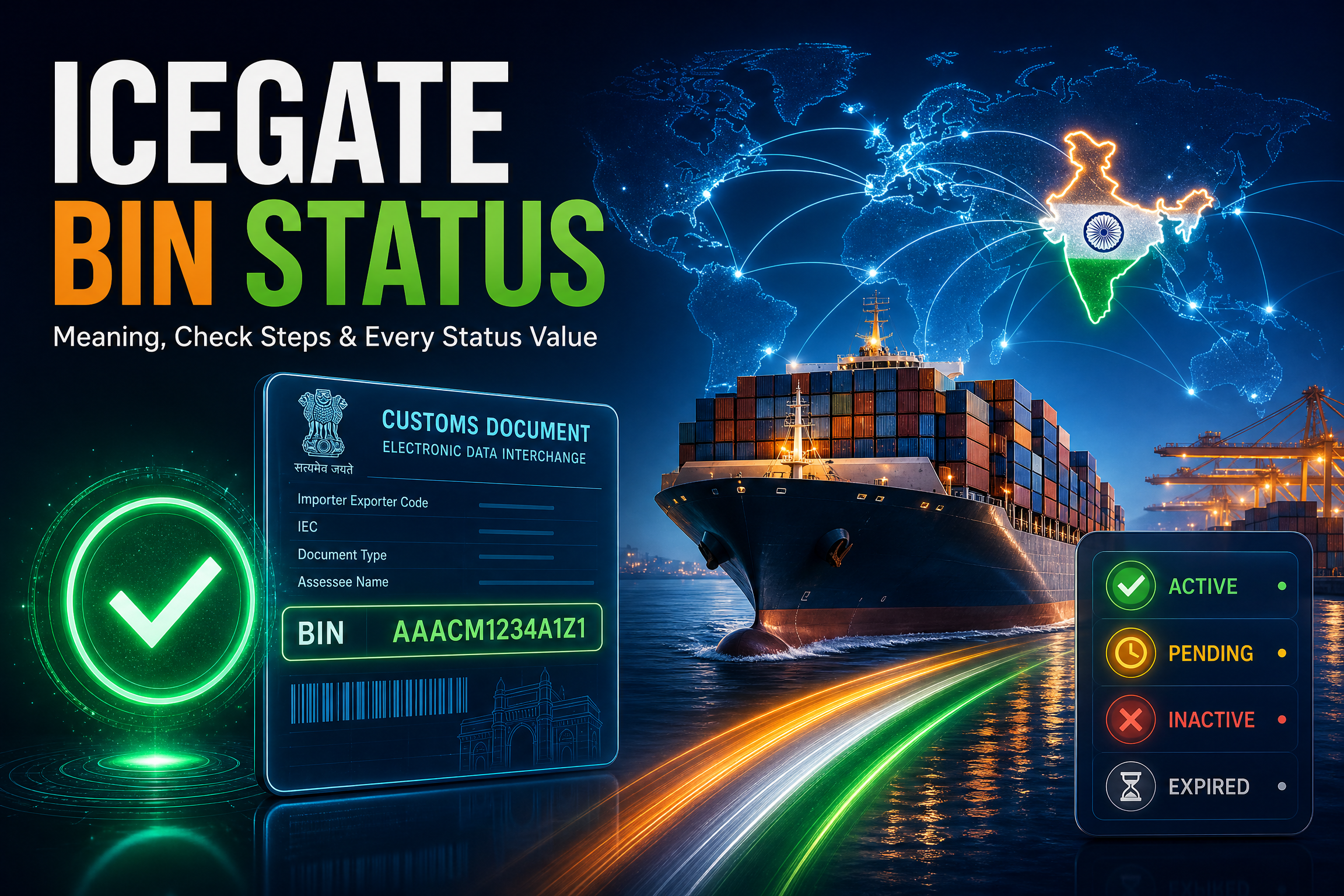
ICEGATE BIN Status: Meaning, Check Steps and Every Status Value Explained
ICEGATE BIN status tells you whether the Business Identification Number tied to your Importer Exporter Code (IEC) is registered and active with Customs. If someone has asked you to confirm your BIN status because a duty drawback claim, an IGST refund, or a RoDTEP scrip has stalled, you’re not alone in finding the term confusing. Most guides skip past what BIN actually is and jump straight to the click path.
Until your ICEGATE BIN status is current, Customs has no valid destination for a refund, a drawback payout, or a duty credit scrip through PFMS. The confusion is rarely about the click path; it’s about which of three separate checks (ICEGATE, DGFT, or EDPMS) actually explains why a payment is stuck against your ICEGATE BIN status.
This guide covers what a BIN is, why an inactive one blocks money you’re owed, what to prepare before checking it, the exact steps to run the check, what each result means, and what to do if the enquiry returns nothing.
New to the portal itself? If you are not yet registered, our ICEGATE registration service handles the whole process, including the IEC-to-BIN sync.
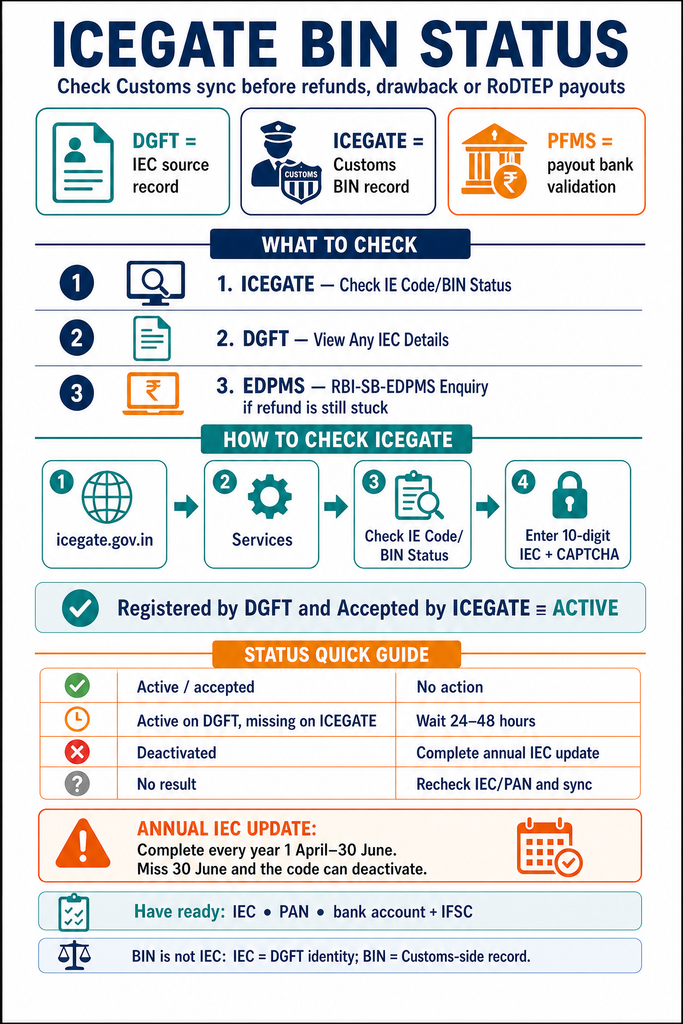
Which BIN Check Do You Actually Need
Start here. This table resolves the confusion in one step.
Your Situation
Check This
A refund, drawback, or RoDTEP payout is stuck
Check IE Code/BIN Status on ICEGATE, then confirm bank details for a PFMS mismatch
You want to confirm your IEC is valid at source
View Any IEC Details on the DGFT portal
ICEGATE and DGFT show different statuses
Wait for the 24–48 hour sync window before treating it as an error
A refund is stuck despite a clean BIN
Check RBI-SB-EDPMS Enquiry on ICEGATE Public Enquiries for eBRC closure
You need to track a specific shipment
Use Bill of Entry / Shipping Bill tracking, a different enquiry entirely
What Is ICEGATE BIN Status
BIN stands for Business Identification Number, a 10-digit alphanumeric code Customs assigns to each IEC holder once DGFT approves and transmits the IEC record. Think of the IEC as your trade identity and the BIN as the matching customs-side record, including the linked bank account.
Customs checks your ICEGATE BIN status before processing a shipping bill, a bill of entry, or any payout tied to your IEC, because the BIN is what tells Customs which importer or exporter, and which bank account, a transaction belongs to.
DGFT issues and manages the IEC. Customs (via ICEGATE) issues and manages the BIN once your IEC syncs across. A code can show active on one and not yet the other, which is why checking both matters.
Why ICEGATE BIN Status Matters
An inactive or unsynced ICEGATE BIN status holds up three things at once:
IGST refunds. These process once shipping bill data matches your GST returns, then pay out through PFMS to your registered bank account. No active BIN-bank link means no valid destination for the payment.
Duty drawback. The same PFMS route pays out drawback once a scroll is generated. An inactive BIN, or an unvalidated bank account, is one of the most common reasons a sanctioned drawback amount never lands.
RoDTEP and duty credit scrips. These incentive transfers also route through the PFMS-linked account tied to your IEC and BIN.
None of this is a penalty. Customs simply won’t push money to an account it doesn’t recognise as correctly registered and active.
CBIC formally moved duty drawback disbursal to direct electronic transfer via PFMS from 5 June 2024, replacing manual intervention in the payout process (PIB press release). That’s exactly why an unsynced BIN or unvalidated bank account now stalls a claim rather than just delaying it. A stalled refund is one of the most common reasons traders come to us. If yours is stuck for reasons beyond BIN sync, see our IGST refund recovery service.
How ICEGATE BIN Status Works
ICEGATE BIN status is created once and then kept in sync as your IEC record changes. The full lifecycle:
Stage
What Happens
Who Manages It
IEC application
You apply and DGFT approves the code
DGFT
Transmission
Approved IEC data is sent to Customs
DGFT to ICEGATE
BIN creation
Customs creates the matching BIN record
ICEGATE
Bank validation
Your linked account is validated for payouts
PFMS
Ongoing sync
Annual updates and profile changes flow through
DGFT to ICEGATE
A short lag between DGFT approval and ICEGATE sync, typically 24 to 48 hours, is normal for a newly issued or newly updated IEC, not a sign of an error.
Checking IEC Status on DGFT (Do This Too)
ICEGATE shows the Customs-side BIN record, but DGFT holds the source record, and the two don’t always agree at the same moment. Running both checks, not just the ICEGATE one, is what separates a quick glance from an actual diagnosis when a payment is stuck.
Go to dgft.gov.in and open Services, then IEC, then View Any IEC Details.
Enter the 10-digit IEC number and the first three characters of the registered firm’s name.
Solve the captcha and select Search.
Read the result: business name, registered address, date of issue, active or inactive status, and any Denied Entity List flag.
A code can read Active on DGFT while ICEGATE still shows it as unregistered. That gap is the sync window, not a conflict, and it’s the single most common reason two checks on the same day give two different answers.
There’s a second layer worth knowing if a refund stays stuck even with a clean BIN: the shipping bill’s eBRC status inside EDPMS, RBI’s system for tracking export proceeds. Until EDPMS marks that entry closed, the export isn’t considered fully realised under FEMA, which can hold up incentive claims even when your BIN and bank account both look fine. On ICEGATE this sits under Public Enquiries, RBI-SB-EDPMS Enquiry, a separate check from the BIN status enquiry covered above. See our free ICEGATE public enquiry checks for the full list of no-login checks, including this one.
What You’re Checking
DGFT (View Any IEC Details)
ICEGATE (Check IE Code/BIN Status)
What it confirms
The IEC is issued and active at source
The BIN is synced and accepted by Customs
Login required
No
No, for the public enquiry
Governs
Whether the code exists and is valid
Whether Customs will process filings and payouts
Typical gap after an update
Reflects changes immediately
Can lag 24–48 hours behind DGFT
What You Need Before You Check
Your 10-digit IEC number.
Your PAN, since IEC and PAN are linked and some enquiry screens ask for it to confirm the match.
ICEGATE login credentials, if you want the fuller logged-in view rather than the public enquiry.
Registered bank account details (account number and IFSC) if you’re chasing a mismatch or a payment hold rather than just checking status. If the linked account itself needs to change, that runs through your AD Code registration, not the BIN enquiry.
Open the Services menu and select Check IE Code/BIN Status, which sits alongside other enquiry tiles such as Drawback Enquiry.
Enter your 10-digit IEC number. No login is required for this public check.
Solve the CAPTCHA and submit.
Read the result. It shows your ICEGATE BIN status and IEC details as held by Customs and the current BIN status.
Registered users can also log in and reach a fuller version of this enquiry from the dashboard, which can show bank account or port-level registration detail the public screen doesn’t display.
Understanding Every BIN Status Value
Each ICEGATE BIN status value maps to a specific cause and a specific fix:
Status Shown
What It Means
What To Do
Registered by DGFT and Accepted by ICEGATE
Fully active and synced; ready for filing and payouts
No action needed
Active (on DGFT, not yet on ICEGATE)
Valid at source, not yet synced to Customs
Wait 24–48 hours, then recheck
Received in DGFT, pending
Application or update still processing
Wait for DGFT to finish processing
Deactivated
Annual update missed after 30 June, or otherwise lapsed
Complete the DGFT annual update to reactivate
Rejected
Application or update refused for incorrect/incomplete details
Correct the details and resubmit
Denied Entity List (DEL) flag
Flagged for a pending compliance or enforcement matter
Resolve the underlying issue with DGFT before trading
The Annual IEC Update: Why an Active BIN Can Suddenly Stop Working
An IEC doesn’t expire on its own, but it isn’t permanent by default either. DGFT requires every holder to confirm or update their IEC profile once each financial year, between 1 April and 30 June, even if nothing has changed. Our IEC renewal service handles this annual update end to end.
Confirming with no changes is free.
Amending any detail carries a fee.
Miss the 30 June deadline, and DGFT deactivates the code shortly after. That Deactivated status flows through to ICEGATE, and Customs stops processing filings and payouts tied to it.
The fix isn’t a fresh application. Log in to DGFT and complete the same annual update, even late. Once processed, the IEC reactivates and the status syncs back to Customs automatically. Setting a recurring April reminder is the simplest way to avoid this entirely.
Common Problems (No Result, Errors, Mismatches)
Wrong IEC or PAN entered. Returns no record, not an explanatory error.
IEC not yet synced from DGFT. A day or two of lag on a fresh or updated code is normal.
Annual update lapsed. The most common reason a previously active BIN suddenly reads inactive.
Bank account or IFSC mismatch. If it’s specifically a refund or drawback hold rather than the BIN record itself, a PFMS validation failure, such as a closed account or wrong IFSC, is a frequent cause even when the BIN looks fine. Correcting this runs through AD Code registration.
Portal load or CAPTCHA issues. Try a different browser or time of day before assuming the record itself is at fault.
BIN Status Enquiry vs IE Code Enquiry vs Bill of Entry Tracking
These three checks sit close together on ICEGATE and get mixed up often.
Check
What It Tells You
Check IE Code/BIN Status
Whether your IEC’s linked BIN record is registered and active with Customs, and it governs refund and drawback payouts
IE Code enquiry on DGFT
Whether the IEC itself is valid and active at the issuing authority, independent of Customs acceptance
Bill of Entry/Shipping Bill tracking
Where a specific consignment sits in the clearance pipeline, a different question entirely
How JPARKS INDIA Helps
JPARKS INDIA provides ICEGATE registration, IEC-to-BIN sync troubleshooting, DGFT annual update filing, AD Code linkage, and refund and drawback recovery for importers, exporters, and customs brokers.
From a stuck BIN status to a stalled refund, we help keep your import-export operations moving.
Frequently Asked Questions
Q1. What does BIN stand for in ICEGATE?
Business Identification Number, a 10-digit alphanumeric code Customs assigns to each IEC holder once DGFT transmits the approved IEC.
Q2. Is BIN the same as IEC?
No. IEC is issued by DGFT as your trade identity. BIN is the matching Customs-side record created once that IEC syncs to ICEGATE. See our IEC registration guide for how the code is issued in the first place.
Q3. How long does it take for a new IEC to show up on ICEGATE?
Typically 24 to 48 hours after DGFT approval or an update. Longer than that without a result is worth following up.
Q4. Why does my BIN status show nothing at all?
Usually a mistyped IEC or PAN, or a code that hasn’t synced from DGFT yet. It’s rarely an error message; it just returns no record.
Q5. What does “Registered by DGFT and Accepted by ICEGATE” mean?
Your IEC and BIN are fully synced and active. No action is needed, and refunds, drawback, and filings can proceed normally.
Q6. Why did my active BIN suddenly show as inactive?
The most common cause is a missed annual IEC update, which must be completed between 1 April and 30 June each year. Our IEC renewal service can complete this even after the deadline.
Q7. Do I need to pay to check my BIN status?
No, the public enquiry on ICEGATE is free and doesn’t require login.
Q8. Can an inactive BIN affect a refund that’s already sanctioned?
Yes, even a sanctioned amount can’t be disbursed through PFMS if the BIN or linked bank account isn’t active and validated.
Need this handled for you?
Tell us where you are stuck. We usually reply the same business day.
5.0 ★ · 123 Google reviews · Since 1990
Posted on Google
Vandana Bajaj
Trustindex verifies that the original source of the review is Google.
Very prompt and reliable service by Rahul Kolge and his team. Exceptional and happy experience.
Posted on Google
Supriya Shetye
Trustindex verifies that the original source of the review is Google.
Had a really good experience with JParks India. Rahul sir helped me a lot with my import work and were always active and responsive. Whatever documents or guidance was needed, they handled everything smoothly and explained things clearly. Felt stress-free throughout the process. Very helpful team, definitely recommend them if you’re doing import or export.
Posted on Google
dipali sakpal
Trustindex verifies that the original source of the review is Google.
Very nice people, get the work done in a very short time.
Posted on Google
Satish Bajaj
Trustindex verifies that the original source of the review is Google.
Excellent & Prompt services in all Import Export matters.
Great to work with you
Posted on Google
Bajaj VCPL
Trustindex verifies that the original source of the review is Google.
It was a great experience having work with you.
Posted on Google
Satish Bajaj
Trustindex verifies that the original source of the review is Google.
"Outstanding professiona services, efficient, and gets things done incredibly fast. Highly recommended for anyone needing reliable and prompt assistance
Posted on Google
Nishat fatima
Trustindex verifies that the original source of the review is Google.
excellent service
Posted on Google
farhan sayed
Trustindex verifies that the original source of the review is Google.
JParks Team is Super helpful! Thanks to Rahul and team!
Posted on Google
Sadik Inamdar
Trustindex verifies that the original source of the review is Google.
Good and personal service for import export code
Posted on Google
Maheshwar
Trustindex verifies that the original source of the review is Google.
Had a really good experience with JParks India. Rahul sir helped me a lot with my import work and were always active and responsive. Whatever documents or guidance was needed, they handled everything smoothly and explained things clearly. Felt stress-free throughout the process. Very helpful team, definitely recommend them if you’re doing import or export.
Verified by Trustindex
Trustindex verified badge is the Universal Symbol of Trust. Only the greatest companies can get the verified badge who has a review score above 4.5, based on customer reviews over the past 12 months. Read more
We use cookies to run this site, measure traffic, and track our ads. Essential cookies are always on. Accept all, reject non-essential, or set your preferences.
Cookie Preferences
Manage your cookie preferences below:
Essential cookies enable basic functions and are necessary for the proper function of the website.
Name
Description
Duration
Cookie Preferences
This cookie is used to store the user's cookie consent preferences.
30 days
Google reCAPTCHA helps protect websites from spam and abuse by verifying user interactions through challenges.
Name
Description
Duration
_GRECAPTCHA
Google reCAPTCHA sets a necessary cookie (_GRECAPTCHA) when executed for the purpose of providing its risk analysis.
179 days
Google Tag Manager simplifies the management of marketing tags on your website without code changes.
Name
Description
Duration
cookiePreferences
Registers cookie preferences of a user
2 years
td
Registers statistical data on users' behaviour on the website. Used for internal analytics by the website operator.
session
Statistics cookies collect information anonymously. This information helps us understand how visitors use our website.
Google Analytics is a web analytics service that tracks and reports website traffic. It collects anonymized data on how visitors use the site to help us understand and improve performance.