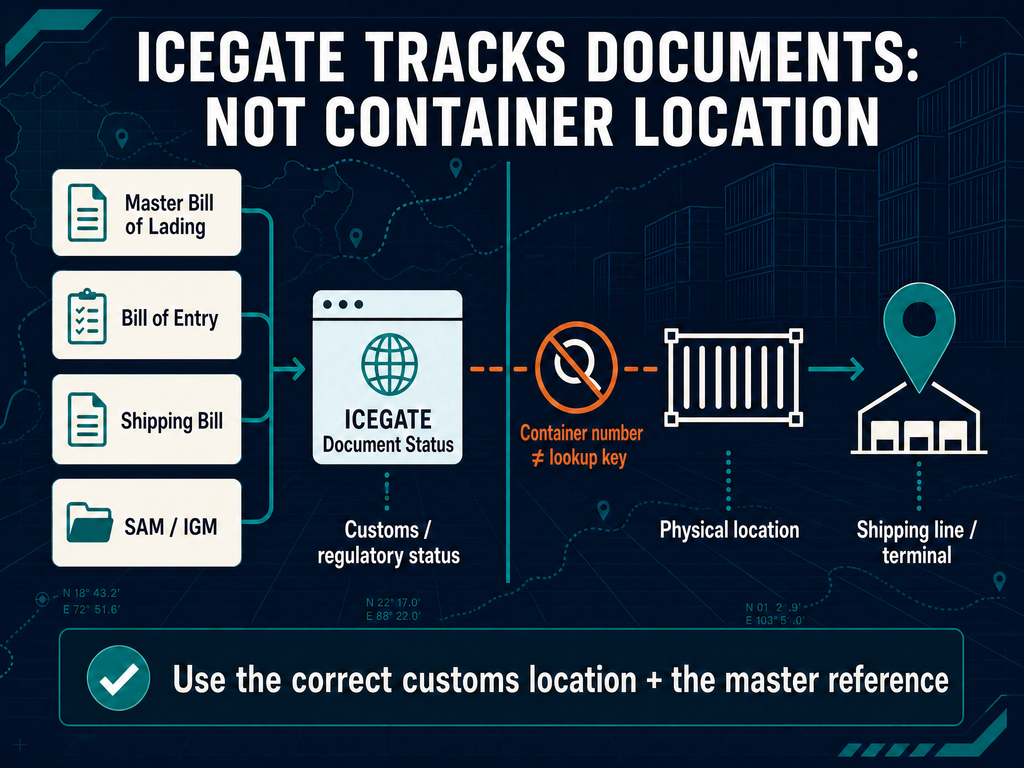
ICEGATE container tracking works on customs documents, not container numbers. There is no field on the portal where you paste a box number and get a location. ICEGATE reports the regulatory status of your cargo, not its physical position.
That distinction has money attached. A container can sit fully discharged and still be legally undeliverable because the manifest is unaccepted or the Bill of Entry unassessed. Demurrage and detention run daily while that is true.
This guide covers the 2026 menu path, the references the portal accepts, what guest access shows and what each status code means. For account setup, see our ICEGATE registration process service.
Why ICEGATE Container Tracking Does Not Use Container Numbers
ICEGATE indexes cargo by declaration. The container number is a field inside the manifest, not a lookup key.
Container numbers are reused, so the same box carries different cargo on different voyages and a bare number cannot identify one customs record. The manifest is filed against a Bill of Lading, which makes the Bill of Lading the natural key.
Sites promising ICEGATE container tracking by box number are aggregators reading carrier feeds. They do not read customs data and are not compliance evidence.
Which References ICEGATE Container Tracking Accepts
Every Document Status enquiry needs a customs location plus one document reference.
Cargo
Enquiry
What you enter
Sea import
SAM/IGM
Discharge port code and master Bill of Lading number
Air import
Air-IGM
Airport code and Master Airway Bill number
Sea import under SCMTR
New SAM/IGM
Site ID, reporting event, BL number and BL date
Export declaration
Shipping Bill
Location code, SB number and SB date
One point causes constant failure. The enquiry matches the master Bill of Lading filed by the carrier, not the house BL from your consolidator. If you hold only a house BL, ask your forwarder for the master. Without it the search returns nothing.
ICEGATE Container Tracking for Imports in 7 Steps
Step 1. Confirm the vessel has arrived.
Get the arrival date from the carrier or terminal. Meaningful customs data will not exist before then.
Step 2. Open Public Enquiries 2.0.
Go to icegate.gov.in, then Services, then Enquiry, then Public Enquiries 2.0. Bookmarks to the old standalone enquiry pages no longer resolve.
Step 3. Click Document Status.
A modal opens listing the document types.
Step 4. Choose SAM/IGM for sea, Air-IGM for air.
SAM is the Sea Arrival Manifest, the SCMTR label for what the trade still calls the IGM.
Step 5. Select the customs location.
Mandatory, and where most searches fail. Use the discharge port, not the port of loading. INNSA1 is Nhava Sheva, INMUN1 Mundra, INMAA1 Chennai, INCCU1 Kolkata, INBOM1 Mumbai Sea.
Step 6. Enter the master reference and submit.
Master Bill of Lading for sea, Master Airway Bill for air. Solve the captcha and record the status text and any error code.
Step 7. Move to Bill of Entry status.
Once the manifest is accepted, switch to Bill of Entry and enter the BE number, date and location. Always check the manifest first. A Bill of Entry cannot clear ahead of the manifest it depends on.
Tracking Export Cargo
The export sequence mirrors the import one. Open Public Enquiries 2.0, select Document Status, choose Shipping Bill, then enter the location code, Shipping Bill number and date.
Read two things: whether Let Export Order has been granted, and whether an EGM date is present. The EGM date confirms the carrier has manifested your cargo as departed. Without it, export incentives stay blocked.
For refund troubleshooting, run the DGFT enquiry inside Public Enquiries 2.0. It returns each Shipping Bill with its EGM date and an integration error code against DGFT records. Failures often trace back to bank or AD Code registration rather than the Shipping Bill.
Reading the Status Codes
Status
Meaning
Your next action
Pending
Received by ICEGATE, awaiting ICES validation
Wait, usually minutes to a few hours
Validated
Structural checks passed, sent to Customs
Wait
Accepted or Approved
Manifest registered, reference assigned
File the Bill of Entry
Rejected
Validation failed, error log available
Carrier corrects and refiles
Not Found
No matching record at that location
Check the port code and master reference first
Mismatched
Data conflict between documents
Carrier files an amendment
Held
Customs hold applied
Escalate through your broker
What Guest Access Shows and What Needs Login
Guest enquiry is more useful than most guides admit. Without logging in you get the manifest status, IGM number, vessel and voyage, inward date, your line and item number and a cargo summary. For sea cargo it also lists the container numbers mapped to that master Bill of Lading line.
Login adds Customs remarks, job status views, signed document downloads and the Overdue Containers List Enquiry, which reports containers not re-exported within the timeline prescribed under customs law. Register because you need signed documents and remarks, not container numbers.
ICEGATE vs Shipping Line vs Terminal
Question
Correct source
Where is my container physically?
Shipping line or terminal
Has the carrier declared my cargo to customs?
ICEGATE manifest enquiry
Is my Bill of Entry assessed and duty paid?
ICEGATE document status and challan enquiry
Can I take delivery?
Terminal, after out of charge
Has my export officially left India?
ICEGATE EGM date
When does detention stop?
Shipping line
Common Problems and Fixes
Problem
Cause
Fix
No record for cargo that has landed
Wrong discharge port code, or a house BL used instead of the master
Confirm the port code from the arrival notice, request the master BL
Manifest accepted, Bill of Entry will not progress
Mismatch in package count, gross weight or container number
The carrier files an IGM amendment. Importers cannot correct manifest data
Stuck at Pending
Validation congestion, common before holidays
Allow a few hours. Beyond a working day, call the helpdesk
LEO granted but no EGM
Carrier has not filed the departure manifest
Escalate in writing quoting the Shipping Bill and container numbers
ICEGATE container tracking is real and free, but it starts from a document rather than a box. Search by master Bill of Lading, Airway Bill, Bill of Entry or Shipping Bill, always with the correct customs location, and check the manifest before the declaration. Manifest problems belong to the carrier, declaration problems to your broker.
If consignments keep stalling at manifest or assessment stage, the cause is usually registration, AD Code mapping or data discipline. JPARKS INDIA has supported 500+ importers and exporters, including as importer of record. Write to [email protected] or start with our ICEGATE registration process service.
Frequently Asked Questions
Q1. Can I track a container on ICEGATE using the container number?
No. ICEGATE indexes cargo by customs document. Search by master Bill of Lading, Master Airway Bill, Bill of Entry or Shipping Bill.
Q2. What is the correct path for ICEGATE container tracking in 2026?
Services, then Enquiry, then Public Enquiries 2.0, then Document Status, then SAM/IGM for sea or Air-IGM for air.
Q3. Why does ICEGATE show no record when the ship has arrived?
Almost always the wrong discharge port code, or a house BL used instead of the master.
Q4. What is the difference between IGM and SAM?
SAM is the Sea Arrival Manifest under SCMTR terminology. It is the same carrier arrival declaration the trade calls the IGM.
Q5. My manifest is accepted but the Bill of Entry is stuck. Why?
A data mismatch between the two, commonly package count, gross weight or container number. The carrier must amend the manifest.
Q6. Who do I contact when the tracking data is wrong?
Manifest errors go to the carrier. Portal errors go to the ICEGATE helpdesk on 1800-3010-1000 or [email protected], available 24×7.
Need this handled for you?
Tell us where you are stuck. We usually reply the same business day.
5.0 ★ · 123 Google reviews · Since 1990
Posted on Google
Vandana Bajaj
Trustindex verifies that the original source of the review is Google.
Very prompt and reliable service by Rahul Kolge and his team. Exceptional and happy experience.
Posted on Google
Supriya Shetye
Trustindex verifies that the original source of the review is Google.
Had a really good experience with JParks India. Rahul sir helped me a lot with my import work and were always active and responsive. Whatever documents or guidance was needed, they handled everything smoothly and explained things clearly. Felt stress-free throughout the process. Very helpful team, definitely recommend them if you’re doing import or export.
Posted on Google
dipali sakpal
Trustindex verifies that the original source of the review is Google.
Very nice people, get the work done in a very short time.
Posted on Google
Satish Bajaj
Trustindex verifies that the original source of the review is Google.
Excellent & Prompt services in all Import Export matters.
Great to work with you
Posted on Google
Bajaj VCPL
Trustindex verifies that the original source of the review is Google.
It was a great experience having work with you.
Posted on Google
Satish Bajaj
Trustindex verifies that the original source of the review is Google.
"Outstanding professiona services, efficient, and gets things done incredibly fast. Highly recommended for anyone needing reliable and prompt assistance
Posted on Google
Nishat fatima
Trustindex verifies that the original source of the review is Google.
excellent service
Posted on Google
farhan sayed
Trustindex verifies that the original source of the review is Google.
JParks Team is Super helpful! Thanks to Rahul and team!
Posted on Google
Sadik Inamdar
Trustindex verifies that the original source of the review is Google.
Good and personal service for import export code
Posted on Google
Maheshwar
Trustindex verifies that the original source of the review is Google.
Had a really good experience with JParks India. Rahul sir helped me a lot with my import work and were always active and responsive. Whatever documents or guidance was needed, they handled everything smoothly and explained things clearly. Felt stress-free throughout the process. Very helpful team, definitely recommend them if you’re doing import or export.
Verified by Trustindex
Trustindex verified badge is the Universal Symbol of Trust. Only the greatest companies can get the verified badge who has a review score above 4.5, based on customer reviews over the past 12 months. Read more
We use cookies to run this site, measure traffic, and track our ads. Essential cookies are always on. Accept all, reject non-essential, or set your preferences.
Cookie Preferences
Manage your cookie preferences below:
Essential cookies enable basic functions and are necessary for the proper function of the website.
Name
Description
Duration
Cookie Preferences
This cookie is used to store the user's cookie consent preferences.
30 days
Google reCAPTCHA helps protect websites from spam and abuse by verifying user interactions through challenges.
Name
Description
Duration
_GRECAPTCHA
Google reCAPTCHA sets a necessary cookie (_GRECAPTCHA) when executed for the purpose of providing its risk analysis.
179 days
Google Tag Manager simplifies the management of marketing tags on your website without code changes.
Name
Description
Duration
cookiePreferences
Registers cookie preferences of a user
2 years
td
Registers statistical data on users' behaviour on the website. Used for internal analytics by the website operator.
session
Statistics cookies collect information anonymously. This information helps us understand how visitors use our website.
Google Analytics is a web analytics service that tracks and reports website traffic. It collects anonymized data on how visitors use the site to help us understand and improve performance.