ICEGATE Duty Payment: 8 Steps to Pay Customs Duty Online for Import Clearance
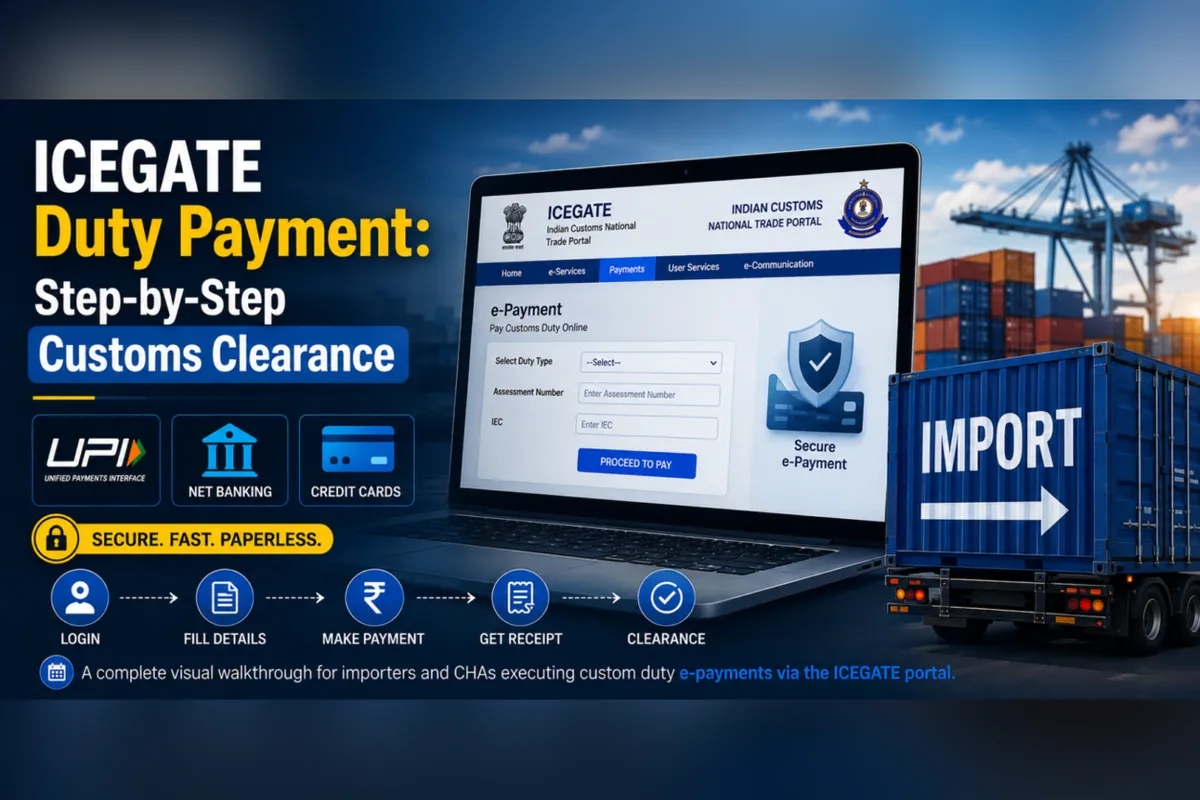
Once your Bill of Entry (BOE) has been filed and assessed, an unpaid challan shows the customs duty due on your imported goods. Importers can pay customs duty through the ICEGATE e-payment portal without visiting a customs house. This customs duty online process lets you complete the required duty payment against the BOE, then monitor payment status while customs processes the entry. Before starting, confirm the amount, keep your IEC details available, and save the receipt for compliance records. If you may qualify for concessional rates instead of paying the full customs duty, review our IGCR Clearance Services.
Who This ICEGATE Duty Payment Guide Applies To
This guide is for importers or the Customs House Agent (CHA) filing on their behalf when an assessed Bill of Entry shows an outstanding duty amount. Before you pay customs through the e-payment system, confirm that the import documentation, IEC details, and challan information are accurate. The importer remains responsible for the payment, even when a CHA completes the online process. For broader import export support, review our Import Export Consultancy Services.
Two Different Payment Flows: Don’t Mix Them Up
ICEGATE supports separate payment journeys, so select the flow that matches your transaction and the current Customs system.
Standard ICEGATE Duty Payment for import: This customs duty payment is made through the main e-Payment page, where users can view unpaid challans linked to the importer’s IEC. This is the method covered by this guide.
Central Excise / Service Tax legacy payments: This tax route is outside the scope of this guide. It starts on the CBIC-GST portal, where users generate a challan and CTIN before completing the payment transaction.
The instructions below explain standard import duty payment for imported goods, not legacy CE/ST payments.
What You Will Need to Have in Advance
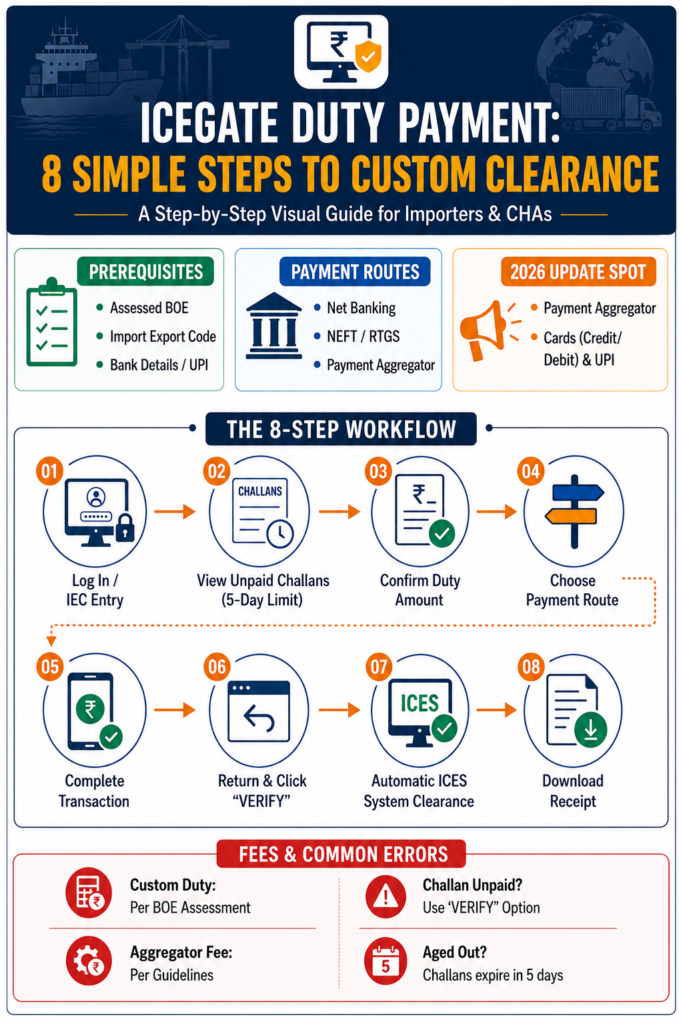
An accepted and assessed Bill of Entry with an unpaid challan.
The Import Export Code (IEC), plus an ICEGATE account if you are using the registered-user route.
Net banking access through a designated bank and/or the ability to use NEFT/RTGS, subject to the bank and transaction requirements.
A debit card, credit card, or UPI account for the Payment Aggregator method, if that option is available.
What changed in 2026:CBIC Circular No. 13/2026-Customs, dated 24 March 2026, and Notification No. 30/2026-Customs introduced a Payment Aggregator option for credit cards, debit cards, and UPI. Verify the current applicability, ECL payment infrastructure, supported banks, and available payment methods on the official ICEGATE portal before starting.
Banks Directly Integrated for ICEGATE E-Payment
Check the current online ICEGATE portal before you pay customs duty.
Bank List A
Bank List B
Bank List C
Axis Bank
Bank of Baroda
Bank of India
Punjab & Sind Bank
Canara Bank
Central Bank of India
Dhanlaxmi Bank
Federal Bank
HDFC Bank
ICICI Bank
IDBI Bank
Indian Bank
Indian Overseas Bank
Karnataka Bank
Karur Vysya Bank
Kotak Bank
Punjab National Bank
RBL Bank
South Indian Bank
State Bank of India
UCO Bank
Union Bank of India
IndusInd Bank
Step-by-Step: ICEGATE Duty Payment Workflow
Step 1: Log In or Continue as an Unregistered User
Open the official ICEGATE e-payment portal and select the e-Payment service. Registered importers can sign in with their account credentials. If the current portal permits it, an unregistered user can enter the importer’s IEC to access the relevant challan. A permanent account may not be required for every custom duty payment, but users should confirm the current access rules before beginning.
Step 2: Open the e-Payment Section
After login or IEC entry, the system displays unpaid challans associated with the importer and Bill of Entry. Review the challan number, BOE details, assessment date, and payment status carefully. Standard BOE challans are stated to remain visible for 5 days from the assessment date; verify this period on the live portal because display rules can change. Do not wait until the final available time to pay customs duty.
Step 3: Select the Challan and Confirm the Amount
Choose “Pay” next to the correct challan and compare the displayed amount with the BOE assessment. Confirm that the customs duty, IGST, or other applicable duty components correspond to the imported goods and agreed assessment. If the amount appears incorrect, pause the payment process and ask your customs broker or the appropriate Customs authority to review the entry.
Step 4: Choose Your Payment Route
Choose payment through a designated bank using net banking or NEFT/RTGS, where supported. Alternatively, select the Payment Aggregator method for UPI, debit card, or credit card if that option is available for the transaction. The available route, bank, and applicable rates may depend on current ICEGATE rules and the payment provider.
Step 5: Complete the Transaction
Follow the selected bank’s instructions or generate the required mandate for NEFT/RTGS. For the Payment Aggregator route, complete the UPI or card transaction on the secure payment screen. Before approving, check the amount and payment details. If your bank debits the funds, do not start a second custom duty payment until you verify the first transaction’s status.
Step 6: Return to the Portal to Confirm
After the bank or gateway process ends, return to the ICEGATE portal and check whether the status shows payment submitted, successful, or unpaid. If the browser closes or the connection fails, use VERIFY against the same challan on the same day when that option is available. Save the bank reference and allow reasonable processing time before contacting support.
Step 7: Automatic Clearance Handoff
After successful payment confirmation, transaction details are generally transmitted to ICES, the Indian Customs EDI System. This may allow the Bill of Entry to proceed to the next customs clearance stage, such as document review or examination. Payment alone does not guarantee immediate release of the goods; other entry, compliance, and Customs requirements may still apply.
Step 8: Download Your Receipt
Download or print the payment receipt and retain the challan number, transaction reference, paid amount, date, and final status. Keep these records for accounting, compliance, importers’ files, and any later query about the duty payment. A receipt confirms the payment record, but it does not replace other documents required for cargo clearance.
Fees and Charges for ICEGATE Duty Payment
Fee Type
How It’s Determined
Basic Customs Duty, IGST, SWS, Anti-Dumping Duty
The customs duty amount is calculated from the specific Bill of Entry assessment for the imported goods. Confirm the applicable tax components before making a custom duty payment.
Bank charges (NEFT/RTGS)
Charges vary by bank and payment route. Check your bank’s current fee schedule before starting the transaction.
Card payment charges
Card charges may vary by bank or payment provider where card payment is supported. Review the displayed amount before approval.
Payment Aggregator commission
The payer generally bears this charge under applicable Customs rules. Verify the current commission and terms on the payment screen.
What Happens Once ICEGATE Duty Payment Is Completed
After the system confirms a successful duty payment, the transaction details may pass to ICES for the next clearance stage. The Bill of Entry can then proceed to document review or examination, but payment does not guarantee immediate cargo release. Retain the receipt, challan number, bank reference, date, amount, and final status for compliance and import export records.
Common Errors During ICEGATE Duty Payment
Challan still shows unpaid after bank debit: Do not pay twice. Use VERIFY on the same day, allow processing time, and contact the bank or Customs support if the status does not update.
Browser closed mid-transaction: Check whether the portal received the redirect and verify the transaction before attempting another payment.
Selected bank does not support the method: Card payment is not universal across all empaneled banks; choose a supported bank or available payment route.
Confusing CE/ST with standard BOE payment: Select the standard BOE e-payment option for import customs duty.
Aged-out challan: Standard BOE challans may drop off after 5 days; confirm the current rule and request guidance if the challan is no longer visible.
How JPARKS Helps With ICEGATE Duty Payment
JPARKS can help importers review BOE details, troubleshoot payment errors, assess IGCR eligibility, and manage broader import export requirements. If your business regularly needs to pay customs duty on imported goods, ask whether concessional rates may reduce the amount payable. For customs duty online guidance, custom duty payment support, or help using the online ICEGATE process, visit JPARKS INDIA or use the Contact Page.
Frequently Asked Questions
1. What happens if I don’t pay customs duty soon after my Bill of Entry is filed?
A confirmed duty payment is generally needed before the entry can move to the next customs clearance stage. Standard BOE challans may remain on the unpaid list for 5 days, but verify the current rule on the portal and pay customs duty as soon as the amount is confirmed.
2. Which banks can I use for ICEGATE Duty Payment?
Choose payment through a directly empaneled bank for net banking, NEFT, or RTGS, where supported. The available banks, payment method, and banking limits can change, so check the current online ICEGATE list before you pay customs.
3. My ICEGATE Duty Payment failed but the amount was debited. What do I do?
Do not repeat the payment immediately. Use VERIFY against the challan on the e-payment portal, check the transaction status, and keep the bank reference. If the status remains unpaid after reasonable processing time, contact your bank, ICEGATE support, or customs broker.
4. Do I need to submit proof of payment to clear my cargo?
The system may transfer confirmed payment details to ICES automatically, but retain the receipt, challan number, amount, and date. Customs officers or other authorities may request records during the clearance and compliance process.
5. Can I use UPI to perform an ICEGATE Duty Payment?
UPI may be available through the Payment Aggregator facility for eligible transactions, subject to current portal availability, applicable charges, and supported limits. Review the payment screen before completing a duty online transaction.
Tell us where you are stuck. We usually reply the same business day.
5.0 ★ · 123 Google reviews · Since 1990
Posted on Google
Vandana Bajaj
Trustindex verifies that the original source of the review is Google.
Very prompt and reliable service by Rahul Kolge and his team. Exceptional and happy experience.
Posted on Google
Supriya Shetye
Trustindex verifies that the original source of the review is Google.
Had a really good experience with JParks India. Rahul sir helped me a lot with my import work and were always active and responsive. Whatever documents or guidance was needed, they handled everything smoothly and explained things clearly. Felt stress-free throughout the process. Very helpful team, definitely recommend them if you’re doing import or export.
Posted on Google
dipali sakpal
Trustindex verifies that the original source of the review is Google.
Very nice people, get the work done in a very short time.
Posted on Google
Satish Bajaj
Trustindex verifies that the original source of the review is Google.
Excellent & Prompt services in all Import Export matters.
Great to work with you
Posted on Google
Bajaj VCPL
Trustindex verifies that the original source of the review is Google.
It was a great experience having work with you.
Posted on Google
Satish Bajaj
Trustindex verifies that the original source of the review is Google.
"Outstanding professiona services, efficient, and gets things done incredibly fast. Highly recommended for anyone needing reliable and prompt assistance
Posted on Google
Nishat fatima
Trustindex verifies that the original source of the review is Google.
excellent service
Posted on Google
farhan sayed
Trustindex verifies that the original source of the review is Google.
JParks Team is Super helpful! Thanks to Rahul and team!
Posted on Google
Sadik Inamdar
Trustindex verifies that the original source of the review is Google.
Good and personal service for import export code
Posted on Google
Maheshwar
Trustindex verifies that the original source of the review is Google.
Had a really good experience with JParks India. Rahul sir helped me a lot with my import work and were always active and responsive. Whatever documents or guidance was needed, they handled everything smoothly and explained things clearly. Felt stress-free throughout the process. Very helpful team, definitely recommend them if you’re doing import or export.
Verified by Trustindex
Trustindex verified badge is the Universal Symbol of Trust. Only the greatest companies can get the verified badge who has a review score above 4.5, based on customer reviews over the past 12 months. Read more
We use cookies to run this site, measure traffic, and track our ads. Essential cookies are always on. Accept all, reject non-essential, or set your preferences.
Cookie Preferences
Manage your cookie preferences below:
Essential cookies enable basic functions and are necessary for the proper function of the website.
Name
Description
Duration
Cookie Preferences
This cookie is used to store the user's cookie consent preferences.
30 days
Google reCAPTCHA helps protect websites from spam and abuse by verifying user interactions through challenges.
Name
Description
Duration
_GRECAPTCHA
Google reCAPTCHA sets a necessary cookie (_GRECAPTCHA) when executed for the purpose of providing its risk analysis.
179 days
Google Tag Manager simplifies the management of marketing tags on your website without code changes.
Name
Description
Duration
cookiePreferences
Registers cookie preferences of a user
2 years
td
Registers statistical data on users' behaviour on the website. Used for internal analytics by the website operator.
session
Statistics cookies collect information anonymously. This information helps us understand how visitors use our website.
Google Analytics is a web analytics service that tracks and reports website traffic. It collects anonymized data on how visitors use the site to help us understand and improve performance.