ICEGATE Digital Signature Certificate: Choosing, Registering and Managing Your DSC
An ICEGATE Digital Signature Certificate (ICEGATE DSC) is what lets an authorised user sign electronic customs documents on the portal, including Bills of Entry, Shipping Bills and e-Sanchit uploads. Getting your ICEGATE Digital Signature Certificate working is a two-part job: choosing the right certificate and holder, and installing the technical components that let ICEGATE read it.
This guide covers the first part, choosing a Certifying Authority, registering the certificate to the right profile, and running DSC access as a controlled business credential rather than a shared password. For the technical install, the PKI component, signer utility, Java setup and fixes for errors like ‘PKI component not found’ or ‘invalid digital signature’, see our complete ICEGATE PKI setup guide.
What Is an ICEGATE Digital Signature Certificate?
This page assumes you already know what a DSC is and why Class 3 is required. For the underlying mechanics, how PKI signing works, why only Class 3 is issued today, who the licensed Certifying Authorities are, and what the USB token actually does, see our Class 3 DSC guide. What follows here is specific to using a DSC on ICEGATE: which certificate qualifies, how to register it to your ICEGATE profile, and how to run it as a controlled business credential rather than a shared login.
Who Needs an ICEGATE Digital Signature Certificate?
Depending on user category and the services in use, a DSC may be required by:
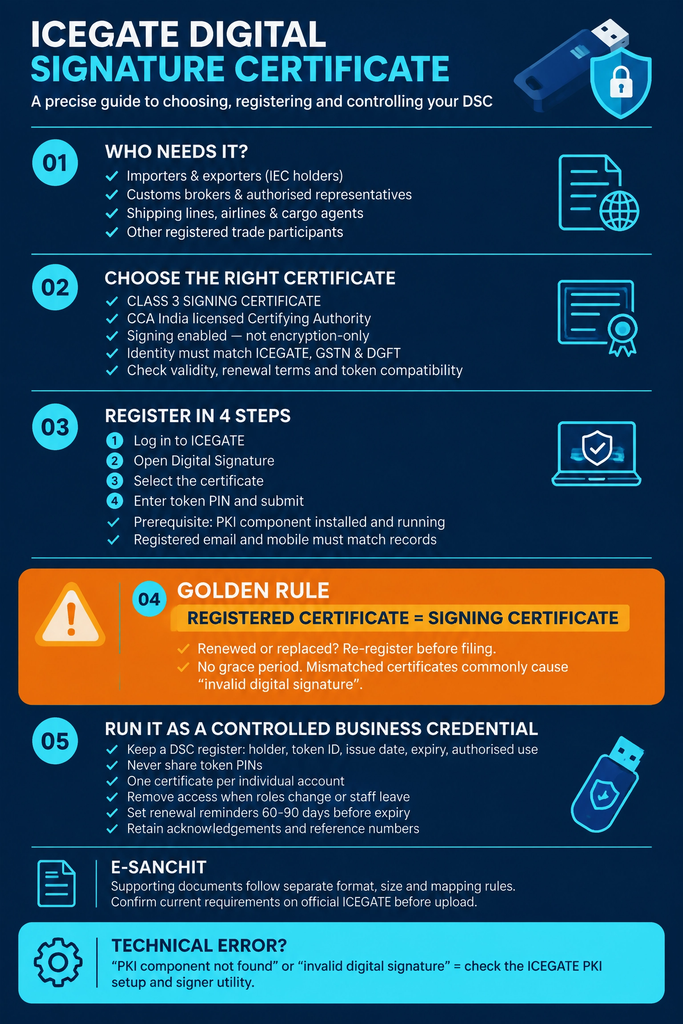
Importers and exporters (IEC holders)
Customs brokers and their authorised representatives
Shipping lines, shipping agents, airlines and air cargo agents
Console agents and other registered trade participants
Signing rights and portal access don’t automatically match. Decide, in writing, who in your business is authorised to prepare, approve and digitally sign customs documents, don’t assume every ICEGATE user has (or should have) the same privileges.
Choosing the Right ICEGATE Digital Signature Certificate
Your ICEGATE DSC must be a Class 3 signing certificate from a CA licensed under CCA India, an encryption-only certificate will fail validation. See our guide to the Class 3 Digital Signature Certificate for how to choose a CA and certificate type.
When applying, confirm:
Certificate type and signing purpose (must support signing, not just encryption)
Identity details exactly match the authorised signatory on the ICEGATE profile
Validity period and renewal terms (commonly 1–3 years, set by the CA)
Token compatibility with your CA (ePass, ProxKey, mToken, WatchData, etc.)
Registering a DSC to Your ICEGATE Profile
Once the certificate is issued and the PKI component is installed and running on your machine, registration itself is a short in-portal step: log in, open the Digital Signature section, select the certificate, enter the token PIN, and submit. No supporting documents are required, but the registered email and mobile must match your GSTN and DGFT records, or registration will be rejected.
If you haven’t installed the signer utility yet, or registration is failing at the technical step, follow the install sequence and error fixes in our ICEGATE PKI guide before trying again.
The Golden Rule for Your ICEGATE Digital Signature Certificate: Registered Must Match Signing
The certificate used to sign a filing must be the same one registered as your ICEGATE DSC. If a certificate is renewed or replaced, complete the ICEGATE re-registration process before filing with it, there is no grace period, and mismatched certificates are the single most common cause of an ‘invalid digital signature’ error.
Running Your ICEGATE DSC as a Business Credential
A DSC is a controlled credential, not a shared login. Recommended practice:
Keep USB tokens and PINs under controlled custody, never share a PIN by email or chat
Assign signing authority through written approval, with one certificate per individual account
Remove DSC access immediately when a role changes or an employee leaves
Set renewal reminders 60–90 days before expiry, and test the renewed certificate before the old one expires
Retain acknowledgements, reference numbers and support correspondence for every registration or renewal
Your ICEGATE Digital Signature Certificate and e-Sanchit
e-Sanchit uploads (invoices, packing lists, certificates of origin, licences and similar supporting documents) sit alongside DSC-signed filings but follow their own format, size and reference-mapping rules, which change periodically. Confirm current e-Sanchit requirements on the official ICEGATE site before uploading, since incorrect mapping can delay processing independent of whether the DSC itself is valid.
Conclusion
An ICEGATE Digital Signature Certificate is a business credential as much as a technical one. Getting the certificate type right, registering it to the correct profile, and controlling who holds signing authority prevents most of the problems that show up later as filing errors. Once your ICEGATE Digital Signature Certificate itself is sorted, installation and error troubleshooting are a separate, more technical step, covered in full in our ICEGATE PKI guide.
If you’d rather have this set up correctly the first time, our ICEGATE registration service handles DSC registration end to end alongside portal and AD Code setup.
Frequently Asked Questions
Q1. Is a DSC required for ICEGATE?
It depends on your user category, the service and the workflow. Confirm the current requirement for the specific activity you’re carrying out.
Q2. Can I use any DSC for ICEGATE filing?
No, see “Choosing the Right ICEGATE Digital Signature Certificate” above for the Class 3 / CCA requirement. The certificate’s identity details must also match your ICEGATE, GSTN and DGFT records.
Q3. Can one DSC be used by multiple employees?
No. A DSC should be used only by its authorised holder. Sharing a token or PIN removes the accountability a digital signature is meant to provide.
Q4. What happens if my DSC expires?
Filing stops until it’s renewed. Renew before expiry and complete the ICEGATE re-registration process for the new certificate; build this into your DSC register with a 60–90 day reminder.
Q5. Do I need to do anything with my old certificate once the new one is registered?
Deregister or discard the old token once the new certificate is confirmed working on ICEGATE, don’t leave both active in your DSC register. If the old certificate is still within its validity period, keep it noted as retired rather than deleting the record entirely, in case you need to reference it for an older filing.
Q6. My DSC isn’t detected, or ICEGATE shows a signature error? Where do I fix that?
Q7. What documents can be uploaded through e-Sanchit?
Supporting documents connected with a customs transaction: invoices, packing lists, bills of lading, certificates of origin, licences, insurance documents and technical certificates.
Q8. What details should I keep when reporting a DSC issue?
The exact error message and code, date and time, ICEGATE user ID, transaction type, reference number, certificate details, and a screenshot. This is what the helpdesk or your customs broker will ask for first.
Need this handled for you?
Tell us where you are stuck. We usually reply the same business day.
5.0 ★ · 123 Google reviews · Since 1990
Posted on Google
Vandana Bajaj
Trustindex verifies that the original source of the review is Google.
Very prompt and reliable service by Rahul Kolge and his team. Exceptional and happy experience.
Posted on Google
Supriya Shetye
Trustindex verifies that the original source of the review is Google.
Had a really good experience with JParks India. Rahul sir helped me a lot with my import work and were always active and responsive. Whatever documents or guidance was needed, they handled everything smoothly and explained things clearly. Felt stress-free throughout the process. Very helpful team, definitely recommend them if you’re doing import or export.
Posted on Google
dipali sakpal
Trustindex verifies that the original source of the review is Google.
Very nice people, get the work done in a very short time.
Posted on Google
Satish Bajaj
Trustindex verifies that the original source of the review is Google.
Excellent & Prompt services in all Import Export matters.
Great to work with you
Posted on Google
Bajaj VCPL
Trustindex verifies that the original source of the review is Google.
It was a great experience having work with you.
Posted on Google
Satish Bajaj
Trustindex verifies that the original source of the review is Google.
"Outstanding professiona services, efficient, and gets things done incredibly fast. Highly recommended for anyone needing reliable and prompt assistance
Posted on Google
Nishat fatima
Trustindex verifies that the original source of the review is Google.
excellent service
Posted on Google
farhan sayed
Trustindex verifies that the original source of the review is Google.
JParks Team is Super helpful! Thanks to Rahul and team!
Posted on Google
Sadik Inamdar
Trustindex verifies that the original source of the review is Google.
Good and personal service for import export code
Posted on Google
Maheshwar
Trustindex verifies that the original source of the review is Google.
Had a really good experience with JParks India. Rahul sir helped me a lot with my import work and were always active and responsive. Whatever documents or guidance was needed, they handled everything smoothly and explained things clearly. Felt stress-free throughout the process. Very helpful team, definitely recommend them if you’re doing import or export.
Verified by Trustindex
Trustindex verified badge is the Universal Symbol of Trust. Only the greatest companies can get the verified badge who has a review score above 4.5, based on customer reviews over the past 12 months. Read more
We use cookies to run this site, measure traffic, and track our ads. Essential cookies are always on. Accept all, reject non-essential, or set your preferences.
Cookie Preferences
Manage your cookie preferences below:
Essential cookies enable basic functions and are necessary for the proper function of the website.
Name
Description
Duration
Cookie Preferences
This cookie is used to store the user's cookie consent preferences.
30 days
Google reCAPTCHA helps protect websites from spam and abuse by verifying user interactions through challenges.
Name
Description
Duration
_GRECAPTCHA
Google reCAPTCHA sets a necessary cookie (_GRECAPTCHA) when executed for the purpose of providing its risk analysis.
179 days
Google Tag Manager simplifies the management of marketing tags on your website without code changes.
Name
Description
Duration
cookiePreferences
Registers cookie preferences of a user
2 years
td
Registers statistical data on users' behaviour on the website. Used for internal analytics by the website operator.
session
Statistics cookies collect information anonymously. This information helps us understand how visitors use our website.
Google Analytics is a web analytics service that tracks and reports website traffic. It collects anonymized data on how visitors use the site to help us understand and improve performance.