ICEGATE Helpdesk: How Tickets, Escalation and Grievances Work
The ICEGATE helpdesk is the 24×7 support channel for the Indian Customs portal, reachable on toll-free 1800-3010-1000 and at [email protected]. It runs three escalation levels, a ticket module inside the ICEGATE 2.0 dashboard, and a separate grievance route for delayed Bill of Entry clearance.
Most users treat it as a call centre: describe a symptom, get generic advice, call again tomorrow with no reference number.
This guide covers what it owns, how escalation works, how to raise a ticket that survives, and when to use the grievance route instead.
What the ICEGATE Helpdesk Covers
It supports users of the customs portal and the Indian Customs EDI System behind it. That includes importers, exporters, customs brokers, shipping lines, airlines, custodians and Customs locations themselves. The official page is ICEGATE helpdesk solutions.
You can select a preferred language and a category, so the issue routes to the right group.
Individual Customs locations run their own helpdesks as well. Those numbers are published in the public notices of the respective Commissionerates.
Save 0124-6725800 and 0124-6722900 as the official outbound numbers. ICEGATE calls back from these. Any other caller claiming to be the helpdesk is not.
Three things sit outside its scope: manifest filing by your carrier, settlement by your bank, and IEC changes that belong to DGFT. Raising those here produces a closed ticket and no progress.
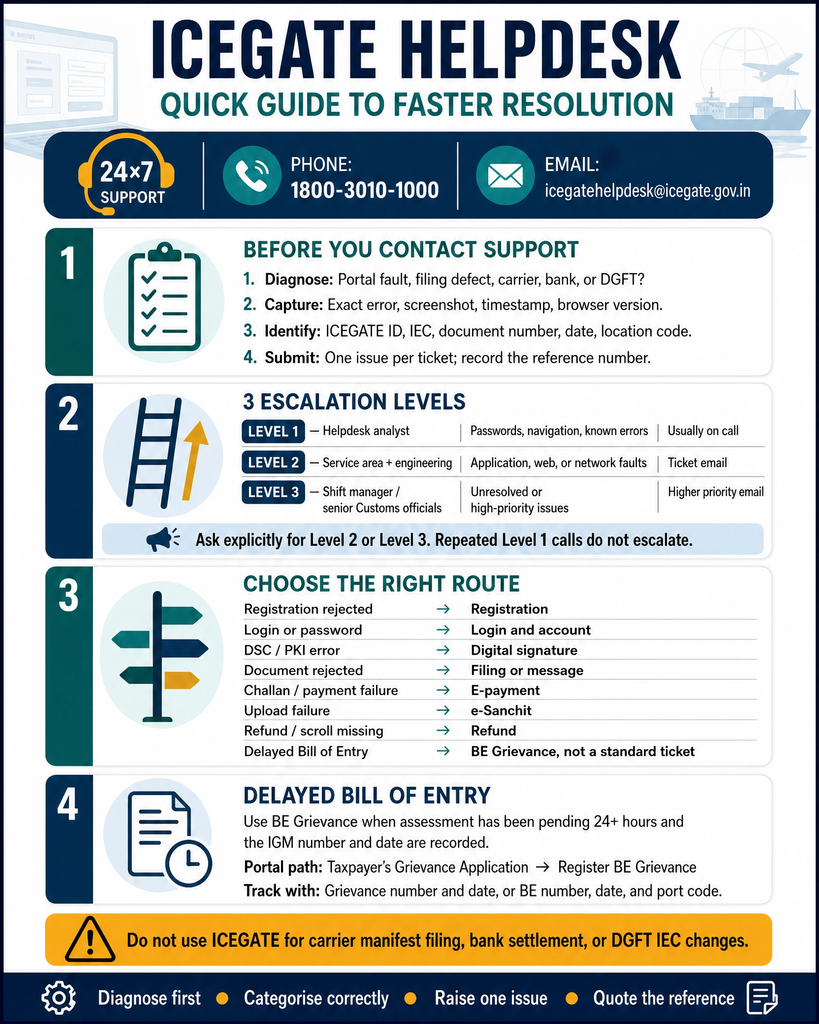
The Three ICEGATE Helpdesk Escalation Levels
Knowing which tier you are speaking to changes how you frame the conversation.
Level
Who handles it
Typical issues
How you hear back
Level 1
Helpdesk analyst
Passwords, navigation, known errors, information requests
On the call
Level 2
Service area analyst plus engineering group
Application, web and network faults needing investigation
Automated email against the ticket
Level 3
Shift manager or senior Customs officials
Unresolved or high priority issues
Automated email, higher priority category
Support runs by phone and email only. Face to face meetings are not part of the model.
Raise a Ticket That Survives
Where your role includes the Ticket Management widget in the ICEGATE 2.0 dashboard, raise it there rather than by phone. The ticket is tied to your ICEGATE ID from the start and leaves a written trail.
Classify first. Decide whether it is a portal fault, a filing defect, a carrier problem or a bank problem. Only the first belongs here.
Capture evidence. Exact error text, screen, timestamp, screenshot, browser version. Copy the error verbatim; paraphrased errors route to the wrong queue.
Assemble identifiers. ICEGATE ID, IEC, location code, document number and date. For payment issues add the challan number and bank reference.
Choose the right category. Category is the routing key, not a label.
One issue per ticket. Bundled issues get partly resolved and closed.
Record the reference. Quote it on every follow up and reply on the same email thread.
Pick the Right Category
Issue
Category to select
Registration rejected, cannot create account
Registration
Login failure, password, ICEGATE ID
Login and account
DSC not detected, PKI component error
Digital signature
Document rejected on submission
Filing or message
Challan not reflecting, payment failure
E-payment
e-Sanchit upload failure
e-Sanchit
Refund or scroll not visible
Refund
Delayed Bill of Entry clearance
Grievance, not a standard ticket
Selecting a general category to save time adds a full reassignment cycle. It is the most common cause of slow resolution unrelated to the actual fault.
Grievance Route for Delayed Bill of Entry
CBIC runs an Anonymised Escalation Mechanism for Bills of Entry stuck in faceless assessment. It is not a standard ticket and it does not follow the tiers.
Two conditions must be met. The Bill of Entry must have been pending in assessment for 24 hours or more after filing, and the IGM number and date must be recorded against it, whether at filing or later.
Log it from the portal under Taxpayer’s Grievance Application, then Register BE Grievance. You can also log it by phone, giving your ICEGATE ID, Bill of Entry number and date, and port code. A grievance number is issued either way.
Track it under Track BE Grievance using the grievance number and date, or the Bill of Entry number, date and port code.
It routes to the concerned Faceless Assessment Group or Import Shed while keeping the officer and location anonymous. Where delay exceeds a working day, a Turant Suvidha Kendra at the port is the parallel route.
If departmental routes are exhausted, CPGRAMS at pgportal.gov.in is the formal channel. For CBIC, the Commissioner (Publicity) is the nominated Public Grievance Officer.
Check These Before You Call
A meaningful share of tickets close by pointing users to information already published.
Public Enquiries 2.0 for document status, manifest filing, challan position and code validity
Error code directories for Bill of Entry, IGM and consol message rejections. Look up the code before describing the symptom
Module user manuals under guidelines, covering enquiries, login and dashboard, download utility and ticket management
Advisories, because a discontinued facility looks exactly like a broken one
Recurring failures in registration, AD Code registration mapping or Class 3 DSC setup are configuration defects, not incidents. Report the pattern with dates and references.
Why Tickets Get Closed Without Resolution
No response. Requests for detail go unanswered and the ticket auto closes
Insufficient detail. Missing ICEGATE ID, document number or exact error text
Wrong ownership. The issue belongs to a carrier, a bank or DGFT
Duplicates. Multiple tickets on one issue leave all but one closed
Working as designed. The behaviour reflects an announced change
Resolved upstream. A platform fix closes open tickets in bulk
If a ticket closes wrongly, reply on the original thread quoting the reference and ask for reopening. A fresh ticket loses the history.
How JPARKS INDIA Helps With the ICEGATE Helpdesk
Diagnose first, categorise correctly, raise one issue per ticket, record the reference and escalate by tier. That discipline changes outcomes more than persistence does.
When the same problem returns monthly, the cause is usually structural in your registration, AD Code or DSC configuration, not the portal. Fixing the setup ends the ticket cycle.
JPARKS INDIA handles ICEGATE work, backed by S.K. Agency, AEO-LO customs brokers since 1990. We raise and escalate helpdesk tickets, chase the ones that go quiet, and fix the registration, AD Code and DSC problems underneath them so the ticket cycle stops. Start with our ICEGATE registration process service, or read our ICEGATE duty payment guide. Ticket open for weeks with no movement? Send us the reference through our contact page. Need help with this? Book a free consultation with the JPARKS INDIA EXIM compliance team.
ICEGATE Helpdesk Frequently Asked Questions
Q1. Is the ICEGATE helpdesk available 24×7?
Yes. It operates round the clock on toll-free 1800-3010-1000 and at [email protected].
Q2. How many escalation levels are there?
Three. Helpdesk analyst at first contact, service area analyst with engineering assignment, then shift manager or senior Customs officials.
Q3. Can I raise a ticket inside the portal?
Yes, where your role includes the Ticket Management widget in the ICEGATE 2.0 dashboard. It beats a cold call because the ticket is already tied to your ID.
Q4. When can I log a grievance for a delayed Bill of Entry?
After 24 hours from filing, provided the IGM number and date are recorded against the Bill of Entry.
Q5. What if I did not receive a ticket number?
Call back with the date, time and your ICEGATE ID and ask for the reference to be located. Without a reference there is nothing to escalate.
Need this handled for you?
Tell us where you are stuck. We usually reply the same business day.
5.0 ★ · 123 Google reviews · Since 1990
Posted on Google
Vandana Bajaj
Trustindex verifies that the original source of the review is Google.
Very prompt and reliable service by Rahul Kolge and his team. Exceptional and happy experience.
Posted on Google
Supriya Shetye
Trustindex verifies that the original source of the review is Google.
Had a really good experience with JParks India. Rahul sir helped me a lot with my import work and were always active and responsive. Whatever documents or guidance was needed, they handled everything smoothly and explained things clearly. Felt stress-free throughout the process. Very helpful team, definitely recommend them if you’re doing import or export.
Posted on Google
dipali sakpal
Trustindex verifies that the original source of the review is Google.
Very nice people, get the work done in a very short time.
Posted on Google
Satish Bajaj
Trustindex verifies that the original source of the review is Google.
Excellent & Prompt services in all Import Export matters.
Great to work with you
Posted on Google
Bajaj VCPL
Trustindex verifies that the original source of the review is Google.
It was a great experience having work with you.
Posted on Google
Satish Bajaj
Trustindex verifies that the original source of the review is Google.
"Outstanding professiona services, efficient, and gets things done incredibly fast. Highly recommended for anyone needing reliable and prompt assistance
Posted on Google
Nishat fatima
Trustindex verifies that the original source of the review is Google.
excellent service
Posted on Google
farhan sayed
Trustindex verifies that the original source of the review is Google.
JParks Team is Super helpful! Thanks to Rahul and team!
Posted on Google
Sadik Inamdar
Trustindex verifies that the original source of the review is Google.
Good and personal service for import export code
Posted on Google
Maheshwar
Trustindex verifies that the original source of the review is Google.
Had a really good experience with JParks India. Rahul sir helped me a lot with my import work and were always active and responsive. Whatever documents or guidance was needed, they handled everything smoothly and explained things clearly. Felt stress-free throughout the process. Very helpful team, definitely recommend them if you’re doing import or export.
Verified by Trustindex
Trustindex verified badge is the Universal Symbol of Trust. Only the greatest companies can get the verified badge who has a review score above 4.5, based on customer reviews over the past 12 months. Read more
We use cookies to run this site, measure traffic, and track our ads. Essential cookies are always on. Accept all, reject non-essential, or set your preferences.
Cookie Preferences
Manage your cookie preferences below:
Essential cookies enable basic functions and are necessary for the proper function of the website.
Name
Description
Duration
Cookie Preferences
This cookie is used to store the user's cookie consent preferences.
30 days
Google reCAPTCHA helps protect websites from spam and abuse by verifying user interactions through challenges.
Name
Description
Duration
_GRECAPTCHA
Google reCAPTCHA sets a necessary cookie (_GRECAPTCHA) when executed for the purpose of providing its risk analysis.
179 days
Google Tag Manager simplifies the management of marketing tags on your website without code changes.
Name
Description
Duration
cookiePreferences
Registers cookie preferences of a user
2 years
td
Registers statistical data on users' behaviour on the website. Used for internal analytics by the website operator.
session
Statistics cookies collect information anonymously. This information helps us understand how visitors use our website.
Google Analytics is a web analytics service that tracks and reports website traffic. It collects anonymized data on how visitors use the site to help us understand and improve performance.