ICEGATE Shipping Bill Status: 7 Easy Steps to Track Your Export
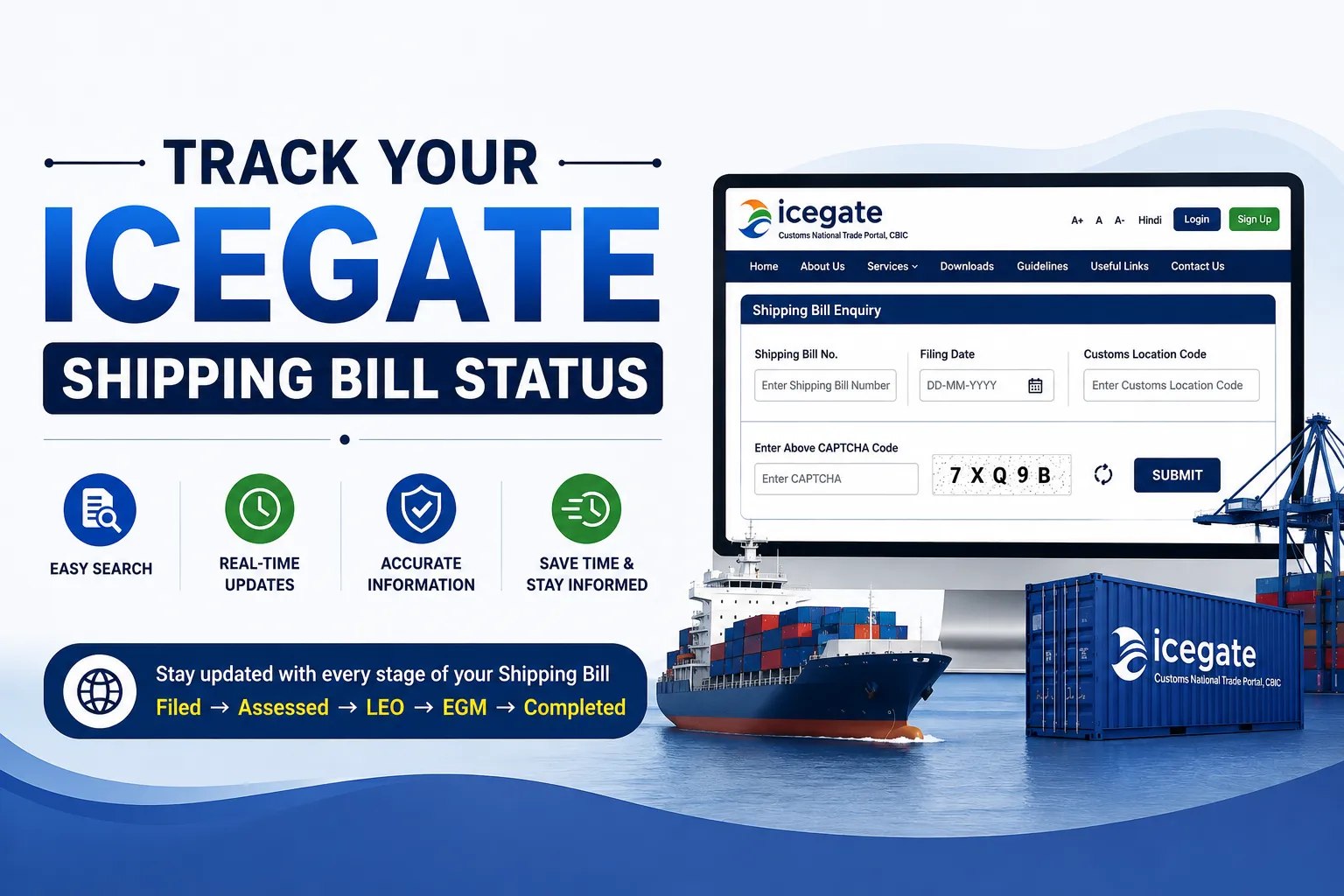
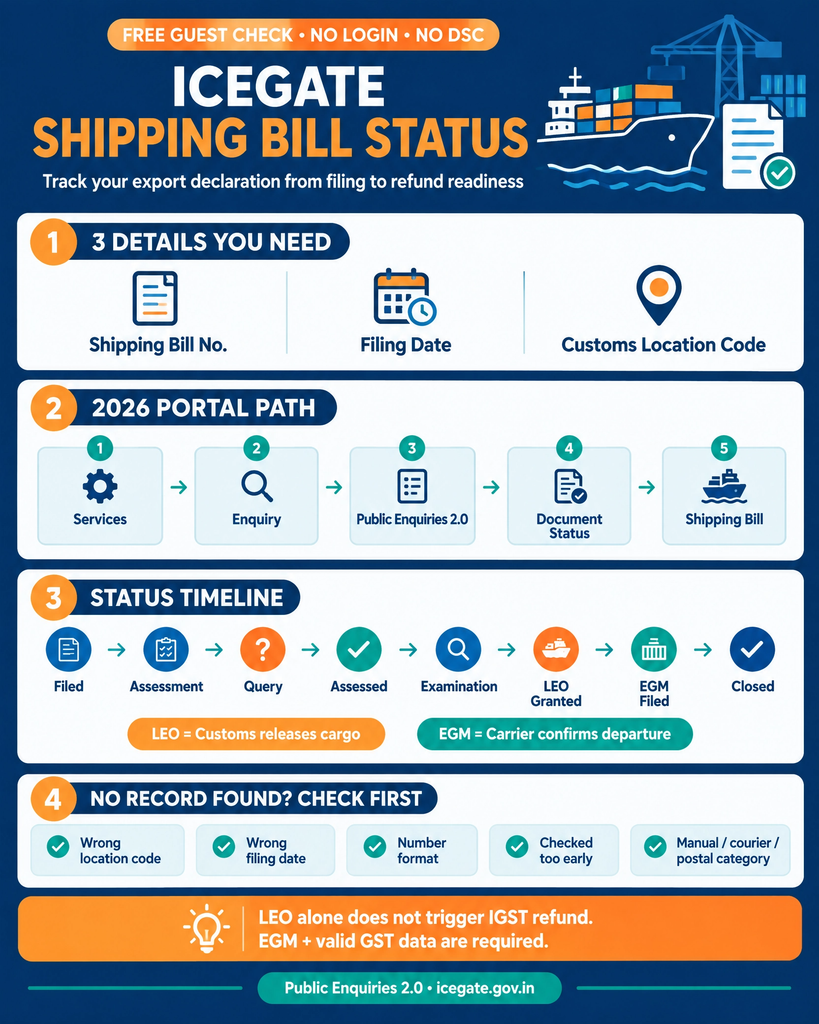
ICEGATE shipping bill status is the live position of your export declaration inside Indian Customs, from filing through assessment, Let Export Order (LEO) and the Export General Manifest (EGM). You can check it free on the ICEGATE portal as a guest, without logging in and without a digital signature. The check takes under two minutes and needs three details: the shipping bill number, the shipping bill date and the customs location code.
The path changed in early 2026, when ICEGATE moved document enquiries into Public Enquiries 2.0. Guides still pointing at the old Public Enquiries pages are stale, and following a retired path is the fastest way to conclude your shipping bill does not exist when it does. If your portal account or AD Code mapping is not yet in place, see our ICEGATE registration service.
Who This ICEGATE Shipping Bill Status Guide Applies To
This guide is for exporters, and the Customs Broker filing on their behalf, tracking a Shipping Bill through Indian Customs after filing. It covers sea, air and ICD exports filed on the EDI system. Manual, courier and postal shipping bills sit under a separate document category and are noted where relevant. The exporter stays responsible for monitoring clearance and refund status even when a broker handles the filing.
Tracking an import instead? A Bill of Entry uses different enquiries. Use our guide to check your BE status on ICEGATE, including the two Bill of Entry checks you can run without logging in.
What ICEGATE Shipping Bill Status Actually Tells You
A Shipping Bill is the export declaration filed with Indian Customs before goods leave the country. Once your broker files it into ICES, the document moves through a fixed sequence of checks, and the ICEGATE shipping bill status screen is a live read of that sequence. It answers three questions:
Has customs assessed the declaration or parked it with a query?
Has Let Export Order been granted? That is the moment your cargo is legally free to leave the port.
Has the carrier filed the EGM after departure?
The third point is where exporters lose money. Under Rule 96 of the CGST Rules, the Shipping Bill is itself treated as the refund application for IGST paid on exports, and the refund moves only once the EGM and a valid GSTR-3B are in place. No EGM means no refund, however clean the rest of the file looks. Our ICEGATE EGM guide shows how to check it.
What You Will Need Before You Check
Detail
Where to find it
Common mistake
Shipping Bill number
Checklist or acknowledgement from your Customs Broker
Using the invoice number instead
Shipping Bill date
The filing date, not the sailing date
Entering the dispatch or invoice date
Customs location code
The port or ICD where the bill was filed, such as INNSA1 for Nhava Sheva
Selecting the gateway port for an ICD filing
If you are unsure of the location code, ask your Customs Broker for the checklist copy. The six-character code sits on the header.
What changed in 2026: ICEGATE consolidated guest document enquiries into Public Enquiries 2.0, and the user manual published on the ICEGATE Enquiry page is dated 29 January 2026. Legacy enquiry links were retired, so verify the menu path on the live portal before following any older guide.
Step-by-Step: ICEGATE Shipping Bill Status Workflow
Step 1: Open the official portal. Go to icegate.gov.in in any browser. Use the official domain only, since lookalike sites harvest exporter data and charge for a check customs provides free. No account is needed.
Step 2: Open Services. The main navigation carries the full service list. Do not go to the login screen. Guest enquiry sits inside Services, not behind authentication.
Step 3: Click Enquiry. This intermediate step is new, which is why older walkthroughs appear to have a missing menu item. The Enquiry page lists Payment Status, Post Login Enquiries and Public Enquiries 2.0.
Step 4: Open Public Enquiries 2.0. The dashboard shows tiles for Track Postal Item Enquiry, Challan Enquiry, VCN Enquiry, Status of BE Transmission to GSTN, SB in RBI EDPMS, Status of BE in RBI IDPMS, Warehouse Code Enquiry, Document Status and DGFT. Note the SB in RBI EDPMS tile, which matters later in this guide. The two BE tiles are for imports.
Step 5: Choose Document Status. The panel lists Shipping Bill, Manual/Courier/Postal Shipping Bill, Air Consol, ICD BL Status, Air-IGM, SAM/IGM Enquiry, New SAM/IGM Enquiry and Custom Transit Declaration. Select the shipping bill type that matches how your document was filed.
Step 6: Select the location and enter the details. Choose your customs location, then enter the Shipping Bill number and date. The location field is mandatory. A valid shipping bill searched against the wrong location returns nothing at all, which is the single most common false alarm.
Step 7: Search and read every tab. The result opens across several tabs. Read it as a timeline rather than a single word, since the stage carrying the most recent date is where your consignment stands. An empty LEO date means the goods have not been released for export yet, whatever anyone at the port said on the phone.
ICEGATE Shipping Bill Status Stages Explained
Stage
What it means
Your next move
Filed
Declaration accepted into ICES, job number generated
Nothing. Wait for assessment
Under assessment
Officer is verifying value, classification and scheme claims
Keep invoice and packing list ready
Query raised
Customs wants a clarification or a document
Reply through your broker the same day. Queries are the biggest single delay
Assessed
Declaration accepted, any export duty or cess determined
Move to examination
Examination or goods registered
Cargo presented and checked under Risk Management System routing
Coordinate with your broker and the CFS
LEO granted
Let Export Order issued. Goods are cleared to leave India
Hand over to the carrier
EGM filed
Carrier has declared departure to customs
Refund and incentive clocks start
Closed
Shipping Bill fully processed
Archive the copy for audit
Note the gap between LEO and EGM. LEO is granted by customs. The EGM is filed by the shipping line or airline under Section 41 of the Customs Act, 1962. Two different parties, and the second one does not answer to you unless you chase it in writing. For the container itself, our ICEGATE container tracking guide covers the movement side.
Why ICEGATE Shipping Bill Status Shows No Record Found
This message almost never means the Shipping Bill is missing. In practice it is one of five things:
Wrong customs location. The most frequent cause by a distance. An export filed at an ICD must be searched under that ICD, not the gateway port the container later passes through.
Wrong date. The field wants the filing date. Exporters routinely enter the sailing or invoice date.
Number formatting. Drop spaces, added leading zeros and any internal prefix your broker uses.
Checked too early. Data moves from the port EDI system to the enquiry layer with a short lag. Wait a few hours after filing.
Manual, courier or postal filing. Those shipping bills sit under their own category in the Document Status panel.
If all five are ruled out and the ICEGATE shipping bill status still returns nothing, the filing may have failed at the broker’s end. Ask for the ICES job number as proof of acceptance.
ICEGATE Shipping Bill Status on the Old Portal and ICEGATE 1.5
Bookmarked tracking links from the old site no longer resolve, and there is no separate lookup for older shipping bills. Historical ICEGATE shipping bill status records are searched through the same Public Enquiries 2.0 path, using the customs location code in force when the bill was filed.
Logging in adds what a guest cannot see: the signed assessed copy through document download, refund and scroll status, and rectification of an incorrect EDPMS status, which the user manual restricts to logged-in users. If you have no portal identity yet, our guide on how to register on ICEGATE covers the documents and the Class 3 DSC requirement, and ICEGATE ID vs IEC explains why the two are not interchangeable.
The SB in RBI EDPMS Enquiry Most Exporters Never Open
Public Enquiries 2.0 carries a separate tile called SB in RBI EDPMS. It shows your Shipping Bill along with the date it was transmitted to the Reserve Bank of India.
This matters because EDPMS is how your bank tracks whether export proceeds have been realised against each Shipping Bill. An entry that never reached EDPMS, or reached it with wrong details, leaves the export open in your bank’s records long after the cargo has gone and the customer has paid.
Check it once a quarter alongside your ICEGATE shipping bill status routine. Fixing a transmission error six weeks after shipment is administrative. Fixing it when your bank flags an overdue export bill is not. Importers have the matching check, Status of BE in RBI IDPMS, covered in our Bill of Entry status guide.
IGST Refund Codes Tied to Your ICEGATE Shipping Bill Status
Once the ICEGATE shipping bill status shows both LEO and EGM, the system matches your Shipping Bill against the export invoices declared in GSTR-1 Table 6A and returns a response code. After login, check it through IGST Validations Enquiry in ICEGATE Enquiry Services by selecting the return month and year, entering your GSTIN and choosing the location.
Code
Meaning
Corrective action
SB000
Validated successfully
None. Scroll generation follows
SB001
Shipping Bill number, date or port code does not match the GST data
Amend through Table 9A of GSTR-1
SB002
EGM not filed
Chase the carrier in writing
SB003
GSTIN mismatch between Shipping Bill and GST return
Amend through Table 9A
SB004
Record already received and validated
No action needed
SB005
Invoice number mismatch between Shipping Bill and GSTR-1
Approach the customs location for manual validation
SB006
Gateway EGM missing, typical for ICD exports
Take it up with gateway port customs
SB005 usually has one root cause: the business raises one invoice series for GST and a different one for customs. Align the two and the error stops recurring. A validated Shipping Bill can still fail to pay out if the bank account has not cleared PFMS validation or an alert is running against your IEC, so confirm your IEC is active before escalating. For a stuck refund end to end, see our IGST refund service.
How to Download the Assessed Shipping Bill Copy
Guest enquiry shows the ICEGATE shipping bill status. It does not release the document. Log in with your registered credentials and use the document download option from the dashboard. What you get is the final assessed version, which is what banks, auditors and GST officers ask for during scrutiny. A draft or checklist copy from your broker is not a substitute.
Common Errors That Stall ICEGATE Shipping Bill Status Progress
Values converted at the wrong rate: customs applies the notified rate in force on the filing date, not your bank rate. Our ICEGATE exchange rate guide explains how that rate is fixed.
AD Code not mapped: without a registered Authorised Dealer code the Shipping Bill cannot be filed at that location. Under CBIC Instruction No. 25/2023-Customs, AD Code registration is a single registration valid across all Indian customs ports.
Bank account not registered for incentives: drawback, RoDTEP and IGST credits need a validated account. Complete export promotion bank account registration before the first shipment.
Scheme intent omitted at filing: RoDTEP and drawback claims must be declared in the Shipping Bill when it is filed. They cannot be added later.
HS code and description mismatch: classification that does not match the goods invites a query, an examination order, or both.
Query reply sent to the wrong desk: an EGM amendment goes through the customs CRU section, not the assessing group. Misdirected replies add weeks.
How JPARKS INDIA Helps With ICEGATE Shipping Bill Status
Three things to take away. The path is Services, Enquiry, Public Enquiries 2.0, Document Status, Shipping Bill, and the location field is mandatory. LEO and EGM come from two different parties, so a granted LEO does not mean your refund can validate. And the refund response code tells you which system to fix: SB001, SB003 and SB005 point at GSTR-1 data, while SB002 and SB006 point at the carrier.
JPARKS INDIA handles export compliance, backed by S.K. Agency, AEO-LO customs brokers since 1990. We handle ICEGATE registration, AD Code mapping, assessment queries, EGM amendments, SB005 manual validations and IGST refund follow-up as routine work.
If your ICEGATE shipping bill status has not moved in a week, or a refund has sat unvalidated for a month, send us the Shipping Bill number and port through our contact page. We will tell you where it is stuck and what it takes to clear it.
Q1. Can I check ICEGATE shipping bill status without logging in?
Yes. Shipping Bill document status on Public Enquiries 2.0 is a guest service. Login is needed only for the signed assessed copy, refund and scroll tracking, and EDPMS rectification.
Q2. How long does ICEGATE shipping bill status take to show LEO after filing?
Clean declarations at EDI ports are typically released within a few working days. A query, an examination order or a scheme claim under scrutiny extends that.
Q3. ICEGATE shipping bill status shows LEO but the IGST refund has not arrived. Why?
Check the EGM first. LEO is issued by customs, while the EGM is filed by the carrier after departure, and the refund cannot validate until the EGM matches your Shipping Bill.
SB005 flags an invoice number mismatch between the Shipping Bill and GSTR-1. It often cannot be fixed by amendment alone, and the file goes to the customs location for manual validation.
Q5. Is the old Public Enquiries page still available?
No. Guest document enquiries now run through Public Enquiries 2.0, and old bookmarked tracking links no longer work.
Q6. Who files the EGM, me or my Customs Broker?
Neither. The person in charge of the conveyance, meaning the shipping line or airline, files the export manifest under Section 41 of the Customs Act, 1962.
Q7. What is the SB in RBI EDPMS enquiry?
It is a separate tile in Public Enquiries 2.0 showing your Shipping Bill with the date it was transmitted to the Reserve Bank of India. Rectifying an incorrect EDPMS status needs login.
Q8. Do I need a separate lookup for old shipping bills?
No. Historical shipping bills are searched through the same Public Enquiries 2.0 path, using the customs location code in force when the bill was filed.
Q9. Does an ICEGATE shipping bill status check cost anything?
No. Document enquiry is free, and no digital signature is needed for a guest check.
Q10. Can I check a Bill of Entry the same way?
Not the same way. The Bill of Entry is not in the guest Document Status panel. Two import checks, Status of BE Transmission to GSTN and Status of BE in RBI IDPMS, are free without login, and post-login enquiries cover duty due, challans and agency release orders. Our BE status guide covers every check.
Need this handled for you?
Tell us where you are stuck. We usually reply the same business day.
5.0 ★ · 123 Google reviews · Since 1990
Posted on Google
Vandana Bajaj
Trustindex verifies that the original source of the review is Google.
Very prompt and reliable service by Rahul Kolge and his team. Exceptional and happy experience.
Posted on Google
Supriya Shetye
Trustindex verifies that the original source of the review is Google.
Had a really good experience with JParks India. Rahul sir helped me a lot with my import work and were always active and responsive. Whatever documents or guidance was needed, they handled everything smoothly and explained things clearly. Felt stress-free throughout the process. Very helpful team, definitely recommend them if you’re doing import or export.
Posted on Google
dipali sakpal
Trustindex verifies that the original source of the review is Google.
Very nice people, get the work done in a very short time.
Posted on Google
Satish Bajaj
Trustindex verifies that the original source of the review is Google.
Excellent & Prompt services in all Import Export matters.
Great to work with you
Posted on Google
Bajaj VCPL
Trustindex verifies that the original source of the review is Google.
It was a great experience having work with you.
Posted on Google
Satish Bajaj
Trustindex verifies that the original source of the review is Google.
"Outstanding professiona services, efficient, and gets things done incredibly fast. Highly recommended for anyone needing reliable and prompt assistance
Posted on Google
Nishat fatima
Trustindex verifies that the original source of the review is Google.
excellent service
Posted on Google
farhan sayed
Trustindex verifies that the original source of the review is Google.
JParks Team is Super helpful! Thanks to Rahul and team!
Posted on Google
Sadik Inamdar
Trustindex verifies that the original source of the review is Google.
Good and personal service for import export code
Posted on Google
Maheshwar
Trustindex verifies that the original source of the review is Google.
Had a really good experience with JParks India. Rahul sir helped me a lot with my import work and were always active and responsive. Whatever documents or guidance was needed, they handled everything smoothly and explained things clearly. Felt stress-free throughout the process. Very helpful team, definitely recommend them if you’re doing import or export.
Verified by Trustindex
Trustindex verified badge is the Universal Symbol of Trust. Only the greatest companies can get the verified badge who has a review score above 4.5, based on customer reviews over the past 12 months. Read more
We use cookies to run this site, measure traffic, and track our ads. Essential cookies are always on. Accept all, reject non-essential, or set your preferences.
Cookie Preferences
Manage your cookie preferences below:
Essential cookies enable basic functions and are necessary for the proper function of the website.
Name
Description
Duration
Cookie Preferences
This cookie is used to store the user's cookie consent preferences.
30 days
Google reCAPTCHA helps protect websites from spam and abuse by verifying user interactions through challenges.
Name
Description
Duration
_GRECAPTCHA
Google reCAPTCHA sets a necessary cookie (_GRECAPTCHA) when executed for the purpose of providing its risk analysis.
179 days
Google Tag Manager simplifies the management of marketing tags on your website without code changes.
Name
Description
Duration
cookiePreferences
Registers cookie preferences of a user
2 years
td
Registers statistical data on users' behaviour on the website. Used for internal analytics by the website operator.
session
Statistics cookies collect information anonymously. This information helps us understand how visitors use our website.
Google Analytics is a web analytics service that tracks and reports website traffic. It collects anonymized data on how visitors use the site to help us understand and improve performance.