If your Importer Exporter Code details have been recently modified, such as a change in business address, contact information, branch addition, or director details, you can use the IEC Print option on the DGFT portal to instantly download the latest version of your certificate. This easy online process lets exporters and importers in India view, download and print their updated IEC certificate at any time, free of cost.
What is IEC Print on the DGFT Portal?
IEC Print is the official online facility provided by the Directorate General of Foreign Trade (DGFT) that allows businesses to view and download a fresh copy of their IEC certificate after any approved modification. The certificate generated through this option reflects all the latest changes and carries a digital signature, making it valid for customs clearance, bank documentation, and shipping line submissions.
You can use the IEC Print option whenever you need to:
Check your current IEC status (active or inactive)
View IEC details after the annual update
Display the latest registered address and contact information
Print a fresh PDF copy for compliance records
Step-by-Step Guide to Print IEC Certificate Online
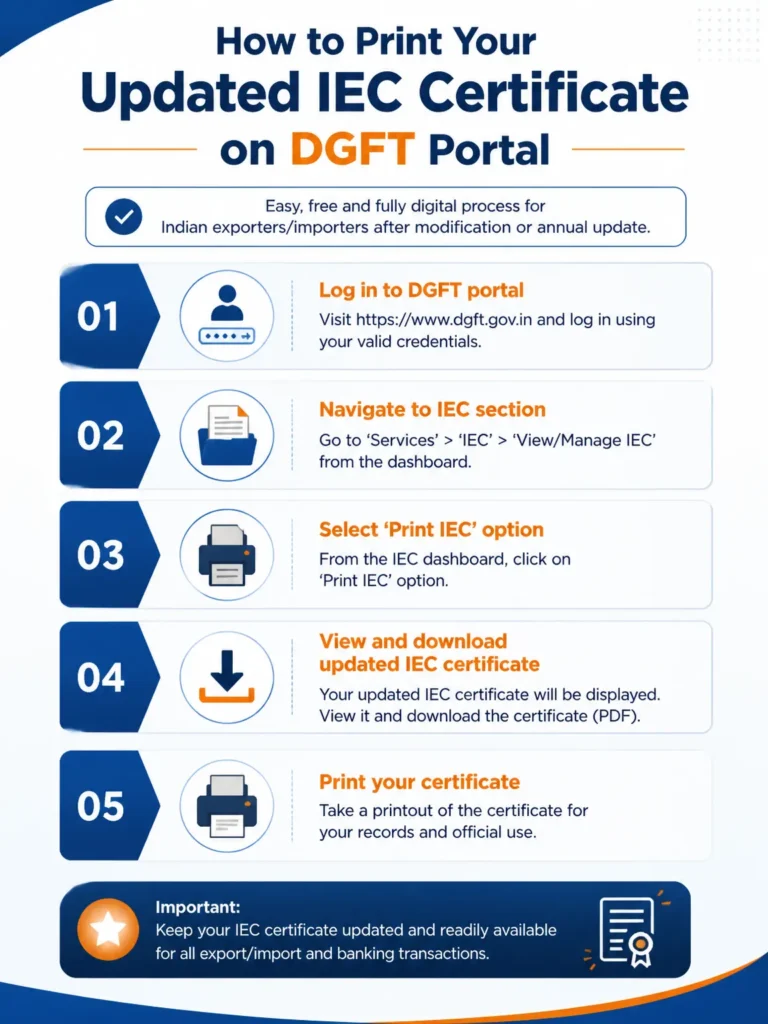
Follow these five simple steps to print your updated IEC certificate directly from the DGFT portal.
Step 1: Login to the DGFT Portal.
Visit the official DGFT website at dgft.gov.in and click on the Login option. Enter your registered username and password. If you have not registered yet, create a new account by linking your IEC PAN.
Step 2: Navigate to IEC Profile Management.
After logging in, go to the Services menu on the top navigation bar. From the dropdown, select IEC Profile Management. This is the dedicated section where you can view, modify, and print your IEC certificate.
Step 3: Select the View IEC Option.
Inside the IEC Profile Management dashboard, click on View IEC. The system will display your current IEC details, including the IEC number, business name, address, branch details, and the date of last modification. If your recent modification has been approved, the updated information will appear here.
Step 4: Click on Print IEC.
Once you have verified that the displayed details are correct, click the Print IEC button. The DGFT system will generate a fresh PDF copy of your IEC certificate with the latest details and a digital signature.
Step 5: Save and Print the Certificate.
Download the PDF file to your computer. Open it and take a clear print on A4 size paper. Keep both a soft copy and a hard copy, as banks, shipping lines, and customs officers may ask for the latest version during compliance checks.
How to View IEC on DGFT Without Printing?
If you only want to check or display your IEC details without taking a printout, the same View IEC option under IEC Profile Management lets you preview all current information on screen. This is useful when you need to quickly verify your IEC status, registered address, or branch details before submitting documents to a bank or customs broker.
When Should You Print a Fresh IEC Certificate?
Indian businesses should download and print a new IEC certificate in the following situations:
After completing the mandatory IEC annual update between April and June
After modifying business name, address, or contact details
After adding or removing a branch, partner, director, or proprietor
After bank account or PAN-linked detail changes
Before applying for AD Code registration or ICEGATE registration at a new port
Before any audit, customs inspection, or bank KYC verification
If your IEC has been deactivated due to a missed annual update, you may need to reactivate it first. Read our complete guide on IEC renewal to understand the process and avoid penalties.
Common Issues When You Print IEC Online.
Sometimes users face issues while trying to download or print their IEC certificate. Here are the most common problems and their solutions.
Updated details not showing: If your modification request was submitted recently, it may still be under review. The View IEC option displays the updated certificate only after DGFT approves the changes. Check your modification status under Track Status.
PDF not opening: Make sure your browser allows pop-ups from dgft.gov.in and that Adobe Reader or any standard PDF viewer is installed on your system.
Login errors: If you are unable to log in, reset your password using the Forgot Password option, or ensure your Digital Signature Certificate (DSC) is properly connected when DSC-based login is required.
Blank certificate or loading error: Clear your browser cache, try a different browser, or use an incognito window. This usually resolves loading errors on the DGFT portal.
Need Help With IEC Modification or Printing?
If your IEC modification is delayed, your updated certificate is not appearing, or you need professional help with annual updates and trade compliance, our team at JParks India can assist you end to end. We handle IEC modification, IEC renewal, ICEGATE registration, AD Code registration, and full import-export compliance for businesses across India.
You can reach us at [email protected] or call +91 9167379073 to speak with a compliance expert.
Frequently Asked Questions.
Q1. Can I print my IEC certificate online for free?
Yes, the IEC Print option on the DGFT portal is completely free. There is no charge to view or download your IEC certificate.
Q2. How long does it take to see the updated IEC after modification?
Most modifications are processed and reflected within a few working days. Some changes that need additional verification may take longer. You can track the status on the DGFT portal.
Q3. Is the printed IEC certificate from the DGFT portal legally valid?
Yes, the PDF generated by the DGFT IEC Print option carries a digital signature and is accepted by customs, banks, and shipping lines as a valid IEC document.
Q4. Can I print IEC without logging into the DGFT portal?
No. To print or download your IEC certificate, you must log in with your registered DGFT credentials linked to your IEC PAN.
Q5. What if my IEC is inactive when I try to print it?
If your IEC shows as inactive, complete the annual update first. Learn more about reactivation in our IEC renewal guide or contact us for assistance.
Q6. Do I need a Digital Signature Certificate to print IEC?
A DSC is needed for modifications and certain authentications. For simply viewing and printing the IEC certificate, your normal DGFT login is sufficient.
Tell us where you are stuck. We usually reply the same business day.
5.0 ★ · 123 Google reviews · Since 1990
Posted on Google
Vandana Bajaj
Trustindex verifies that the original source of the review is Google.
Very prompt and reliable service by Rahul Kolge and his team. Exceptional and happy experience.
Posted on Google
Supriya Shetye
Trustindex verifies that the original source of the review is Google.
Had a really good experience with JParks India. Rahul sir helped me a lot with my import work and were always active and responsive. Whatever documents or guidance was needed, they handled everything smoothly and explained things clearly. Felt stress-free throughout the process. Very helpful team, definitely recommend them if you’re doing import or export.
Posted on Google
dipali sakpal
Trustindex verifies that the original source of the review is Google.
Very nice people, get the work done in a very short time.
Posted on Google
Satish Bajaj
Trustindex verifies that the original source of the review is Google.
Excellent & Prompt services in all Import Export matters.
Great to work with you
Posted on Google
Bajaj VCPL
Trustindex verifies that the original source of the review is Google.
It was a great experience having work with you.
Posted on Google
Satish Bajaj
Trustindex verifies that the original source of the review is Google.
"Outstanding professiona services, efficient, and gets things done incredibly fast. Highly recommended for anyone needing reliable and prompt assistance
Posted on Google
Nishat fatima
Trustindex verifies that the original source of the review is Google.
excellent service
Posted on Google
farhan sayed
Trustindex verifies that the original source of the review is Google.
JParks Team is Super helpful! Thanks to Rahul and team!
Posted on Google
Sadik Inamdar
Trustindex verifies that the original source of the review is Google.
Good and personal service for import export code
Posted on Google
Maheshwar
Trustindex verifies that the original source of the review is Google.
Had a really good experience with JParks India. Rahul sir helped me a lot with my import work and were always active and responsive. Whatever documents or guidance was needed, they handled everything smoothly and explained things clearly. Felt stress-free throughout the process. Very helpful team, definitely recommend them if you’re doing import or export.
Verified by Trustindex
Trustindex verified badge is the Universal Symbol of Trust. Only the greatest companies can get the verified badge who has a review score above 4.5, based on customer reviews over the past 12 months. Read more
We use cookies to run this site, measure traffic, and track our ads. Essential cookies are always on. Accept all, reject non-essential, or set your preferences.
Cookie Preferences
Manage your cookie preferences below:
Essential cookies enable basic functions and are necessary for the proper function of the website.
Name
Description
Duration
Cookie Preferences
This cookie is used to store the user's cookie consent preferences.
30 days
Google reCAPTCHA helps protect websites from spam and abuse by verifying user interactions through challenges.
Name
Description
Duration
_GRECAPTCHA
Google reCAPTCHA sets a necessary cookie (_GRECAPTCHA) when executed for the purpose of providing its risk analysis.
179 days
Google Tag Manager simplifies the management of marketing tags on your website without code changes.
Name
Description
Duration
cookiePreferences
Registers cookie preferences of a user
2 years
td
Registers statistical data on users' behaviour on the website. Used for internal analytics by the website operator.
session
Statistics cookies collect information anonymously. This information helps us understand how visitors use our website.
Google Analytics is a web analytics service that tracks and reports website traffic. It collects anonymized data on how visitors use the site to help us understand and improve performance.