How to Download a Renewed IEC Certificate from DGFT in 2026
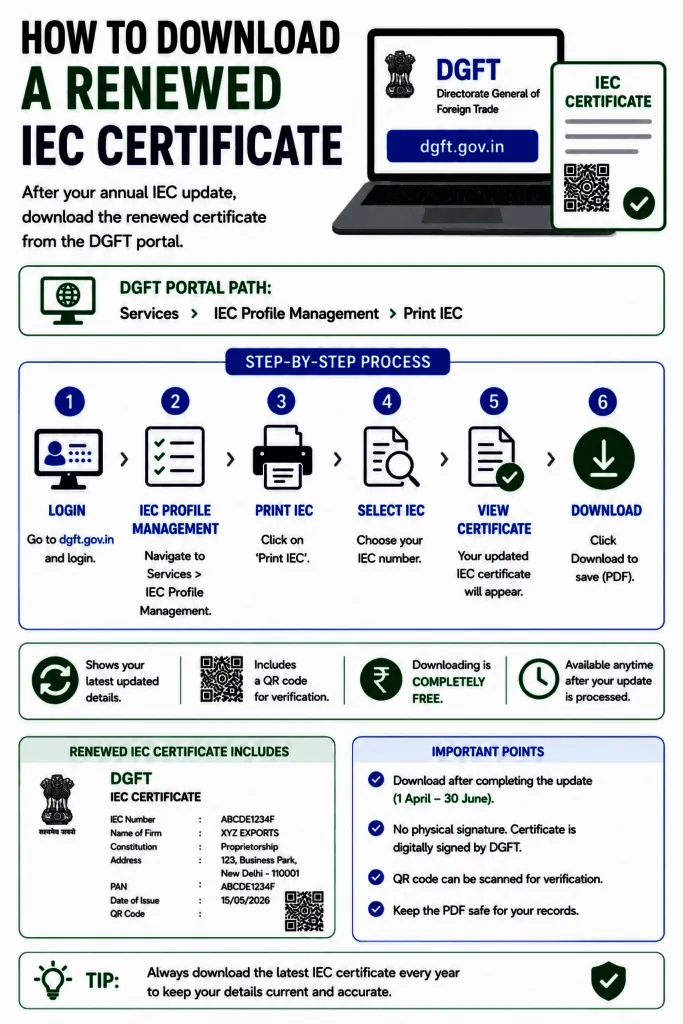
How to download a renewed IEC certificate is simple once your annual update is processed, since the Directorate General of Foreign Trade does not post any physical copy and the digital PDF from the DGFT portal is your only official certificate. This guide shows you the exact steps to download, view, and print your renewed Importer Exporter Code certificate, plus how to fix common issues when updated details do not show up.
An Importer Exporter Code is a 10-digit identification number that lets your business legally import into and export from India. Once your annual IEC update or renewal is processed, the refreshed certificate carries your latest firm name, address, and a unique QR code that customs, banks, and trade partners can verify online. Keeping a downloaded copy ready saves you delays during customs clearance and foreign remittance.
How to Download a Renewed IEC Certificate Online: Step by Step
1. Visit the Official DGFT Portal
Open dgft.gov.in in your browser. This is the only official portal for every IEC service, including registration, updates, and certificate download. Avoid third-party links to keep your login secure.
2. Log In to Your Account
Click Login at the top right corner. Enter your registered username, password, and the captcha code. Your account must be linked to the same PAN and IEC tied to your firm. If you forgot your password, use the Forgot Password option to receive a temporary one on your registered email and mobile.
3. Open IEC Profile Management
After logging in, go to the Services tab and select IEC Profile Management. Choose the View IEC or Print IEC option. Once your renewal or update has been processed, the refreshed certificate appears here with the new details.
4. Verify Your Details with OTP
DGFT sends a one-time password to your registered mobile number and email for security. Enter the OTP to confirm your identity. If the OTP does not arrive within a few minutes, check your spam folder or click Resend OTP.
5. Download and Print the Certificate
Click Print IEC to generate your renewed certificate as a PDF. Review the firm name, address, IEC number, and QR code to confirm the updated details are correct. Save the digital copy to your device and print a hard copy on A4 paper in portrait orientation for official use. Downloading and printing the IEC certificate from DGFT is completely free.
What to Do If Your Renewed Details Do Not Show Up
Sometimes you follow every step on how to download a renewed IEC certificate but the new details still do not appear. Updates can take 24 to 48 hours to reflect after your renewal is processed. If the new details still do not appear, the request may be marked In Process and pending approval from your Regional DGFT office.
Why You Should Keep Your IEC Certificate Downloaded
Customs authorities ask for your IEC certificate to clear import and export shipments. Banks require it to process foreign currency payments and outward remittances. The certificate is also needed for AD Code registration, e-commerce export programs, and applying for DGFT scheme benefits. A ready digital and printed copy keeps you audit-ready and avoids last-minute delays.
Need Help With Your IEC Renewal or Download?
If your renewed certificate is not reflecting correctly, your IEC has been deactivated, or you want the entire update handled for you, JPARKS INDIA can take care of it end to end. Learn more about our IEC Renewal service, or explore how to apply for IEC online and complete your ICEGATE registration. You can also browse our full range of IEC resources.
Frequently Asked Questions.
Q1. Is there a fee to download the IEC certificate?
No. Downloading and printing your IEC certificate from the DGFT portal is completely free. A fee of Rs. 200 applies only when you modify IEC details, while the annual confirmation with no changes is free between April and June.
Q2. How long does it take for renewed details to reflect?
Renewed or updated details usually reflect within 24 to 48 hours. If your request is still In Process, it is pending approval from your Regional DGFT office.
Q3. Do I need to reapply if I lose my IEC certificate?
No. You never need to reapply. Simply log in to the DGFT portal and download your certificate again anytime from IEC Profile Management.
Q4. How can I retrieve my IEC number if I forgot it?
On the DGFT portal, use the View Any IEC or Print IEC option and enter your firm details such as PAN to retrieve your IEC number. You can also contact DGFT if you cannot find it online.
Q5. Does the IEC number change after renewal?
No. Your IEC number stays the same for the lifetime of your business. Only the details and validity status are refreshed after the annual update.
Tell us where you are stuck. We usually reply the same business day.
5.0 ★ · 123 Google reviews · Since 1990
Posted on Google
Vandana Bajaj
Trustindex verifies that the original source of the review is Google.
Very prompt and reliable service by Rahul Kolge and his team. Exceptional and happy experience.
Posted on Google
Supriya Shetye
Trustindex verifies that the original source of the review is Google.
Had a really good experience with JParks India. Rahul sir helped me a lot with my import work and were always active and responsive. Whatever documents or guidance was needed, they handled everything smoothly and explained things clearly. Felt stress-free throughout the process. Very helpful team, definitely recommend them if you’re doing import or export.
Posted on Google
dipali sakpal
Trustindex verifies that the original source of the review is Google.
Very nice people, get the work done in a very short time.
Posted on Google
Satish Bajaj
Trustindex verifies that the original source of the review is Google.
Excellent & Prompt services in all Import Export matters.
Great to work with you
Posted on Google
Bajaj VCPL
Trustindex verifies that the original source of the review is Google.
It was a great experience having work with you.
Posted on Google
Satish Bajaj
Trustindex verifies that the original source of the review is Google.
"Outstanding professiona services, efficient, and gets things done incredibly fast. Highly recommended for anyone needing reliable and prompt assistance
Posted on Google
Nishat fatima
Trustindex verifies that the original source of the review is Google.
excellent service
Posted on Google
farhan sayed
Trustindex verifies that the original source of the review is Google.
JParks Team is Super helpful! Thanks to Rahul and team!
Posted on Google
Sadik Inamdar
Trustindex verifies that the original source of the review is Google.
Good and personal service for import export code
Posted on Google
Maheshwar
Trustindex verifies that the original source of the review is Google.
Had a really good experience with JParks India. Rahul sir helped me a lot with my import work and were always active and responsive. Whatever documents or guidance was needed, they handled everything smoothly and explained things clearly. Felt stress-free throughout the process. Very helpful team, definitely recommend them if you’re doing import or export.
Verified by Trustindex
Trustindex verified badge is the Universal Symbol of Trust. Only the greatest companies can get the verified badge who has a review score above 4.5, based on customer reviews over the past 12 months. Read more
We use cookies to run this site, measure traffic, and track our ads. Essential cookies are always on. Accept all, reject non-essential, or set your preferences.
Cookie Preferences
Manage your cookie preferences below:
Essential cookies enable basic functions and are necessary for the proper function of the website.
Name
Description
Duration
Cookie Preferences
This cookie is used to store the user's cookie consent preferences.
30 days
Google reCAPTCHA helps protect websites from spam and abuse by verifying user interactions through challenges.
Name
Description
Duration
_GRECAPTCHA
Google reCAPTCHA sets a necessary cookie (_GRECAPTCHA) when executed for the purpose of providing its risk analysis.
179 days
Google Tag Manager simplifies the management of marketing tags on your website without code changes.
Name
Description
Duration
cookiePreferences
Registers cookie preferences of a user
2 years
td
Registers statistical data on users' behaviour on the website. Used for internal analytics by the website operator.
session
Statistics cookies collect information anonymously. This information helps us understand how visitors use our website.
Google Analytics is a web analytics service that tracks and reports website traffic. It collects anonymized data on how visitors use the site to help us understand and improve performance.