ICEGATE IEC Registration: How to Get Your IEC Onto the Customs System
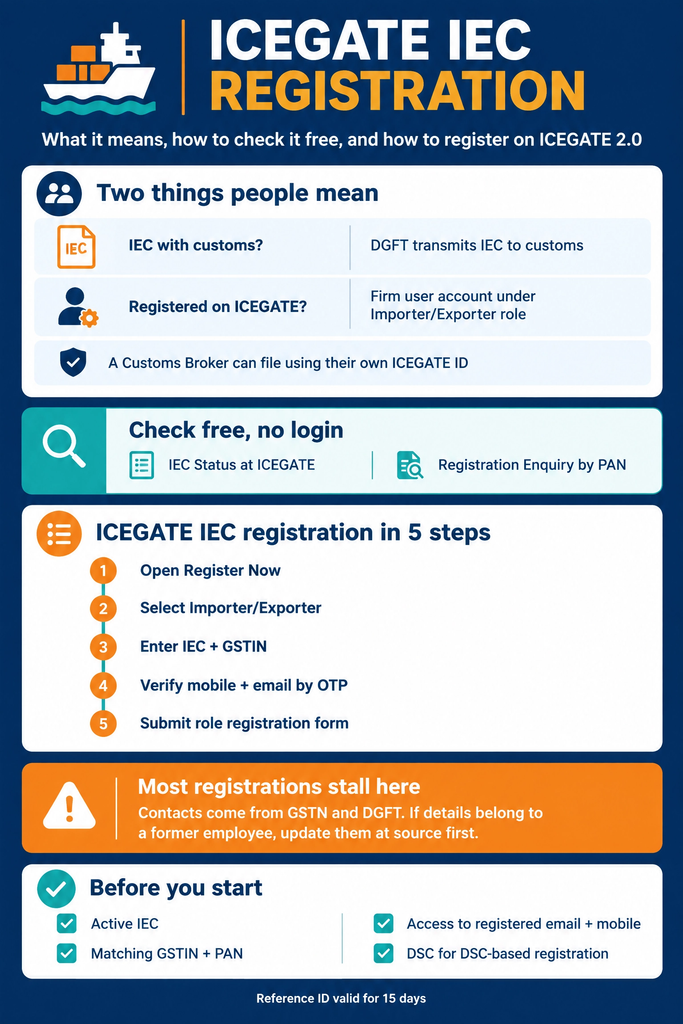
ICEGATE IEC registration is how an Import Export Code is put to work on the customs system. Two separate things sit behind the phrase, and mixing them up is why filings bounce on a code that looks perfectly healthy on DGFT. The first is whether DGFT has transmitted your IEC to customs. The second is whether your firm holds a registered user account on ICEGATE under the Importer/Exporter role. Both are checkable free, with no login.
This guide covers the free ICEGATE IEC checks, the five-step registration on ICEGATE 2.0, what the portal asks for, and why the contact details screen stops more registrations than any other step.
What people mean by ICEGATE IEC
What it actually is
How to check
Is my IEC with customs?
DGFT transmitting the IEC to the customs system, so filings can be made against it
IEC Status at ICEGATE, free on the DGFT home page
Am I registered on ICEGATE?
A user account on ICEGATE under the Importer/Exporter role, with its own ICEGATE ID
Registration Enquiry on ICEGATE, by PAN
Can my broker file for me?
The Customs Broker files with their own ICEGATE ID against your IEC
No registration of your own needed for this
ICEGATE IEC: Two Things People Mean
An IEC is issued by DGFT. ICEGATE is the customs portal. The code has to reach customs before anything can be filed against it, and that transmission happens between the two departments, not through anything you do on ICEGATE.
Registering on ICEGATE is a separate matter. It creates a user account for your firm so you can file, track and pay yourself. Plenty of importers and exporters never register at all, because their Customs Broker files against their IEC using the broker’s own ICEGATE ID. That is legitimate and common. Register when you want your own visibility and your own filing rights, not because someone told you the IEC will not work otherwise.
Run both checks before you spend an hour on a registration form. Neither costs anything and neither needs an account.
Has the IEC reached customs? The DGFT home page carries an IEC Status at ICEGATE link. It answers the one question that matters when filings are being rejected on an active code. Our guide on how to view IEC and IEC status covers the DGFT side of the same check.
Is the firm already registered on ICEGATE? ICEGATE runs a Registration Enquiry that tells you whether a particular PAN is registered with ICEGATE. The CBIC advisory for it describes entering the PAN and a captcha, with the result showing the ICEGATE ID, the role, the registration date and the filing services registered against it.
That second check saves real time. In firms where staff have changed, an ICEGATE IEC registration often already exists against the PAN, done years ago by someone who has left. You need the account recovered, not a new one.
Your GSTIN. ICEGATE validates GSTIN and PAN online during registration, so the details have to match.
Access to the email and mobile held in GSTN and DGFT records. The portal offers you those contacts to verify. It does not let you type in a fresh one.
A digital signature for DSC based registration. Our DGFT digital signature service covers the token and its mapping.
ICEGATE IEC Registration in 5 Steps
The ICEGATE 2.0 registration manual breaks the process into five sections: role selection, verification of GSTIN details, verification of user details, verification of mobile and email, and filling and submission of the role registration form. On screen it runs like this.
Step 1: Open the registration module.
Go to the ICEGATE login page and click Register Now. The first screen offers two routes: continue using a Reference ID if you have an unexpired one, or Fresh Registration if you do not.
Step 2: Select your role.
Eighteen roles are listed, from Airline to Warehouse Licensee. Importers and exporters take Importer/ Exporter. Firms without an IEC take Non IEC Holder/ UIN Holder.
Step 3: Enter the IEC and GSTIN.
The Importer/Exporter role asks for the IEC Code and the GSTIN, and validates both. This is the point at which an ICEGATE IEC registration fails if the code and the GST record disagree.
Step 4: Verify contact details and collect the Reference ID.
The system fetches the contact details held in GSTN and DGFT records, you select one, and you verify the mobile number and email by OTP. ICEGATE then generates a Reference ID valid for 15 days and emails it to you. Miss that window and the step has to be done again.
Step 5: Fill and submit the role registration form.
Complete the form, make the declaration that the information is correct, and submit. The application goes to the ICEGATE approving authority, and the ICEGATE ID and password are assigned by them, not chosen by you. Once it arrives, our ICEGATE login guide covers the first sign-in.
The Contact Details Screen Catches Most Firms Out
This is the step that ends most ICEGATE IEC registrations halfway. The portal does not ask you to nominate an email address. It lists the contact details already recorded in GSTN and, for importers and exporters, DGFT, and asks you to pick one and prove you control it.
If every address on that screen belongs to a former employee or a consultant you no longer use, there is no workaround inside ICEGATE. The manual is explicit: update the contact details in GSTN, and on DGFT as well for the Importer/Exporter role, then come back and register.
Those contacts are also where ICEGATE will reach you afterwards, so a shared business inbox that survives staff changes is worth setting up before you start rather than after.
Already Had an ICEGATE 1.0 Login?
Two cases, and neither needs a fresh registration.
A full ICEGATE 1.0 registration. Log in directly with the existing ICEGATE ID and password, with User Type set to ICEGATE User. Our guide to ICEGATE 2.0 covers what moved on the new portal.
A Simplified Registration from ICEGATE 1.0. These accounts have to be upgraded to DSC based registration on ICEGATE 2.0 to reach the services. The DSC is added from the dashboard after login.
Why ICEGATE IEC Filings Still Fail
What you see
Likely cause
Fix
IEC active on DGFT, filings rejected at customs
The code has not been transmitted to the customs system
Run the IEC Status at ICEGATE check on the DGFT home page
GSTIN or PAN not validating during registration
The GST record and the IEC record do not agree
Correct the details at source, then register again
No OTP arrives
The contacts on file belong to someone who has left
Update the contacts in GSTN and DGFT first
Reference ID rejected
It is older than 15 days
Start the verification steps again for a fresh Reference ID
Registration submitted but no ICEGATE ID
It is with the approving authority
Wait, then follow up with the helpdesk quoting the Reference ID
Logged in but services unavailable
A Simplified Registration carried over from ICEGATE 1.0
Add a DSC from the dashboard to upgrade the account
A registration already exists against the PAN
A former colleague registered the firm
Recover that account rather than creating a second one
The ICEGATE helpdesk runs on 1800-3010-1000, and our ICEGATE helpdesk guide lists what to have ready before you call.
How JPARKS INDIA Helps With ICEGATE IEC Registration
Three things to carry away. An ICEGATE IEC check costs nothing, so run the IEC Status at ICEGATE and the Registration Enquiry before filling in any form. The contact details come from GSTN and DGFT, so fix them at source first. And the ICEGATE ID is assigned by the approving authority after your application is reviewed, so it is not something you pick during sign-up.
JPARKS INDIA handles ICEGATE and IEC work, backed by S.K. Agency, AEO-LO customs brokers since 1990. We complete ICEGATE IEC registrations, recover accounts stranded on a former employee’s email, upgrade simplified registrations to DSC based ones, and chase codes that have not reached customs.
Registration stuck, or filings failing on an active code? Send us the IEC and GSTIN through our contact page.
Need an ICEGATE IEC registration done properly the first time?Book a free consultation with the JPARKS INDIA EXIM compliance team.
Frequently Asked Questions
Q1. What does ICEGATE IEC mean?
It covers two things: the IEC reaching the customs system from DGFT, and a user account registered on ICEGATE under the Importer/Exporter role. They are checked in different places.
Q2. Do I have to register on ICEGATE to import or export?
No. Your Customs Broker can file against your IEC using their own ICEGATE ID. Register when you want to file, track or pay yourself.
Q3. How do I check whether my PAN is already registered on ICEGATE?
Use the Registration Enquiry on ICEGATE. It reports the ICEGATE ID, role, registration date and registered filing services against a PAN, with no login.
Q4. What does ICEGATE ask for in Importer/Exporter registration?
The IEC Code and the GSTIN, both validated online, followed by verification of a mobile number and email taken from GSTN and DGFT records.
Q5. Can I register with a different email address?
Not directly. ICEGATE offers only the contacts held in GSTN and DGFT. Update them there first, then register.
Fifteen days. If the remaining steps are not completed in that window, the Reference ID has to be generated again.
Q7. Who issues the ICEGATE ID and password?
The approving authority at ICEGATE assigns both once the role registration is complete.
Q8. My IEC is active on DGFT but customs rejects the filing. Why?
The code has probably not reached the customs system yet. Run the IEC Status at ICEGATE check from the DGFT home page before refiling.
Need this handled for you?
Tell us where you are stuck. We usually reply the same business day.
5.0 ★ · 123 Google reviews · Since 1990
Posted on Google
Vandana Bajaj
Trustindex verifies that the original source of the review is Google.
Very prompt and reliable service by Rahul Kolge and his team. Exceptional and happy experience.
Posted on Google
Supriya Shetye
Trustindex verifies that the original source of the review is Google.
Had a really good experience with JParks India. Rahul sir helped me a lot with my import work and were always active and responsive. Whatever documents or guidance was needed, they handled everything smoothly and explained things clearly. Felt stress-free throughout the process. Very helpful team, definitely recommend them if you’re doing import or export.
Posted on Google
dipali sakpal
Trustindex verifies that the original source of the review is Google.
Very nice people, get the work done in a very short time.
Posted on Google
Satish Bajaj
Trustindex verifies that the original source of the review is Google.
Excellent & Prompt services in all Import Export matters.
Great to work with you
Posted on Google
Bajaj VCPL
Trustindex verifies that the original source of the review is Google.
It was a great experience having work with you.
Posted on Google
Satish Bajaj
Trustindex verifies that the original source of the review is Google.
"Outstanding professiona services, efficient, and gets things done incredibly fast. Highly recommended for anyone needing reliable and prompt assistance
Posted on Google
Nishat fatima
Trustindex verifies that the original source of the review is Google.
excellent service
Posted on Google
farhan sayed
Trustindex verifies that the original source of the review is Google.
JParks Team is Super helpful! Thanks to Rahul and team!
Posted on Google
Sadik Inamdar
Trustindex verifies that the original source of the review is Google.
Good and personal service for import export code
Posted on Google
Maheshwar
Trustindex verifies that the original source of the review is Google.
Had a really good experience with JParks India. Rahul sir helped me a lot with my import work and were always active and responsive. Whatever documents or guidance was needed, they handled everything smoothly and explained things clearly. Felt stress-free throughout the process. Very helpful team, definitely recommend them if you’re doing import or export.
Verified by Trustindex
Trustindex verified badge is the Universal Symbol of Trust. Only the greatest companies can get the verified badge who has a review score above 4.5, based on customer reviews over the past 12 months. Read more
We use cookies to run this site, measure traffic, and track our ads. Essential cookies are always on. Accept all, reject non-essential, or set your preferences.
Cookie Preferences
Manage your cookie preferences below:
Essential cookies enable basic functions and are necessary for the proper function of the website.
Name
Description
Duration
Cookie Preferences
This cookie is used to store the user's cookie consent preferences.
30 days
Google reCAPTCHA helps protect websites from spam and abuse by verifying user interactions through challenges.
Name
Description
Duration
_GRECAPTCHA
Google reCAPTCHA sets a necessary cookie (_GRECAPTCHA) when executed for the purpose of providing its risk analysis.
179 days
Google Tag Manager simplifies the management of marketing tags on your website without code changes.
Name
Description
Duration
cookiePreferences
Registers cookie preferences of a user
2 years
td
Registers statistical data on users' behaviour on the website. Used for internal analytics by the website operator.
session
Statistics cookies collect information anonymously. This information helps us understand how visitors use our website.
Google Analytics is a web analytics service that tracks and reports website traffic. It collects anonymized data on how visitors use the site to help us understand and improve performance.