How to retrieve old IEC code that you have lost, forgotten, or misplaced? Whether you forgot the number, lost the certificate, or your old IEC was issued before the DGFT went digital, you can retrieve it in minutes using your PAN. Here is exactly how
How to Retrieve Old IEC Code: Everything You Need to Know
An old Importer Exporter Code (IEC) is any IEC issued before the DGFT migrated to its current online portal. These codes are still fully valid and usable for import and export. However, they must be linked to your DGFT profile before you can trade, renew, or download a copy. If your IEC was issued after 2021, it is already on the portal and linked to your PAN number.
How to Retrieve Your Old IEC Code Step by Step
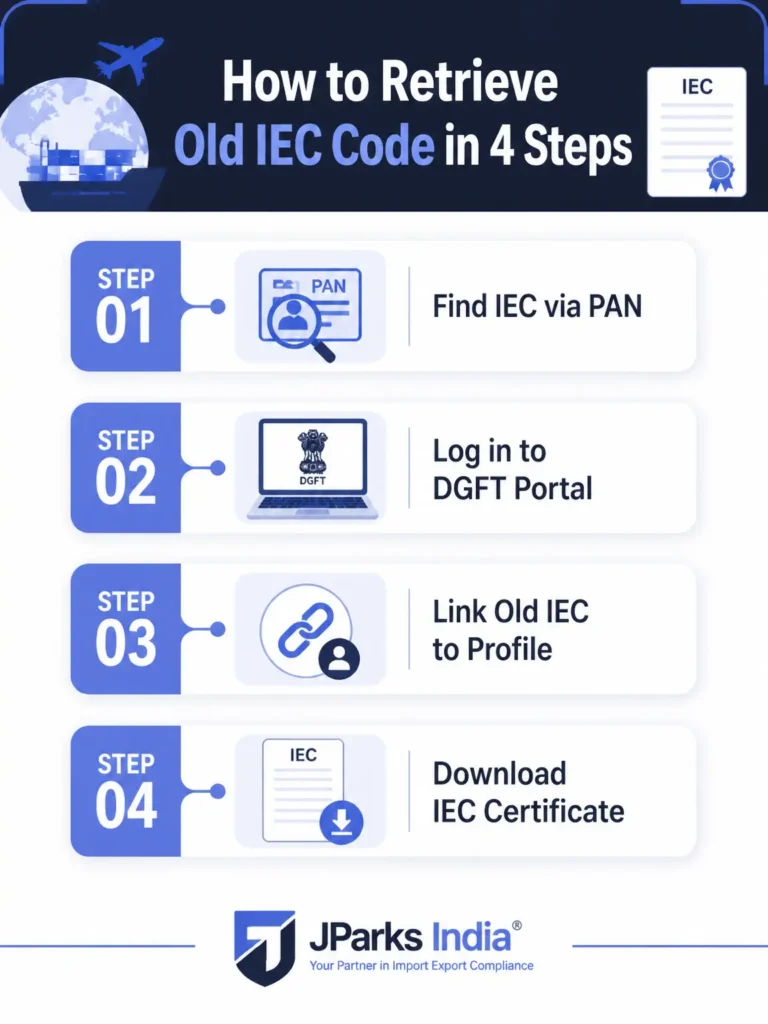
Step 1: Find Your IEC Number Using PAN.
Your IEC number is the same as your PAN. If you remember your PAN, you already know your IEC number. To confirm it officially, visit dgft.gov.in, go to Services, then IEC Profile Management, then Know Your IEC. Enter your PAN and the portal will display the IEC registered against it instantly. No login is required for this step.
Step 2: Log In to the DGFT Portal.
Go to DGFT portal and log in using your registered email ID or mobile number. If you have never logged in before, click Register, enter your PAN, and create a new account. DGFT will automatically detect and display any IEC already linked to that PAN.
Step 3: Link Your Old IEC to Your Profile.
If your IEC does not appear automatically after login, click the Link IEC button on your dashboard. Enter your 10-digit IEC number, verify with your PAN details, and authenticate using Aadhaar OTP or DSC. Once linked, your full IEC profile becomes accessible immediately.
Step 4: Print or Download Your IEC Certificate.
Once your IEC is visible in your profile, go to the Print IEC section. Download a digitally signed copy of your IEC certificate in PDF format. This copy is accepted at customs, banks, and ICEGATE as a fully valid official document. The updated certificate also includes a QR code for instant online verification.
How to Find IEC Code by PAN Number?
Since 2021, the IEC and PAN are the same 10-digit number for all new registrations. For older IECs, you can still search by PAN using the Know Your IEC tool on the DGFT portal. Go to Services, then IEC Profile Management, then Know Your IEC. Enter your PAN and the linked IEC will appear on screen immediately.
How to Search IEC Code by Company Name?
The DGFT portal does not support direct IEC search by company name. PAN is the only accepted search parameter on the portal. If you do not have your PAN handy, check your old bank documents, AD Code registration letter, shipping bills, or customs bills of entry. Your IEC number is printed on all of these documents.
How to Get a Copy of Your IEC Certificate?
Log in to the DGFT portal with your registered credentials. Navigate to Services, then IEC Profile Management, then Print IEC. Your current certificate showing firm name, address, IEC number, date of issue, branch details, and QR code is available for immediate download. There is no fee for downloading an IEC copy.
Special Cases: What to Do When You Cannot Recover Your IEC.
If Your Registered Mobile Number or Email Is No Longer Active.
This is the most common problem people face during IEC recovery. Raise a grievance through the DGFT Helpdesk at dgft.gov.in or email [email protected] with proof of identity and business ownership documents. DGFT will update your contact details manually so you can complete OTP verification and proceed with recovery.
If Your IEC Was Issued Before the DGFT Went Online.
Log in to the DGFT portal, go to IEC Profile Management, and click Modify IEC. Submit your PAN card, Aadhaar card, and current address proof to update and activate your IEC online. Once the update is processed, your certificate is immediately available for download at no charge.
If Your IEC Is Deactivated Due to Non-Renewal.
A deactivated IEC means the mandatory annual update was not filed between April and June. You can reactivate it by completing the renewal on the DGFT portal. Retrieval of your IEC number is still possible, but trading cannot resume until the IEC is active again. Read our detailed guide on IEC Renewal to complete this step.
If Your IEC Is Cancelled.
A cancelled IEC requires a separate revocation request on the DGFT portal. You can still retrieve the IEC number for reference purposes, but it cannot be used for import or export transactions until the cancellation is formally revoked. Contact the DGFT Helpdesk or speak to a trade compliance expert for assistance with this process.
Documents Required to Retrieve an Old IEC Code.
In most cases you only need two things: your PAN number and access to the mobile number or email ID registered with DGFT to receive the OTP. For pre-digital IECs or cases where contact details are inactive, you may additionally need your PAN card, Aadhaar card, and current address proof. No physical documents need to be couriered or submitted offline.
IEC Retrieval vs IEC Renewal: What Is the Difference?
Aspect
IEC Retrieval
IEC Renewal (Annual Update)
Purpose
To locate your IEC number and download the IEC certificate
To keep the IEC active by completing the mandatory annual update
When Required
Whenever you need to access or verify your IEC details
Every year between April 1 and June 30
Action Involved
Retrieve and download the IEC certificate from the DGFT portal
Submit the annual confirmation or update details on the DGFT portal
Government Fee
No fee
₹0 if completed within the due period (unless changes require additional charges)
Effect on IEC Status
Does not change the status of the IEC
Keeps the IEC active for import and export activities
If IEC Is Deactivated
Retrieval only shows the current status
Renewal/reactivation is required before using the IEC for shipments
Outcome
Access to IEC details and certificate
Active IEC eligible for customs clearance and trade transactions
Many importers and exporters search for how to retrieve old IEC code when they switch banks, change their registered mobile number, or prepare for a new shipment after years of inactivity. The process is entirely online and free through the DGFT portal. Whether you are learning how to retrieve old IEC code for customs submission, bank AD Code update, or ICEGATE login, the steps remain the same: confirm your PAN, log in to DGFT, link your IEC if needed, and download the certificate from the Print IEC section.
Frequently Asked Questions.
Q1. Can I retrieve my IEC code for free?
Yes. Using the Know Your IEC tool and downloading your IEC certificate from the DGFT portal are both completely free. No government fee applies for retrieval or printing of your IEC.
Q2. How do I print my IEC certificate online?
Log in to dgft.gov.in, go to Services, then IEC Profile Management, then Print IEC. Your certificate is generated instantly and can be saved as a PDF. This downloaded copy is valid for all official purposes including customs, banking, and ICEGATE registration.
Q3. I forgot my IEC code completely. What should I do?
Your IEC is the same as your PAN. Use the Know Your IEC tool on the DGFT portal to confirm it by entering your PAN. If you do not remember your PAN either, check old bank documents, shipping bills, or any customs paperwork where both numbers are printed.
Q4. How do I check if my IEC is still active?
Log in to dgft.gov.in and go to IEC Profile Management. Your current IEC status, whether active, deactivated, or cancelled, is displayed in your dashboard. If it shows deactivated, file the annual renewal immediately to restore it.
Q5. Is the downloaded IEC certificate valid without a physical stamp?
Yes. The digitally signed certificate downloaded from the DGFT portal is fully valid for customs clearance, AD Code registration, ICEGATE registration, and bank submissions. No physical stamp or attestation is required.
Q6. What is the difference between IEC code and IEC certificate?
The IEC code is your 10-digit Importer Exporter Code number, which is the same as your PAN. The IEC certificate is the official document issued by DGFT certifying your registration as an importer or exporter. Both are needed for trade operations and both can be retrieved from the DGFT portal at any time.
Q7. Can I use my old IEC for a new export shipment?
Yes, provided the IEC is active and linked to your DGFT profile. If the IEC was issued before 2021 and has not been linked online yet, complete the linking process first. If it is deactivated due to missed renewal, file the IEC renewal before attempting any shipment.
Tell us where you are stuck. We usually reply the same business day.
5.0 ★ · 123 Google reviews · Since 1990
Posted on Google
Vandana Bajaj
Trustindex verifies that the original source of the review is Google.
Very prompt and reliable service by Rahul Kolge and his team. Exceptional and happy experience.
Posted on Google
Supriya Shetye
Trustindex verifies that the original source of the review is Google.
Had a really good experience with JParks India. Rahul sir helped me a lot with my import work and were always active and responsive. Whatever documents or guidance was needed, they handled everything smoothly and explained things clearly. Felt stress-free throughout the process. Very helpful team, definitely recommend them if you’re doing import or export.
Posted on Google
dipali sakpal
Trustindex verifies that the original source of the review is Google.
Very nice people, get the work done in a very short time.
Posted on Google
Satish Bajaj
Trustindex verifies that the original source of the review is Google.
Excellent & Prompt services in all Import Export matters.
Great to work with you
Posted on Google
Bajaj VCPL
Trustindex verifies that the original source of the review is Google.
It was a great experience having work with you.
Posted on Google
Satish Bajaj
Trustindex verifies that the original source of the review is Google.
"Outstanding professiona services, efficient, and gets things done incredibly fast. Highly recommended for anyone needing reliable and prompt assistance
Posted on Google
Nishat fatima
Trustindex verifies that the original source of the review is Google.
excellent service
Posted on Google
farhan sayed
Trustindex verifies that the original source of the review is Google.
JParks Team is Super helpful! Thanks to Rahul and team!
Posted on Google
Sadik Inamdar
Trustindex verifies that the original source of the review is Google.
Good and personal service for import export code
Posted on Google
Maheshwar
Trustindex verifies that the original source of the review is Google.
Had a really good experience with JParks India. Rahul sir helped me a lot with my import work and were always active and responsive. Whatever documents or guidance was needed, they handled everything smoothly and explained things clearly. Felt stress-free throughout the process. Very helpful team, definitely recommend them if you’re doing import or export.
Verified by Trustindex
Trustindex verified badge is the Universal Symbol of Trust. Only the greatest companies can get the verified badge who has a review score above 4.5, based on customer reviews over the past 12 months. Read more
We use cookies to run this site, measure traffic, and track our ads. Essential cookies are always on. Accept all, reject non-essential, or set your preferences.
Cookie Preferences
Manage your cookie preferences below:
Essential cookies enable basic functions and are necessary for the proper function of the website.
Name
Description
Duration
Cookie Preferences
This cookie is used to store the user's cookie consent preferences.
30 days
Google reCAPTCHA helps protect websites from spam and abuse by verifying user interactions through challenges.
Name
Description
Duration
_GRECAPTCHA
Google reCAPTCHA sets a necessary cookie (_GRECAPTCHA) when executed for the purpose of providing its risk analysis.
179 days
Google Tag Manager simplifies the management of marketing tags on your website without code changes.
Name
Description
Duration
cookiePreferences
Registers cookie preferences of a user
2 years
td
Registers statistical data on users' behaviour on the website. Used for internal analytics by the website operator.
session
Statistics cookies collect information anonymously. This information helps us understand how visitors use our website.
Google Analytics is a web analytics service that tracks and reports website traffic. It collects anonymized data on how visitors use the site to help us understand and improve performance.