ICEGATE Mail Login: Who Can Use It and What Traders Need Instead
Looking for the ICEGATE trade portal? Importers, exporters and Customs Brokers do not use webmail. Use our ICEGATE login guide instead.
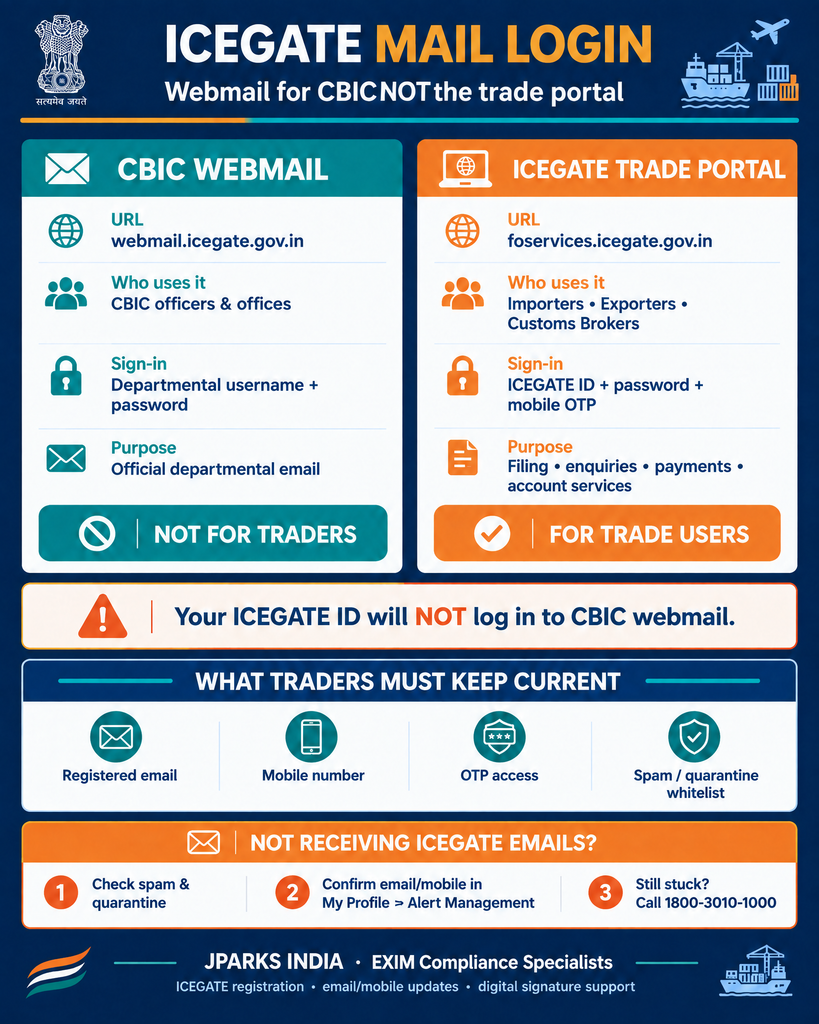
ICEGATE mail login is the sign-in to CBIC webmail at webmail.icegate.gov.in, the departmental email system of the Central Board of Indirect Taxes and Customs. It is for officers and offices that hold an @icegate.gov.in mailbox. Traders cannot get an ICEGATE mailbox, and the webmail page will not accept an ICEGATE ID used for the trade portal.
This guide explains who uses ICEGATE webmail, what trade users rely on instead, how to update the email ICEGATE uses to reach you, and what to do when ICEGATE emails stop arriving.
What Is ICEGATE Mail Login?
Open webmail.icegate.gov.in and you reach a page titled CBIC Webmail. It welcomes @icegate.gov.in users, asks for an ICEGATE username and password, and offers a Forgot Password link. This is an email service for the department, not a place to file Bills of Entry, Shipping Bills or payments.
The name causes confusion because “ICEGATE” is also the name of the trade portal. The two share a brand but have separate addresses, users and credentials.
Who Gets an @icegate.gov.in Mailbox
CBIC officers and customs formations that are issued official mailboxes.
ICEGATE’s own support functions, such as the helpdesk address [email protected].
Importers, exporters, Customs Brokers, shipping lines and freight forwarders are not issued ICEGATE webmail. If someone offers to create an @icegate.gov.in address for your business, treat it as a scam.
What Trade Users Have Instead of ICEGATE Webmail
Trade users work through the ICEGATE 2.0 portal. You log in at foservices.icegate.gov.in with your ICEGATE ID, password and mobile OTP, and ICEGATE contacts you on the email and mobile registered to that account. Our new ICEGATE login guide walks through the steps, the OTP rules and password reset.
Queries and clearance messages that affect Out of Charge.
How to Update Your Registered Email on ICEGATE
If you can still log in: log in to the ICEGATE portal and update your contact details from your profile on the dashboard. The same area, My Profile then Alert Management, lets you turn on email OTP.
If you cannot log in because the old email or mobile is gone: use Forgot Email/Mobile? on the ICEGATE login page.
Use a shared business address that survives staff changes, not a personal inbox.
Not Receiving ICEGATE Emails
Check spam and quarantine folders, and whitelist the icegate.gov.in domain with your IT team.
Confirm the registered address in your ICEGATE profile. It is often a former employee’s inbox.
Check the mobile number too, since the login OTP always goes to mobile.
Two things to remember. ICEGATE mail login at webmail.icegate.gov.in is departmental email for CBIC, not the trade portal. Traders log in at foservices.icegate.gov.in and receive ICEGATE messages on the email and mobile registered to their account.
JPARKS INDIA handles ICEGATE work, backed by S.K. Agency, AEO-LO customs brokers since 1990. We register ICEGATE accounts, update lost email and mobile details, and map digital signatures through our DGFT digital signature service, so ICEGATE alerts reach the right inbox.
Missing ICEGATE emails or locked out? Reach us through our contact page.
It is the sign-in to CBIC webmail at webmail.icegate.gov.in, used by holders of @icegate.gov.in mailboxes.
Q2. Can importers or exporters get an @icegate.gov.in email?
No. ICEGATE webmail is departmental. Traders use their own business email, registered on their ICEGATE portal account.
Q3. Can I log in to webmail with my ICEGATE ID?
No. The trade ICEGATE ID works only on the portal login at foservices.icegate.gov.in.
Q4. Where do I log in to file on ICEGATE?
At foservices.icegate.gov.in/#/login with User Type set to ICEGATE User. Our ICEGATE login guide has the steps.
Q5. How do I change the email ICEGATE sends alerts to?
Update it from your profile after logging in, or use Forgot Email/Mobile? on the login page if you cannot log in.
Q6. Why am I not getting ICEGATE emails?
Usually the registered address is outdated or the messages are going to spam. Check your profile and your email filters first.
Need this handled for you?
Tell us where you are stuck. We usually reply the same business day.
5.0 ★ · 123 Google reviews · Since 1990
Posted on Google
Vandana Bajaj
Trustindex verifies that the original source of the review is Google.
Very prompt and reliable service by Rahul Kolge and his team. Exceptional and happy experience.
Posted on Google
Supriya Shetye
Trustindex verifies that the original source of the review is Google.
Had a really good experience with JParks India. Rahul sir helped me a lot with my import work and were always active and responsive. Whatever documents or guidance was needed, they handled everything smoothly and explained things clearly. Felt stress-free throughout the process. Very helpful team, definitely recommend them if you’re doing import or export.
Posted on Google
dipali sakpal
Trustindex verifies that the original source of the review is Google.
Very nice people, get the work done in a very short time.
Posted on Google
Satish Bajaj
Trustindex verifies that the original source of the review is Google.
Excellent & Prompt services in all Import Export matters.
Great to work with you
Posted on Google
Bajaj VCPL
Trustindex verifies that the original source of the review is Google.
It was a great experience having work with you.
Posted on Google
Satish Bajaj
Trustindex verifies that the original source of the review is Google.
"Outstanding professiona services, efficient, and gets things done incredibly fast. Highly recommended for anyone needing reliable and prompt assistance
Posted on Google
Nishat fatima
Trustindex verifies that the original source of the review is Google.
excellent service
Posted on Google
farhan sayed
Trustindex verifies that the original source of the review is Google.
JParks Team is Super helpful! Thanks to Rahul and team!
Posted on Google
Sadik Inamdar
Trustindex verifies that the original source of the review is Google.
Good and personal service for import export code
Posted on Google
Maheshwar
Trustindex verifies that the original source of the review is Google.
Had a really good experience with JParks India. Rahul sir helped me a lot with my import work and were always active and responsive. Whatever documents or guidance was needed, they handled everything smoothly and explained things clearly. Felt stress-free throughout the process. Very helpful team, definitely recommend them if you’re doing import or export.
Verified by Trustindex
Trustindex verified badge is the Universal Symbol of Trust. Only the greatest companies can get the verified badge who has a review score above 4.5, based on customer reviews over the past 12 months. Read more
We use cookies to run this site, measure traffic, and track our ads. Essential cookies are always on. Accept all, reject non-essential, or set your preferences.
Cookie Preferences
Manage your cookie preferences below:
Essential cookies enable basic functions and are necessary for the proper function of the website.
Name
Description
Duration
Cookie Preferences
This cookie is used to store the user's cookie consent preferences.
30 days
Google reCAPTCHA helps protect websites from spam and abuse by verifying user interactions through challenges.
Name
Description
Duration
_GRECAPTCHA
Google reCAPTCHA sets a necessary cookie (_GRECAPTCHA) when executed for the purpose of providing its risk analysis.
179 days
Google Tag Manager simplifies the management of marketing tags on your website without code changes.
Name
Description
Duration
cookiePreferences
Registers cookie preferences of a user
2 years
td
Registers statistical data on users' behaviour on the website. Used for internal analytics by the website operator.
session
Statistics cookies collect information anonymously. This information helps us understand how visitors use our website.
Google Analytics is a web analytics service that tracks and reports website traffic. It collects anonymized data on how visitors use the site to help us understand and improve performance.