ICEGATE 2.0: What Changed on India’s Customs Portal and How to Use It
ICEGATE 2.0 is the current version of the Indian Customs National Trade Portal, run by the Central Board of Indirect Taxes and Customs. The header on icegate.gov.in says so in as many words: Indian Customs National Trade Portal 2.0. It is where importers, exporters, Customs Brokers, shipping lines and custodians file documents, pay duty and check the status of everything in between.
The rebuild moved things. Enquiries that used to sit on their own pages are now inside Public Enquiries 2.0, the login carries two-factor authentication, and what you see after signing in depends on your role. This guide maps ICEGATE 2.0: what you can do without an account, what needs one, and where each service now sits.
ICEGATE is the electronic gateway between the trade and Indian Customs. Every Bill of Entry, Shipping Bill, manifest, duty payment and licence message passes through it on the way to the customs system, ICES, and to the partner agencies that clear regulated goods.
ICEGATE 2.0 is the rebuilt ICEGATE portal that replaced the older site. Same job, different building: a single sign-in page, a role-based dashboard, consolidated enquiries and a services menu split into Registration, Electronic Filing, E-Payment, Enquiry and Others.
The version number matters for a practical reason. Guides, bookmarks and internal SOPs written for the old portal send people to pages that no longer exist, which is why so many users conclude a document is missing when it is simply being looked for in the wrong place.
What Changed From the Old ICEGATE
Area
Old portal
ICEGATE 2.0
Enquiries
Separate pages per enquiry, linked from all over the site
Consolidated into Public Enquiries 2.0 under Services, then Enquiry
Login
ID and password
One login page with a user type, plus an OTP to the registered mobile
After login
Menu-driven
A dashboard of widgets that changes with your role
Old address
old.icegate.gov.in
No longer reachable for day-to-day work
Documentation
Scattered
Manuals published per module, dated and versioned
Our guide to the ICEGATE old website covers what happened to the previous site and which references you can safely retire.
What ICEGATE 2.0 Does Without a Login
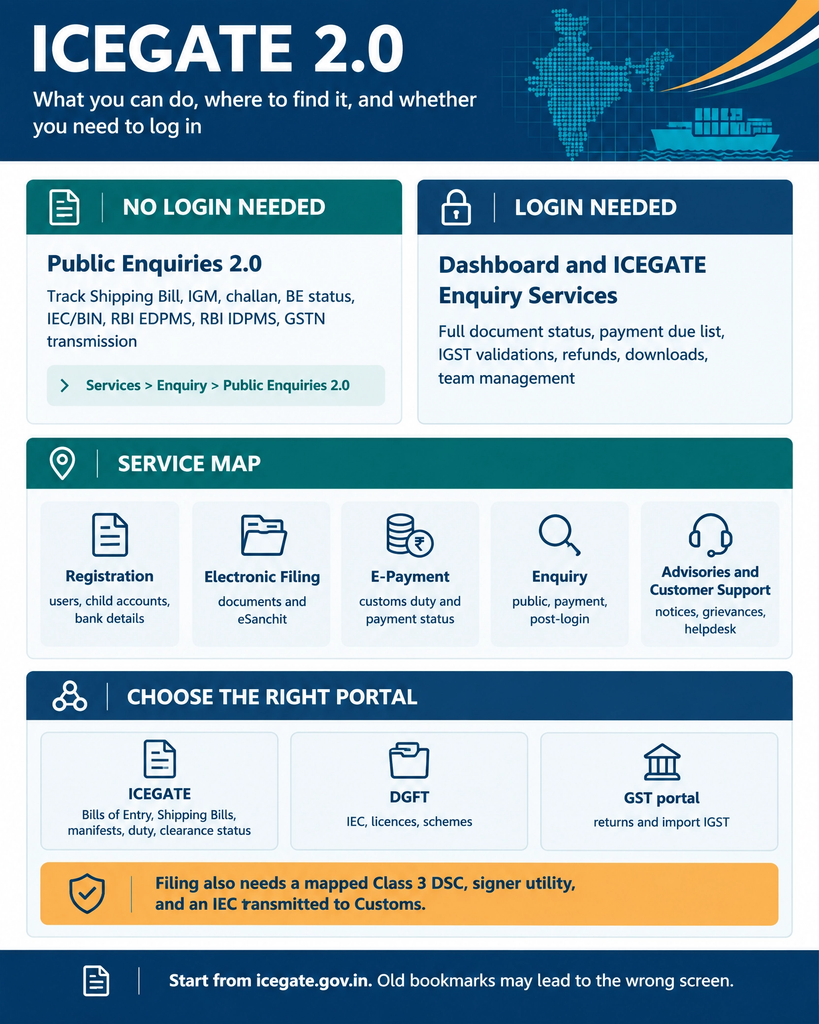
This is the part most people underuse. Public Enquiries 2.0 is open to anyone, with no account, no digital signature and no charge. Open Services, then Enquiry, then Public Enquiries 2.0, and you get tiles for:
Document Status, covering Shipping Bill, Manual, Courier and Postal Shipping Bill, Air Consol, ICD BL Status, Air-IGM, SAM/IGM Enquiry, New SAM/IGM Enquiry, Custom Transit Declaration and Other Govt Agencies.
Challan Enquiry for duty payments.
SB in RBI EDPMS for exports and Status of BE in RBI IDPMS for imports.
Status of BE Transmission to GSTN, which matters when import IGST is missing from your GST records.
VCN Enquiry, Warehouse Code Enquiry and Track Postal Item Enquiry.
Signing in adds the things tied to your own documents and money:
ICEGATE Enquiry Services from the Services widget, including Job Status, Payment Due BE’s List, IGST Validations and Drawback enquiries.
Dashboard widgets for challans generated, licences, bonds and bank guarantees, drawback, IGST refund, foreign remittances and the count of Bills of Entry and Shipping Bills at each stage.
Document downloads, such as the signed assessed copy of a shipping bill.
Team management and linking your Customs Broker.
The sign-in itself, the OTP rules and the common errors are covered in our ICEGATE login guide. Filing and signing also need a valid Class 3 certificate mapped to the account, which is where our ICEGATE PKI guide comes in.
Where Each Service Sits Now
Menu
What lives there
Registration
New user registration, linking child users, bank account management
Electronic Filing
Document filing routes and webforms
E-Payment
Customs duty payment and payment status
Enquiry
Payment Status, Post Login Enquiries and Public Enquiries 2.0
Advisories
Module notices for SCMTR, SWIFT, SEZ, IGCR, Warehouse, Webforms and API integration
Customer Support
Lodge grievances, track a filing, the 24×7 helpdesk on 1800-3010-1000
ICEGATE Portal, DGFT and GST: Which One Do You Need?
Half the time lost on the ICEGATE portal is spent on the wrong portal entirely. Three systems touch an import or export file, and each owns a different question.
Portal
Run by
What it owns
ICEGATE
CBIC, Indian Customs
Bills of Entry, Shipping Bills, manifests, duty payment, customs clearance status
DGFT
Directorate General of Foreign Trade
The IEC itself, licences, schemes and status holder recognition
GST portal
GSTN
Returns, and the import IGST that flows in from customs data
A worked example: your IEC is issued by DGFT, transmitted to customs, and only then usable for filing on the ICEGATE portal. If the code is active on DGFT but filings still fail, the break is in that transmission, not in the portal. Our guides to checking an IEC and ICEGATE ID vs IEC cover both ends of it.
Import IGST works the same way. Customs sends the Bill of Entry data to GSTN, and if that transmission has not happened, the credit will not appear in your GST records however correct the filing was.
What Still Trips People Up
Old bookmarks. Links saved from the previous portal fail or land on the wrong screen. Start from icegate.gov.in each time.
Guides written for the old site. If a walkthrough has no Enquiry step between Services and Public Enquiries, it predates ICEGATE 2.0.
Login is not filing permission. A successful sign-in still leaves filing blocked without a mapped Class 3 DSC and the signer utility running.
An IEC that never reached customs. A code active on DGFT can still be missing at ICEGATE. Check it with our view IEC guide.
The wrong user type. Trade users must pick ICEGATE User, not Officers Only.
Role limits. Some enquiries are open only to importers, Customs Brokers, airlines or shipping lines, so a colleague’s screen may not match yours.
How JPARKS INDIA Helps With ICEGATE 2.0
Three things to carry away. Most tracking on ICEGATE 2.0 is free and needs no account, through Public Enquiries 2.0. Your own documents, duty and refunds sit behind the login and a role-based dashboard. And nothing files until the account, the DSC and the IEC at customs all line up.
JPARKS INDIA works on ICEGATE, backed by S.K. Agency, AEO-LO customs brokers since 1990. We register accounts, map digital signatures, link Customs Brokers, and chase filings that stall on the portal so shipments keep moving.
Stuck on ICEGATE 2.0? Tell us the screen and the error through our contact page.
It is the current version of the Indian Customs National Trade Portal run by CBIC, used by the trade for filing, duty payment and status enquiries.
Q2. Is ICEGATE 2.0 a different website?
No. It is the same address, icegate.gov.in, rebuilt. The old portal address is no longer used for day-to-day work.
Q3. Do I need an account to track a shipment on ICEGATE 2.0?
No. Public Enquiries 2.0 covers shipping bill, IGM, challan and several other checks with no login.
Q4. Where did the old enquiry pages go?
Into Public Enquiries 2.0, under Services, then Enquiry. That extra Enquiry step is why older guides look wrong.
Q5. Why does my dashboard look different from my colleague’s?
The dashboard is role-based, so an importer, a Customs Broker and a shipping line each see a different set of widgets.
Q6. Is the ICEGATE portal free to use?
Yes. Registration and enquiries cost nothing. You pay customs duty and any bank charges, not portal fees.
Q7. Can I still use my old ICEGATE bookmarks?
Not reliably. Save the new paths instead, starting from icegate.gov.in.
Q8. Who do I contact when the portal fails?
The ICEGATE helpdesk on 1800-3010-1000. Our helpdesk guide explains what details to send.
Need this handled for you?
Tell us where you are stuck. We usually reply the same business day.
5.0 ★ · 123 Google reviews · Since 1990
Posted on Google
Vandana Bajaj
Trustindex verifies that the original source of the review is Google.
Very prompt and reliable service by Rahul Kolge and his team. Exceptional and happy experience.
Posted on Google
Supriya Shetye
Trustindex verifies that the original source of the review is Google.
Had a really good experience with JParks India. Rahul sir helped me a lot with my import work and were always active and responsive. Whatever documents or guidance was needed, they handled everything smoothly and explained things clearly. Felt stress-free throughout the process. Very helpful team, definitely recommend them if you’re doing import or export.
Posted on Google
dipali sakpal
Trustindex verifies that the original source of the review is Google.
Very nice people, get the work done in a very short time.
Posted on Google
Satish Bajaj
Trustindex verifies that the original source of the review is Google.
Excellent & Prompt services in all Import Export matters.
Great to work with you
Posted on Google
Bajaj VCPL
Trustindex verifies that the original source of the review is Google.
It was a great experience having work with you.
Posted on Google
Satish Bajaj
Trustindex verifies that the original source of the review is Google.
"Outstanding professiona services, efficient, and gets things done incredibly fast. Highly recommended for anyone needing reliable and prompt assistance
Posted on Google
Nishat fatima
Trustindex verifies that the original source of the review is Google.
excellent service
Posted on Google
farhan sayed
Trustindex verifies that the original source of the review is Google.
JParks Team is Super helpful! Thanks to Rahul and team!
Posted on Google
Sadik Inamdar
Trustindex verifies that the original source of the review is Google.
Good and personal service for import export code
Posted on Google
Maheshwar
Trustindex verifies that the original source of the review is Google.
Had a really good experience with JParks India. Rahul sir helped me a lot with my import work and were always active and responsive. Whatever documents or guidance was needed, they handled everything smoothly and explained things clearly. Felt stress-free throughout the process. Very helpful team, definitely recommend them if you’re doing import or export.
Verified by Trustindex
Trustindex verified badge is the Universal Symbol of Trust. Only the greatest companies can get the verified badge who has a review score above 4.5, based on customer reviews over the past 12 months. Read more
We use cookies to run this site, measure traffic, and track our ads. Essential cookies are always on. Accept all, reject non-essential, or set your preferences.
Cookie Preferences
Manage your cookie preferences below:
Essential cookies enable basic functions and are necessary for the proper function of the website.
Name
Description
Duration
Cookie Preferences
This cookie is used to store the user's cookie consent preferences.
30 days
Google reCAPTCHA helps protect websites from spam and abuse by verifying user interactions through challenges.
Name
Description
Duration
_GRECAPTCHA
Google reCAPTCHA sets a necessary cookie (_GRECAPTCHA) when executed for the purpose of providing its risk analysis.
179 days
Google Tag Manager simplifies the management of marketing tags on your website without code changes.
Name
Description
Duration
cookiePreferences
Registers cookie preferences of a user
2 years
td
Registers statistical data on users' behaviour on the website. Used for internal analytics by the website operator.
session
Statistics cookies collect information anonymously. This information helps us understand how visitors use our website.
Google Analytics is a web analytics service that tracks and reports website traffic. It collects anonymized data on how visitors use the site to help us understand and improve performance.