IGST Refund Status: How to Check It and Fix a Stuck Refund
Table of Contents
IGST refund status is checked in two places. The GST portal shows whether the export invoices in your GSTR-1 were transmitted to customs. ICEGATE shows whether customs validated each shipping bill against those invoices, put it in a refund scroll and sent it to PFMS for payment into the bank account you registered with customs. Start on the GST portal: if an invoice never left it, ICEGATE has nothing to show.
JPARKS INDIA’s IGST refund support is priced on enquiry: send us the shipping bill numbers, ports and return periods and we send a quote. We are not a customs broker. We read the status and the response codes, tell you who has to act on each shipping bill, and follow the case up.
What you want to know
Where to check
What you need
Were my invoices sent to customs?
GST portal: Services, Refunds, Track status of invoice data to be shared with ICEGATE
GST login, financial year and month
Why were they not sent?
Same screen: invoice level errors and View Export Ledger
GST login
Did customs validate each shipping bill?
ICEGATE: IGST Validations Enquiry
ICEGATE login, return month and year, GSTIN, location
Has a refund scroll been sanctioned?
ICEGATE: IGST Scroll Sanctioned Status
ICEGATE login, location, a date range of 7 days or less
Is my refund account accepted by PFMS?
ICEGATE: Bank Account Management, Refund/Incentive account
ICEGATE login
Has the carrier filed the EGM?
ICEGATE public enquiry: Document Status, Shipping Bill (no login)
Location, shipping bill number and date
How the IGST refund on exports works
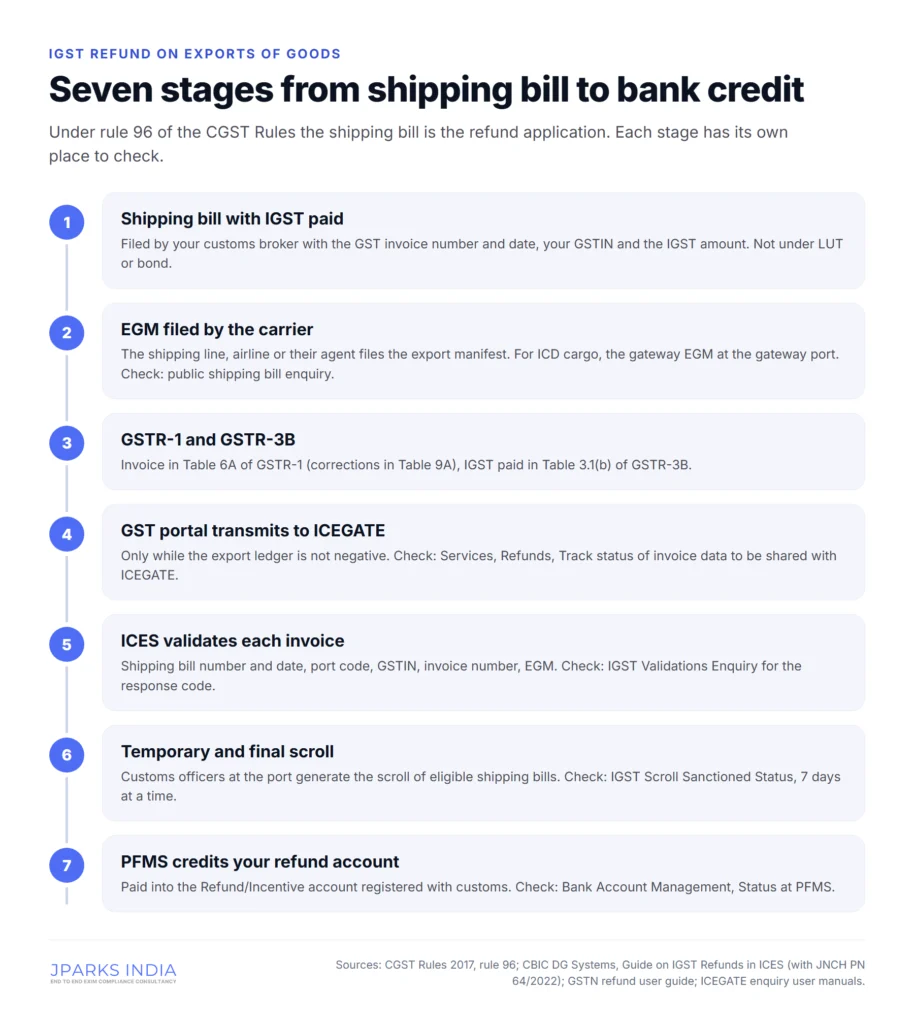
Under rule 96 of the CGST Rules, 2017, the shipping bill you file for goods exported with payment of IGST is itself the refund application. There is no separate refund form for goods. The application counts as filed only when:
the person in charge of the conveyance (the shipping line, airline or their agent) has filed the export manifest or export report covering your shipping bill;
you have furnished a valid return in FORM GSTR-3B;
you have completed Aadhaar authentication under rule 10B.
If the shipping bill and your GSTR-1 (as amended in GSTR-1A) do not match, the application is treated as filed on the date you correct the mismatch. After that, the systems do the work:
You report each export invoice in Table 6A of GSTR-1 (corrections go in Table 9A) and pay the IGST in Table 3.1(b) of GSTR-3B.
The GST portal transmits the invoice details to ICEGATE, but only if your export ledger is not negative.
ICES, the customs system, matches each invoice with the shipping bill: shipping bill number and date, port code, GSTIN, invoice number, and whether the EGM has been filed. Each invoice gets a response code.
Customs officers at the port put validated shipping bills in a temporary IGST scroll and then a final scroll.
The final scroll goes to PFMS (Public Financial Management System), which pays the refund into the bank account registered with customs for your IEC.
Exported services are different: their IGST refund is claimed in FORM GST RFD-01 under rule 96(9). So is extra IGST paid when you raise the price after export on goods whose original IGST was already refunded (proviso to rule 96(1), inserted in July 2024).
Which exports get an IGST refund
Only goods exported with payment of IGST. An export under bond or LUT pays no IGST, so customs has nothing to refund. For those exports the route is a refund of unutilised input tax credit under rule 89(4), filed in RFD-01 on the GST portal.
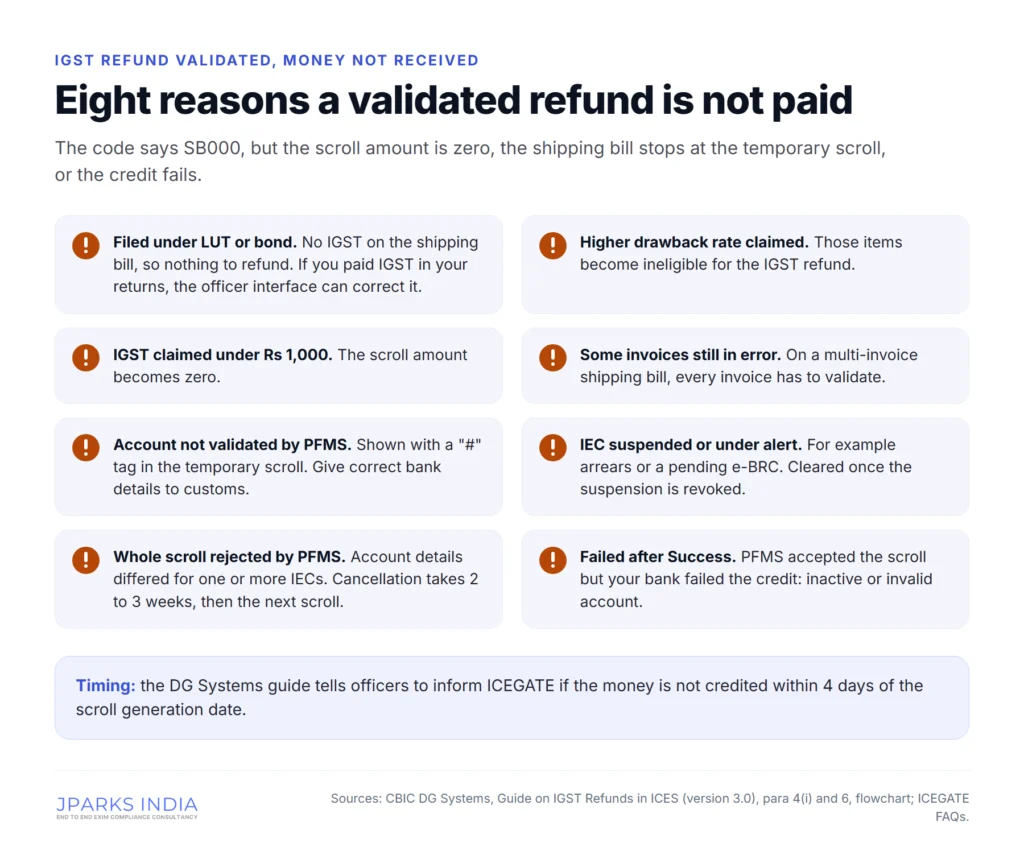
Even with IGST paid, the CBIC Directorate General of Systems guide on IGST refunds lists cases where a validated shipping bill gets a scroll amount of zero:
the shipping bill was filed under LUT or bond, or with zero IGST, although you paid the IGST in your returns (the customs officer can correct this through the officer interface);
the higher rate of duty drawback was claimed on the shipping bill, which makes those items ineligible for the IGST refund;
the IGST claimed is less than Rs 1,000;
only some of the invoices on a multi-invoice shipping bill are validated, and the others are stuck on an error.
Rule 96(10) no longer applies
Rule 96(10) used to bar the IGST refund where your inputs were bought under the deemed export notification 48/2017-Central Tax, or imported without IGST under Notification 78/2017-Customs or 79/2017-Customs. Notification 20/2024-Central Tax of 8 October 2024 omitted the sub-rule. For earlier exports, CBIC Circular 233/27/2024-GST (10 September 2024) says the refund is not treated as a contravention where the IGST and cess on those imported inputs was later paid with interest and the Bill of Entry was reassessed.
Check IGST refund status on the GST portal
This check tells you whether the problem is on the GST side or the customs side. GSTN documents it in its refund user guide.
Log in to the GST portal.
Go to Services, Refunds, Track status of invoice data to be shared with ICEGATE.
Select the financial year and the month. If you file GSTR-1 quarterly, select the last month of the quarter: the result covers the whole quarter.
Click Search. The results show a count of invoices.
Click the figure in the Count column to see invoice level details, including the validation error for each invoice that was not transmitted to ICEGATE.
Use Download Failed Invoices to get the failures as a file you can work through.
The export ledger: why nothing reaches customs
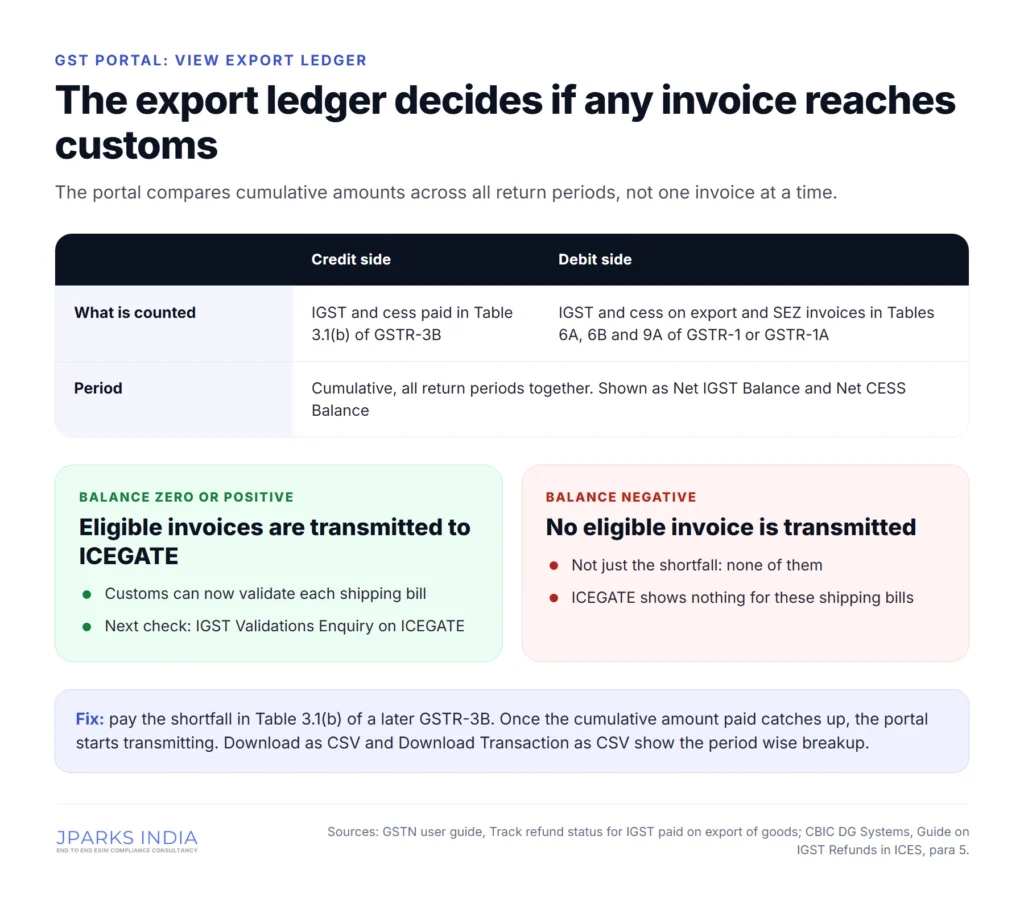
The GST portal does not test invoices one by one. It keeps an export ledger for all periods together. The credit side is the IGST and cess you paid in Table 3.1(b) of GSTR-3B. The debit side is the IGST and cess on your export and SEZ invoices in Tables 6A, 6B and 9A of GSTR-1 or GSTR-1A. Eligible invoices go to ICEGATE only when the cumulative Table 3.1(b) amount is equal to or more than the cumulative invoice amount.
If the balance is negative, GSTN’s guide says the portal will not transmit any eligible invoice to ICEGATE. Not just the shortfall: none of them. Click View Export Ledger on the same screen to see the Net IGST Balance and Net CESS Balance. Download as CSV gives the ledger entries, and Download Transaction as CSV gives the return period wise breakup with the table amounts used.
The fix is in a later GSTR-3B: pay the shortfall in Table 3.1(b). Because the comparison is cumulative, the portal starts transmitting once the total paid catches up. If you paid the export IGST in Table 3.1(a), as if it were a domestic inter-state supply, the DG Systems guide refers that case to CBIC Circular 12/2018-Customs (29 May 2018).
The guide gives two other reasons GSTN does not send the data: GSTR-1 or GSTR-3B has not been filed for that period, or the shipping bill number, date or port code is missing or wrong for the invoice in GSTR-1. File or amend the return. If the returns are correct and the invoices still do not move, write to the GSTN helpdesk.
Check IGST refund status on ICEGATE
Once the invoices have been transmitted, customs has its own enquiries. They sit under Services, Enquiries after you log in as an IEC user (our ICEGATE login guide covers getting in). ICEGATE’s enquiry user manual describes each one.
IGST Validations Enquiry
Select the return month and year, enter the GSTIN and select the location, then search. ICEGATE shows the IGST validation details and the response code against each shipping bill number. That code tells you why a refund has not moved and who has to act.
IGST Scroll Sanctioned Status
This shows the IGST shipping bills sanctioned at a location. The screen fills in your IEC and PAN. Select a date range of not more than 7 days and the location, then search: ICEGATE shows the scroll details for each shipping bill. Because of the 7 day limit, work back a week at a time, at the port where the shipping bill was filed.
GSTIN Enquiry
Open to IEC and customs broker users. Select the GSTIN and the return month and year to see your shipping bills with their GSTIN details. The DG Systems guide suggests looking at these shipping bill details while you prepare GSTR-1, so the shipping bill number, date and port code you report match what customs holds.
Without a login: the shipping bill enquiry
ICEGATE’s public enquiry needs no login. Under Document Status, Shipping Bill, select the location and enter the shipping bill number and date. The result includes the current status, EGM status, IGST invoice details and gateway EGM status. Our shipping bill status guide walks through it.
IGST refund error codes: what each means and who fixes it
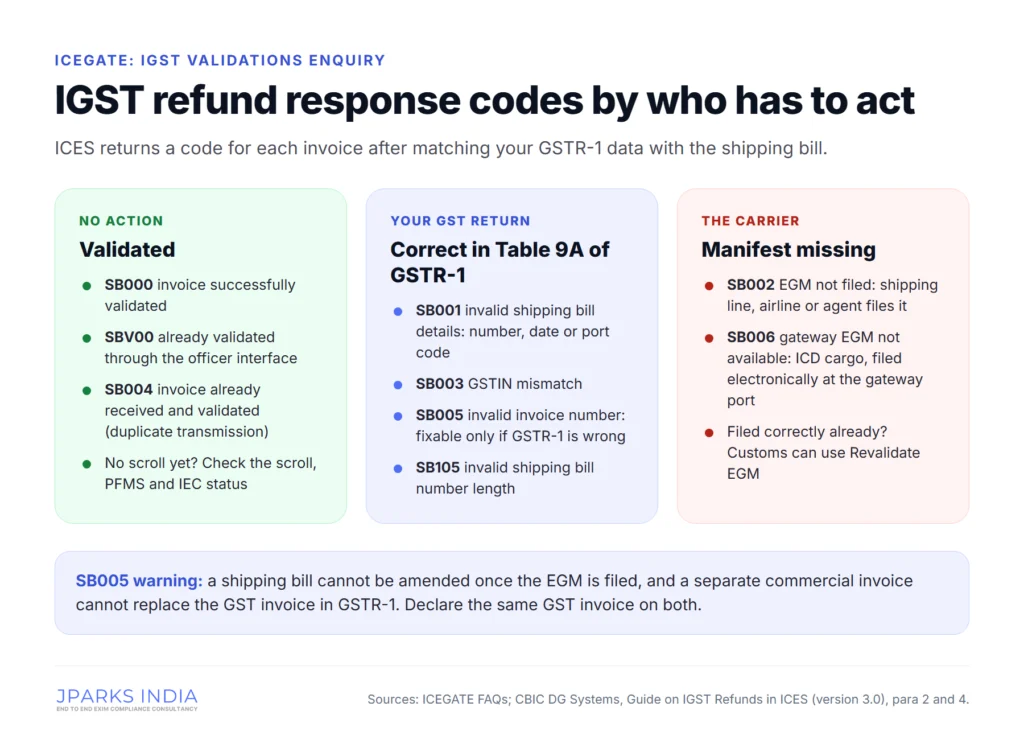
These are the response codes ICES returns when it matches your GSTR-1 data with the shipping bill. The meanings are from ICEGATE’s FAQ and the DG Systems guide.
Code
Meaning
Who acts
Fix
SB000
Invoice successfully validated
Nobody
Wait for the scroll. If none comes, see “Validated but not paid” below
SBV00
Shipping bill already validated, through the officer interface
Nobody
Scroll status shows Ready
SB001
Invalid shipping bill details
You
Correct the shipping bill number, date or port code in Table 9A of GSTR-1
SB002
EGM not filed
The carrier
Ask the shipping line, airline or their agent to file the EGM. If it is filed correctly, the customs EGM officer can use Revalidate EGM
SB003
GSTIN mismatch
You
Amend in Table 9A. If the shipping bill shows your PAN, or another GSTIN on the same PAN, the officer interface can be used
SB004
Invoice already received and validated
Nobody
A duplicate transmission. Check the scroll status
SB005
Invalid invoice number
You
Table 9A only if GSTR-1 is wrong. See the next section
SB006
Gateway EGM not available
The carrier at the gateway port
For ICD exports, the gateway EGM must be filed electronically at the gateway port
SB105
Invalid shipping bill number (not a valid length of 7 for ESB, 6 for MSB or 5 for CRSB, at a non-SEZ port)
You
Correct it in Table 9A of GSTR-1
SB005: the invoice mismatch that rarely fixes itself
The DG Systems guide calls SB005 the most common error. The invoice number on the shipping bill differs from the one in GSTR-1 for the same supply, for one of two reasons: a typing mistake in GSTR-1 or the shipping bill, or two sets of invoices, a GST invoice in the return and a separate commercial invoice on the shipping bill.
A typing mistake in GSTR-1 can be amended in Table 9A. The other cases are harder. A shipping bill cannot be amended once the EGM is filed, and a separate commercial invoice used on the shipping bill cannot go into GSTR-1 in place of your GST invoice. The guide concludes that SB005 largely cannot be corrected by amending either side.
CBIC Circular 05/2018-Customs (23 February 2018) set up an officer interface in which the customs officer could sanction past SB005 cases from a concordance table supplied by the exporter. The guide describes it as a one-time measure for past shipping bills and tells exporters not to repeat the mistake. The fix that works is prevention: give your customs broker the same GST invoice number and date for the shipping bill that you report in GSTR-1.
SB002 and SB006: when the EGM is the problem
No refund moves until the carrier’s manifest is on record. SB002 means the EGM is not filed at the port of export. SB006 appears for ICD exports when the gateway EGM was not filed electronically or is stuck in an error; a manually filed gateway EGM does not count. What to do:
check the EGM status and gateway EGM status in the public shipping bill enquiry;
if they are blank, ask the shipping line whether the EGM was filed, in which EGM your cargo went, and whether it shows your shipping bill correctly;
if the EGM was filed correctly, the customs EGM officer can run Revalidate EGM (Revalidate AWB for air cargo);
if it was not filed or was filed wrongly, the shipping line files a supplementary EGM, which the gateway port officer approves;
for ICD cargo, the train or truck summary has to be filed as soon as the cargo leaves the ICD, and the shipping line has to mention the ICD shipping bill in the gateway EGM.
Some gateway EGM errors are corrected by officers, not the carrier: a wrong gateway port code (error M) or a LEO date after the sailing date (error L) by the Assistant Commissioner (Exports) at the ICD, and container number or count mismatches (errors C and N) by the preventive officer at the gateway port.
Validated but not paid: the IGST scroll and PFMS
The refund is paid by scroll. An officer in the CLK role generates the temporary IGST scroll of eligible shipping bills, and an officer in the AC_DBK role generates the final scroll. Only shipping bills in a temporary scroll can reach the final one. The final scroll goes to PFMS automatically; nothing is sent to the bank separately.
In the temporary scroll but not the final one
Your account is not validated by PFMS. These shipping bills appear with a “#” tag. Give the correct bank account details to the customs location so the account is updated in ICES.
Your IEC is suspended or under an alert at the custom house, for example for arrears or a pending e-BRC. Clear the dues or submit the e-BRC; the shipping bills go into the final scroll once the suspension is revoked.
Scrolled, but no money in the account
PFMS rejected the whole scroll, because the account details it held for one or more IECs differed from the scroll. The location’s system manager writes to the ICEGATE helpdesk; the guide says reconciliation and cancellation can take 2 to 3 weeks, after which the shipping bills go into the next scroll.
PFMS accepted the scroll but your bank failed the credit, because the account is inactive or invalid. PFMS calls these “Failed after Success” cases; ICES Advisory 21/2018 sets the procedure.
The guide tells officers to inform ICEGATE if the money is not credited within 4 days of the scroll generation date. A scroll older than that with no credit is worth raising with the port.
The bank account behind the refund
Rule 96(3) says the refund is credited to the bank account in your registration particulars and as intimated to customs. On ICEGATE that is the Refund/Incentive account under Bank Account Management, also called the Export Promotion account. It is separate from the AD Code account used for foreign remittances.
ICEGATE’s Bank Account Management manual shows each Refund/Incentive account with its location code, bank, IFSC, account number, Status at Customs and Status at PFMS. An account can be modified only when both statuses read Accepted. Two recent changes help:
CBIC Circular 24/2025-Customs (7 October 2025): once the same account and IFSC is approved for your IEC at one customs location, requests for other locations are approved by the system;
ICEGATE advisory of 1 October 2026: for banks integrated with ICEGATE, the account is verified with the bank online, with no document or IRN to upload, and an “All” option selects every customs location in one step.
The advisory lists the usual reasons verification fails: a wrong account number or IFSC, a PAN or IEC that does not match the bank’s records or sits under a different customer ID, outdated KYC, or a dormant, frozen or closed account. When PFMS rejects an account, the DG Systems guide gives the error and the fix:
PFMS code
What it means
Fix
TBE0008
Rejected by bank: account number invalid
Check the account number and submit correct details, once in the day
TBE0010
Bank account details not provided
Submit correct details
TBE0015
Invalid IFSC
Check the IFSC and submit correct details
TBE0016
Rejected by bank: account does not exist
Check the account number and submit correct details
TBE0017
Rejected by bank: account closed
Submit a valid, operative account
TBE0019
Blocked account
Submit another valid account
TBE0021
IFSC does not exist in PFMS
Customs informs DG Systems for rectification
The problem is common. Jawaharlal Nehru Custom House Public Notice 85/2023 reported about 20,000 IECs with PFMS status Rejected, delaying drawback and IGST refunds, and asked exporters to submit their details again through ICEGATE. If you have no Refund/Incentive account yet, see Export Promotion bank account registration.
When the refund is withheld
Rule 96(4) lets the refund be withheld, even with every code clear, in three cases:
the jurisdictional GST Commissioner asks for it under section 54(10) or 54(11) of the CGST Act;
the customs officer finds the goods were exported in violation of the Customs Act, 1962;
the Commissioner in the Board, or an officer it authorises, decides from data analysis and risk parameters that the exporter’s credentials, including its input tax credit, must be verified first.
In the first and third cases the claim is sent through the GST portal to the GST officer as a system-generated RFD-01, which is treated as your refund application and decided under rule 89, and you are told electronically. In the customs case the same happens after the customs officer passes an order. From then on the refund is followed up with the GST officer, not at ICEGATE.
A stuck IGST refund: what to check, in order
The shipping bill was filed with payment of IGST, not under LUT, and the EGM shows as filed in the public shipping bill enquiry.
Table 6A of GSTR-1 carries the exact shipping bill number, date, port code and invoice number.
GSTR-3B is filed with the IGST in Table 3.1(b).
The export ledger is not negative.
The invoices show as transmitted on the GST portal’s tracking screen.
IGST Validations Enquiry shows SB000 (or SBV00 or SB004) for every invoice.
IGST Scroll Sanctioned Status shows the scroll, searched week by week at the right location.
The Refund/Incentive account reads Accepted at Customs and at PFMS for that location.
Your IEC has no suspension or alert at the port.
Where to take it
ICEGATE’s FAQ sets the route: the GSTN helpdesk when records were not transmitted; your shipping line, airline or carrier for SB002 and SB006; the customs field formation with correct bank details when a temporary scroll does not reach the final scroll; ICEGATE or the gateway port customs once you have corrected everything on your side. Any other grievance on an IGST refund goes to the Principal Commissioner or Commissioner of Customs of the gateway port. ICEGATE’s helpdesk is 1800-3010-1000.
What JPARKS INDIA does for a stuck IGST refund
JPARKS INDIA is an EXIM compliance consultancy in Vashi, Navi Mumbai, with 500+ clients and a 5.0 rating from 123 Google reviews. We are not a customs broker: your customs broker files the shipping bill, the carrier files the EGM, and your GST returns are filed from your GST login. We work out where each refund is stuck and get the right party to act:
read the GST portal tracking screen, the export ledger and the ICEGATE response code for every shipping bill;
tell you, shipping bill by shipping bill, whether the fix sits with your GST return, your carrier, your bank or the customs location;
list the Table 9A corrections for whoever files your GSTR-1;
follow up with the shipping line, airline or their agent on missing EGMs and gateway EGMs;
check your Refund/Incentive account at customs and PFMS, and register or correct it;
set up your ICEGATE registration first if you have no login (Rs 3,500 + GST, 2 to 3 working days).
IGST refund support is priced on enquiry. Send the shipping bill numbers, ports and return periods to [email protected] or call +91 91673 79073.
Official references
CBIC, Rule 96 of the CGST Rules, 2017, with amendment notes (including the omission of sub-rule (10) by Notification 20/2024-Central Tax, 8 October 2024)
Jawaharlal Nehru Custom House, Public Notice 85/2023, IECs with PFMS account status Rejected
CBIC Circular 24/2025-Customs (7 October 2025), auto-approval of incentive bank accounts across customs locations
Frequently asked questions
Straight answers, before you even ask
How do I check IGST refund status for exports?
Check two places. On the GST portal, Services, Refunds, Track status of invoice data to be shared with ICEGATE shows whether your GSTR-1 export invoices reached customs. On ICEGATE, IGST Validations Enquiry gives the response code for each shipping bill and IGST Scroll Sanctioned Status shows whether a refund scroll was sanctioned.
How do I check IGST refund status on ICEGATE?
Log in to ICEGATE as an IEC user and open Services, Enquiries. In IGST Validations Enquiry, select the return month and year, enter the GSTIN and select the location to see the response code against each shipping bill. In IGST Scroll Sanctioned Status, select a date range of up to 7 days and the location to see the scroll details.
What is IGST scroll sanctioned status?
It is the ICEGATE enquiry that lists the IGST shipping bills sanctioned in a refund scroll at a customs location. The date range cannot be more than 7 days, so search week by week at the port where the shipping bill was filed.
Do I have to file a refund application for IGST paid on exported goods?
No. Under rule 96 of the CGST Rules, the shipping bill is treated as the refund application once the carrier has filed the export manifest and you have filed a valid GSTR-3B. Exported services are different: their IGST refund is claimed in FORM GST RFD-01.
Why are my export invoices not transmitted to ICEGATE?
Usually because the export ledger on the GST portal is negative: the IGST paid in Table 3.1(b) of GSTR-3B, added up across all periods, is less than the IGST on export invoices in GSTR-1. While it is negative, no eligible invoice is transmitted. Pay the shortfall in Table 3.1(b) of a later GSTR-3B.
What does SB005 mean in IGST refund?
SB005 means invalid invoice number: the invoice number on the shipping bill does not match the one in GSTR-1 for the same supply. A typing mistake in GSTR-1 can be corrected in Table 9A, but a shipping bill cannot be amended once the EGM is filed, so declare the same GST invoice on both.
What do SB002 and SB006 mean?
SB002 means the EGM has not been filed, and SB006 means the gateway EGM is not available, which happens with ICD exports. Both are for the carrier to fix: ask the shipping line, airline or their agent to file the EGM electronically. If it is already filed correctly, the customs EGM officer can use Revalidate EGM.
My shipping bill shows SB000 but I have not received the refund. Why?
SB000 only means the invoice is validated. The refund can still stop if the shipping bill was filed under LUT, the higher drawback rate was claimed, the IGST is under Rs 1,000, another invoice on the same shipping bill is in error, your refund account is not validated by PFMS, or your IEC is suspended.
The IGST scroll is generated but the money has not arrived. What should I do?
Check the Refund/Incentive account under Bank Account Management on ICEGATE: it must read Accepted at Customs and at PFMS. The CBIC DG Systems guide tells officers to inform ICEGATE if the money is not credited within 4 days of the scroll generation date, so raise an older scroll with the customs location.
Which bank account receives the IGST refund on exports?
The refund is credited to the bank account registered with customs for your IEC, the Refund/Incentive (Export Promotion) account in ICEGATE Bank Account Management. It is separate from the AD Code account and must be validated by PFMS before any refund is paid.
Can I check IGST refund status without logging in?
Only partly. The public shipping bill enquiry on ICEGATE shows the EGM status, gateway EGM status and IGST invoice details with the location, shipping bill number and date. The validation and scroll enquiries need an ICEGATE login, and the GST portal check needs your GST login.
Can I get an IGST refund on exports made under LUT?
No. An export under LUT or bond pays no IGST, so customs has nothing to refund. The route for those exports is a refund of unutilised input tax credit under rule 89, filed in FORM GST RFD-01 on the GST portal.
Posted on Google
Vandana Bajaj
Trustindex verifies that the original source of the review is Google.
Very prompt and reliable service by Rahul Kolge and his team. Exceptional and happy experience.
Posted on Google
Supriya Shetye
Trustindex verifies that the original source of the review is Google.
Had a really good experience with JParks India. Rahul sir helped me a lot with my import work and were always active and responsive. Whatever documents or guidance was needed, they handled everything smoothly and explained things clearly. Felt stress-free throughout the process. Very helpful team, definitely recommend them if you’re doing import or export.
Posted on Google
dipali sakpal
Trustindex verifies that the original source of the review is Google.
Very nice people, get the work done in a very short time.
Posted on Google
Satish Bajaj
Trustindex verifies that the original source of the review is Google.
Excellent & Prompt services in all Import Export matters.
Great to work with you
Posted on Google
Bajaj VCPL
Trustindex verifies that the original source of the review is Google.
It was a great experience having work with you.
Posted on Google
Satish Bajaj
Trustindex verifies that the original source of the review is Google.
"Outstanding professiona services, efficient, and gets things done incredibly fast. Highly recommended for anyone needing reliable and prompt assistance
Posted on Google
Nishat fatima
Trustindex verifies that the original source of the review is Google.
excellent service
Posted on Google
farhan sayed
Trustindex verifies that the original source of the review is Google.
JParks Team is Super helpful! Thanks to Rahul and team!
Posted on Google
Sadik Inamdar
Trustindex verifies that the original source of the review is Google.
Good and personal service for import export code
Posted on Google
Maheshwar
Trustindex verifies that the original source of the review is Google.
Had a really good experience with JParks India. Rahul sir helped me a lot with my import work and were always active and responsive. Whatever documents or guidance was needed, they handled everything smoothly and explained things clearly. Felt stress-free throughout the process. Very helpful team, definitely recommend them if you’re doing import or export.
PIMS registration is mandatory before notified paper and paperboard imports arrive in India. We file it inside the 75-to-5-day window, so your URN matches the Bill of Entry and customs clears without fines.
As your Exporter of Record, we export goods out of India in our name, with the IEC, AD Code and filings the shipment needs, and our sister concern S. K. Agency clears it at the port.
Shipping fundamentals cover Incoterms freight mode export documents ICEGATE customs and tracking so you can reduce delays avoid penalties and ship faster from India
Star Export House is DGFT recognition for top Indian exporters that unlocks EPCG duty-free capital goods imports faster customs clearance and stronger buyer and bank credibility.
IGST Refund Status is the live tracking of your export IGST refund claim on the GST portal using ARN or shipping bill number to see if it is pending approved rejected or under scrutiny.
Deemed Exports are domestic supplies to EOU SEZ UN or government projects that qualify for export benefits like IGST refund and duty drawback even though goods stay in India.
Expert MOOWR scheme application support for importers & exporters in India. Complete guide on eligibility, process, benefits & compliance. Get approved fast.
Want to register on the IceGate portal? The smallest mistake can end up in a rejection. To avoid wasting time, get in touch with us and we'll help you get registered on IceGate within 2 to 3 working days!
As an importer of record we Import goods into India on your behalf & deliver them to your desired location. We handle everything from legal compliance to last mile delivery to ensure timely & safely clearance of your Imported goods. Ideal service if you are planning to import for the first time.
We check your goods against the notification, file IGCR-1 on ICEGATE, get your IIN, set up the continuity bond and keep your quarterly IGCR-3 returns on time.
Learn about SVB registration with our comprehensive guide to the Special Valuation Branch. Simplify the process and ensure compliance with our expert services.
Unable to Import or Export due to a deactivated IEC? We have helped 500+ Importers & Exporters renew their IEC within 24 hours of a complete document set.
Need to get CPCB EPR Plastic Waste registration for your business in 2026? We help you get it in a hassle free manner so you can stay compliant with the EPR laws! Get in touch now.
Need a Class 3 DSC Digital Signature Certificate for your business? Get it in 1 to 2 days. At JPARKS INDIA we are Emudhra Partners, and can get the DSC for your at the fastest and most affordable rates. Contact us now!
Get Certificate of Origin | Preferential & Non Preferential
Need a Certificate of Origin for your Export or Import? Look no further, at JPARKS we provide preferential and Non preferential COOs at the best rates. Contact us to know more!
Need to reactivate your IEC on the DGFT portal? The IEC Based DGFT DSC is what you need to move forward hassle free. Contact us now to get your DGFT DSC in 1 to 2 days.
Looking to start your Import Export Business? Getting an IEC is mandatory to get into EXIM trade. We help you apply IEC online and get started within 24 hours.
Want to claim benefits of duty drawback and various other schemes under FTP? You need to register your Bank Account for Export Promotion Incentives. Contact us now to register your Bank Account on IceGate Potal.
We use cookies to run this site, measure traffic, and track our ads. Essential cookies are always on. Accept all, reject non-essential, or set your preferences.
Cookie Preferences
Manage your cookie preferences below:
Essential cookies enable basic functions and are necessary for the proper function of the website.
Name
Description
Duration
Cookie Preferences
This cookie is used to store the user's cookie consent preferences.
30 days
Google reCAPTCHA helps protect websites from spam and abuse by verifying user interactions through challenges.
Name
Description
Duration
_GRECAPTCHA
Google reCAPTCHA sets a necessary cookie (_GRECAPTCHA) when executed for the purpose of providing its risk analysis.
179 days
Google Tag Manager simplifies the management of marketing tags on your website without code changes.
Name
Description
Duration
cookiePreferences
Registers cookie preferences of a user
2 years
td
Registers statistical data on users' behaviour on the website. Used for internal analytics by the website operator.
session
Statistics cookies collect information anonymously. This information helps us understand how visitors use our website.
Google Analytics is a web analytics service that tracks and reports website traffic. It collects anonymized data on how visitors use the site to help us understand and improve performance.