Bill of Entry Status: How to Check It, Plus IGM and Container Tracking
Bill of entry status tells you where your import declaration stands in customs: filed, under assessment, waiting for duty, under examination, or cleared with Out of Charge (OOC). On ICEGATE 2.0 you check it after logging in: the importer or their customs broker opens the dashboard and reads the “Bill of Entry-Job Status” widget. Only OOC means the goods can leave the port or CFS.
There is no public, no-login Bill of Entry status form on ICEGATE 2.0. A few related checks still work without a login, and so do the two look-ups that come before the BE: IGM status (is your cargo on the carrier’s import manifest?) and container tracking (where is the box?). All three are covered below.
Log in to ICEGATE 2.0 with the ID of the importer or the customs broker who filed the BE. Our new ICEGATE login guide covers the login itself.
On the dashboard, find the “Bill of Entry-Job Status” widget. It tracks the status of the Bills of Entry filed under your ID.
Click “Detailed Status”. This downloads an Excel file showing the status BE by BE.
Find your BE number and port in the file and read the stage it has reached.
If the widget does not load or a BE is missing, the advisory points users to [email protected].
If you are an importer without your own ICEGATE login, ask your customs broker for the status or for a copy of the Excel file. Your broker sees every BE it filed for you.
What you can check without a login
Public Enquiries 2.0 does not show BE status, but it does show what happened to a BE in other systems. These are useful when the broker is not reachable or you want to confirm one point.
Public enquiry
What you enter
What it tells you
Status of BE Transmission to GSTN
Port Code, BoE Number, BoE Date
Whether customs has sent the BE to the GST network, which you need for IGST credit
Status of BE in RBI- IDPMS
BE number, date, port code
Whether the BE has reached RBI’s IDPMS, the system banks use to track import payments
Document Status > Other Govt Agencies > Release Order Status
Location, Agency, BE Number, BE Date
Whether the other government agency you select has issued its release order
Document Status > Other Govt Agencies > BE Ack Status
The stages of a Bill of Entry under faceless assessment
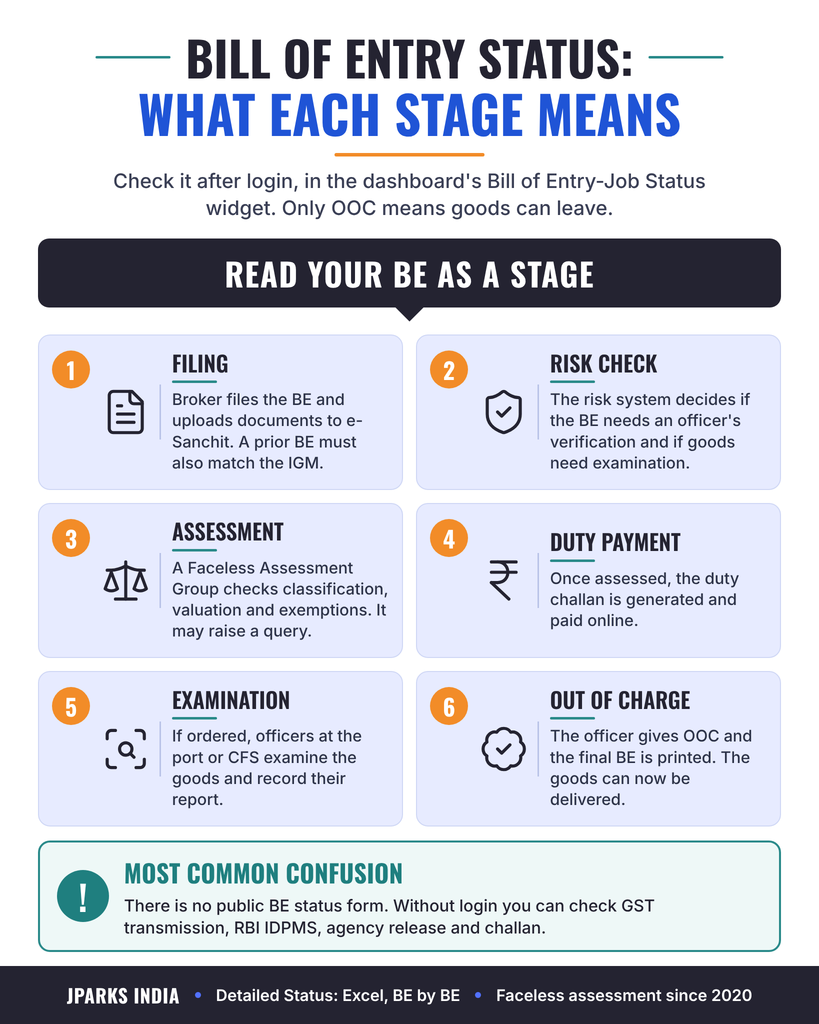
Since 31 October 2020, Faceless Assessment, part of CBIC’s Turant Customs programme, covers imports at all ports. The system marks most BEs to a Faceless Assessment Group whose officer may sit in another city; BEs not marked to a group, and cases referred back, are handled by the port’s own assessment group. JNCH Public Notice 117/2020 sets out the flow:
Filing. Your customs broker files the BE on ICEGATE and uploads supporting documents to e-Sanchit. The BE number is generated. If the BE was filed before arrival, it also has to be matched with the carrier’s manifest (see the IGM sections below).
Risk check. The customs risk system decides whether the BE needs an officer’s verification and whether the goods need examination.
Assessment. A Faceless Assessment Group checks classification, valuation and exemptions. It can accept the self-assessment, raise an electronic query, re-assess, or order examination or testing. If you disagree with a re-assessment, you can ask for a speaking order under Section 17(5), generally issued within 15 days.
Duty payment. Once assessed, the duty challan is generated and paid online. Our duty payment guide covers the payment steps.
Examination. If ordered, officers at the port or CFS examine the goods and record their report in the system.
Out of Charge. The officer gives OOC and the final Bill of Entry is printed. The goods can now be delivered. Our Out of Charge guide explains the OOC copy.
What common statuses mean
The wording in the Detailed Status file can differ from the stage names below, so read each entry as a stage.
What you see
What it means
What you do
BE filed, no assessment date
Waiting in the assessment queue or for IGM match
Check the IGM line; wait if both are fine
Query raised
The assessing officer needs a document or explanation
Reply through your broker with the document on e-Sanchit
Query replied
Your reply is with the officer
Wait; a second query is possible
Assessed, duty not paid
Duty is final and the challan is ready
Pay the duty challan
First check ordered
Goods are to be examined before assessment
Book the examination with the CFS or terminal
Second check or examination after duty payment
Goods are examined after assessment and payment
Book the examination; OOC follows the report
Duty paid, no OOC
Examination or a final check is pending
Ask your broker what is open
Out of Charge
Customs clearance is complete
Arrange delivery
Why a bill of entry gets stuck
Most delays have one of five causes:
No IGM match. A prior or advance BE stays unregularised until the carrier’s manifest line matches it.
Unanswered query. The clock does not move until the reply is on record.
Other agency clearance pending. Use Document Status > Other Govt Agencies > Release Order Status on Public Enquiries 2.0, with the location, agency, BE number and BE date, to see whether the agency has released it.
Duty unpaid. An assessed BE waits for payment. If the challan fails, check it on the Challan Enquiry listed in the table above.
Late filing. A BE filed after the Section 46 deadline attracts charges. As per ACC Mumbai Public Notice 01/2026-27, these are Rs 5,000 a day for the first three days and Rs 10,000 a day after that, not more than the duty payable (Rs 50,000 where no duty is payable). The proper officer can waive them if the reason is genuine, such as an ICEGATE fault backed by a helpdesk ticket.
The Section 46 deadline, as amended in 2021, depends on the customs station. Circular 08/2021-Customs of 29 March 2021 sets it out:
Customs station
BE due by
Sea port
End of the day before arrival (end of the day of arrival for goods consigned from Bangladesh, Maldives, Myanmar, Pakistan or Sri Lanka)
Airport
End of the day of arrival
Land customs station
End of the day of arrival
ICD
End of the day of arrival
Checking the BOE on the GST portal for IGST credit
The GST portal has its own Search BoE option, but it is for input tax credit, not for clearance status. Log in to the GST portal and go to Services, User Services, Search BoE. As per the GST portal user manual, you need the port code (6 characters), BE number, BE date and reference date.
The reference date is the date the goods were cleared, which is the latest of the OOC date, duty payment date or amendment date. It must be at least five days before today. If the BE is missing, use the QUERY ICEGATE button to pull it from customs. You can search up to 10 BEs at a time, or 11 to 50 through the bulk Excel option.
IGM status and IGM tracking on ICEGATE
The Import General Manifest is the carrier’s declaration to customs of all cargo on board an arriving vessel, aircraft or vehicle. The Customs Act calls it the arrival manifest or import manifest, and Section 30 of the Customs Act is the provision that requires it. You, as the importer, do not file the IGM. The shipping line, airline or their agent does. But a missing or wrong IGM line stops your Bill of Entry from moving, so it is worth checking before the vessel or flight arrives.
For sea cargo, the SCMTR (Sea Cargo Manifest and Transhipment Regulations, 2018) has the “authorised sea carrier”, meaning the master of the vessel or his agent, file the manifest electronically before the vessel arrives. In practice this is the shipping line’s agent in India. Where cargo is consolidated, the freight forwarder or consolidator files a Cargo Summary Notification (CSN), and the vessel operator’s manifest has to pick up those CSNs. ICEGATE screens call the sea manifest both SAM (Sea Arrival Manifest, the SCMTR message name) and IGM: they mean the same document. For air cargo, the airline files the IGM and the consol agent files the Consol General Manifest (CGM) for house air waybills.
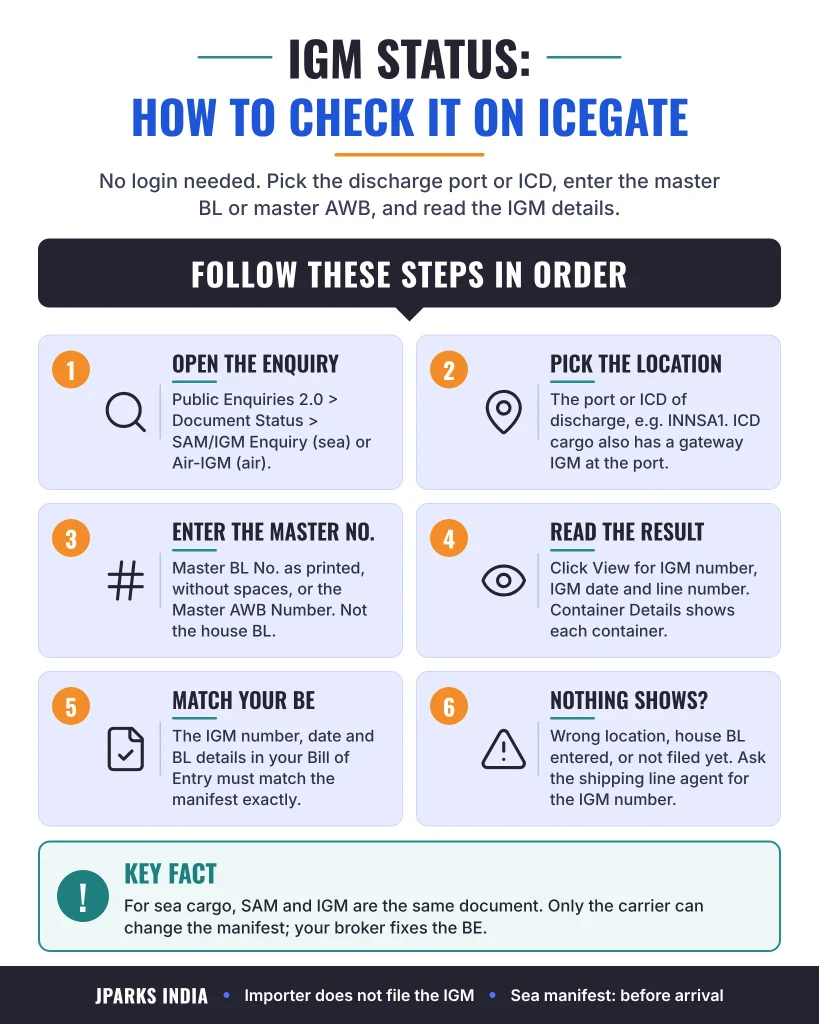
Choose Document Status, then SAM/IGM Enquiry for sea cargo, or Air-IGM for air cargo.
Select the Location. This is the port or ICD where the cargo is to be discharged (for example INNSA1 for Nhava Sheva). ICD cargo has a gateway IGM at the port of arrival as well as an IGM at the ICD, so check which one you need.
Enter the Master BL No. exactly as printed, without spaces. For Air-IGM, enter the Master AWB Number.
Type the captcha and submit.
For sea cargo, the result shows the current status. Click View for the SAM/IGM details (IGM number, IGM date and line number), and Container Details for each container and its status. Check the shipment details against your bill of lading.
A third screen, Document Status > Manifest Details, looks up SCMTR filings by bill of lading. You enter the Site ID/Port, pick a Rep-Event (choose SAM, the Sea Arrival Manifest), and enter the BL No and the BL Date in DD-MMM-YY format. It is newer than the Enquiries 2.0 (Public) user manual, so the manual does not describe it yet.
IGM number, line number and sub-line number
These three numbers are how customs connects your Bill of Entry to the carrier’s manifest.
Identifier
What it identifies
Where you get it
IGM number and date
The carrier’s manifest for that vessel or flight at that port
IGM enquiry result, or the shipping line’s arrival notice
Line number
One master bill of lading (or master air waybill) in that manifest
IGM enquiry result against your MBL
Sub-line number
A house bill of lading under a consolidated master line
IGM enquiry result, or the consolidator’s CSN
When your customs broker files the Bill of Entry, the IGM number, date and bill of lading details must match the manifest exactly. If the line is wrong, the BE is “filed” but cannot be regularised against the cargo.
Sea and air IGM enquiries compared
Point
SAM/IGM Enquiry (sea)
Air-IGM
Who files
Shipping line or its agent; consolidator files CSN
Airline; consol agent files CGM
What you enter
Location, Master BL No., captcha
Location, Master AWB Number, captcha
Extra on the result
View button for SAM/IGM details; Container Details button with container status
As shown on the result
If the enquiry shows nothing, the usual reasons are a wrong location code, the house BL number entered instead of the master, or the carrier not having filed yet. Ask the shipping line’s agent for the IGM number directly; they have it as soon as it is filed.
IGM problems, BE amendments and the 2026 sea IGM changes
A Bill of Entry can be filed up to 30 days before expected arrival. It can even go in on the house bill of lading alone, with “NOMBL” (sea) or “NOMAWB” (air) in place of the master number. Once the carrier files the IGM, the BE is regularised against it.
If you filed without the master number, or got it wrong, your broker files a BE amendment under code A_PBEIGM with the correct MBL or HBL. As per JNCH Public Notice 50/2021, this amendment is auto-approved and the BE regularises itself when the numbers match the IGM. Any other change, such as container details, still needs an officer’s approval.
The IGM also matters for duty. Under Section 15, if your BE is filed before the vessel gets entry inwards, it is treated as filed on the entry inwards date, and the duty rate on that date applies.
Common IGM problems and who fixes them
Problem
What you see
Who fixes it
IGM not found
Enquiry returns nothing for your MBL
Shipping line agent (not yet filed) or you (wrong port or number)
BL missing from manifest
Master line exists, your house BL does not
Consolidator (CSN) and vessel agent, through an SCMTR amendment
Wrong line or sub-line in BE
BE filed but not regularised
Your customs broker, by BE amendment
Package count, weight or description mismatch
Query or hold at assessment
Carrier amends the manifest; broker aligns the BE
Vague description such as “general cargo”
Delay in risk checks or scanning
Carrier, using the full description from your BL
Wrong container on an empty or transhipment line
Record cannot be closed
Shipping line, with a justification letter (JNCH Public Notice 115/2026)
Only the carrier side can change the manifest. Your broker can correct the Bill of Entry, but not the IGM. So when the mistake is in the manifest, write to the shipping line’s agent the same day with the correct bill of lading copy attached.
What changed for sea IGMs in 2026
From 1 July 2026, all SCMTR messages except Import Transhipment (ITP) are operational across India, including the arrival messages SAM, SAA (the arrival amendment) and SEI (Sea Entry Inwards). JNCH Public Notice 80/2026 of 2 July 2026 explains this, citing CBIC Circular 29/2026-Customs.
Notification 61/2026-Customs (N.T.) of 1 July 2026 extended the SCMTR transitional provisions to 31 August 2026. Check your port’s latest public notice for anything issued after that date.
From 12 August 2026, supplementary IGMs are no longer accepted at any port, by e-mail or on paper. Any IGM amendment goes only through the SCMTR amendment message (SAA), as JNCH Public Notice 97/2026 of 11 August 2026 says.
For importers, the practical effect is simple. Ask your forwarder to confirm the CSN and the master BL are correct before the vessel sails, because a manifest error can now be fixed only by the carrier’s amendment message.
ICEGATE container tracking: which tool answers which question
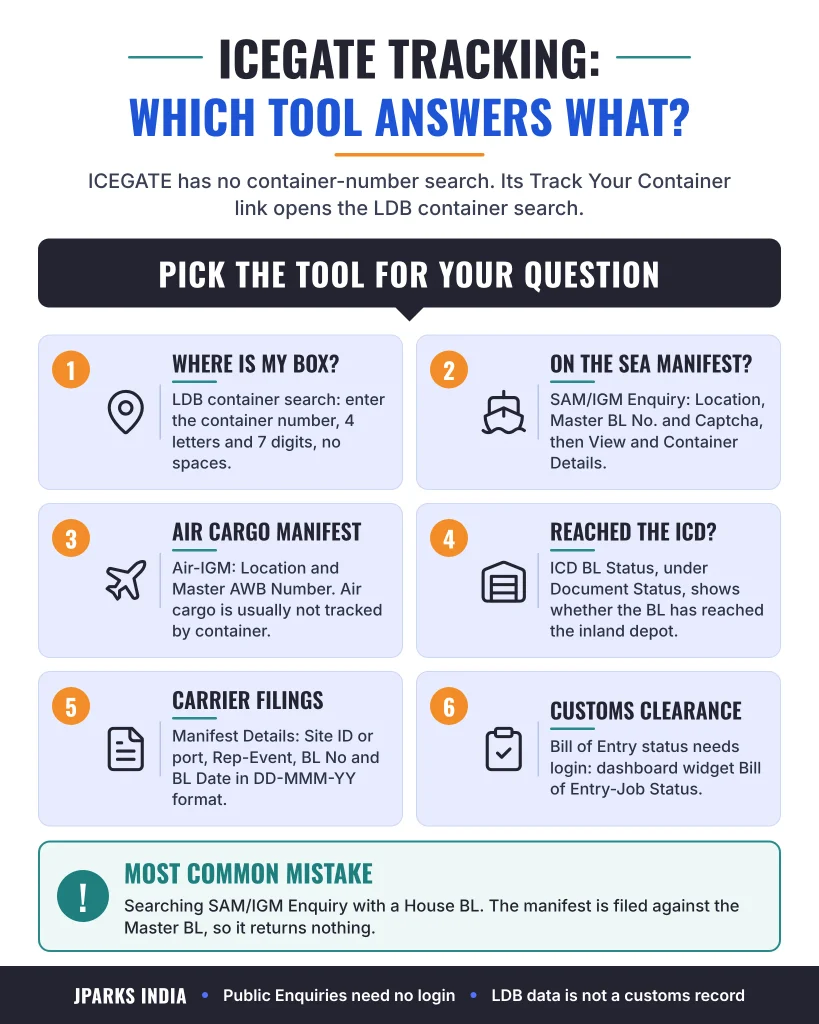
ICEGATE container tracking by container number is not done on ICEGATE itself. On icegate.gov.in, Quick Links > Tracking Applications lists three services: Indian Trade Portal, Intellectual Property Rights, and Track Your Container. The last one is not an ICEGATE screen. It opens the Logistics Data Bank (LDB) container search, run by NICDC Logistics Data Services Limited (NLDSL), a joint venture with the Government of India. LDB follows EXIM containers fitted with RFID tags from port terminals to ICDs and onward.
ICEGATE’s Public Enquiries 2.0 work differently. They look up customs documents by Master BL, Master AWB or Shipping Bill number, and no ICEGATE field searches by container number alone. Most failed ICEGATE container tracking searches come from mixing up these two systems. For the customs side of an import container, run the SAM/IGM Enquiry above with the Master BL and open Container Details.
Your question
Tool
What you enter
What you get
Where is my container right now?
LDB container search (via ICEGATE Track Your Container)
Container number
Movement of the container through tagged points
Is my sea cargo on the import manifest, and what is the container status?
ICEGATE SAM/IGM Enquiry
Location, Master BL No., Captcha
Current status, SAM/IGM details (View), Container Details
Is my air cargo on the import manifest?
ICEGATE Air-IGM
Location, Master AWB Number, Captcha
Air IGM details for that AWB
Has my BL been received at the ICD?
ICEGATE ICD BL Status
As prompted on the screen
BL status at the inland container depot
Which manifest messages has the carrier filed against my BL?
ICEGATE Manifest Details
Site ID / Port, Rep-Event, BL No, BL Date
The SCMTR filing for that event (for example SAM, Sea Arrival Manifest)
When will the vessel arrive?
Shipping line or terminal website (ICEGATE VCN Enquiry for vessel call details)
Booking or BL number on the line’s site; IMO No and arrival date range on VCN Enquiry
Vessel schedule, ETA and call details
ICD BL Status sits in the Document Status menu; we have not listed its inputs because the current screen may differ from older guides. VCN Enquiry takes the vessel’s IMO number and an expected arrival (EDTA) date range, but for a day-to-day ETA the shipping line’s own tracking is usually more current.
Keep the Container tab selected. The other tabs are Export, Truck and Train.
Choose Single for one container. Use Multiple for several, or Group if you have created a group number.
In “Enter Container No.”, type the full container number. That is 4 letters and 7 digits, for example ABCU1234567, with no spaces.
Run the search and read the movement history.
The same LDB page offers “Get The Tracking Notification” for alerts and “Create Your Group Number” for regular shipments. Remember what LDB does not show. It is a logistics tracking service, not a customs record, so it will not tell you whether your Bill of Entry is assessed, whether duty is paid, or whether Out of Charge is given.
Why a container search shows no result
What you see
Likely reason
What to do
No record on ICEGATE for a container number
ICEGATE has no container-number search
Use LDB, or SAM/IGM Enquiry with the Master BL
BL found but Container Details empty or different
Container details in the manifest are missing or wrong
Ask the shipping line’s agent to correct the manifest through an amendment
No movement on LDB
Typo in the number, or the container has not passed a tagged point
Check the 4 letters and 7 digits; try again after discharge
Container moved but cargo not released
Customs clearance is pending
Check BE status after login (see the top of this page)
A blank SAM/IGM result has the same causes as a missing IGM above, most often a House BL entered instead of the Master BL. If your cargo came under a consolidator, the Master BL is the one the shipping line issued to the consolidator; ask your forwarder for it.
For export containers, LDB offers “Track your Container’s Export Journey”. The customs side of an export, from shipping bill filing to LEO and EGM, is in our shipping bill and EGM status guide.
How JPARKS INDIA can help
JPARKS INDIA is an EXIM compliance consultancy in Vashi, Navi Mumbai. We do not file Bills of Entry or IGMs and we do not clear cargo: a licensed customs broker files the BE, and the shipping line, airline or consolidator files the manifest. What we set up is your own access. With an ICEGATE registration for your firm, your team can log in and check Bill of Entry status itself instead of waiting for the broker’s file (Rs 3,500 + GST, 2 to 3 working days).
Q1. Can I check bill of entry status without an ICEGATE login?
Not the full status. On ICEGATE 2.0, BE status sits behind login, in the dashboard widget described in ICEGATE’s advisory. Without a login you can only check related points: GST transmission, RBI IDPMS, other agency release and the duty challan, plus the IGM and container look-ups.
Q2. My BE shows assessed and duty paid, but no OOC. What is pending?
Usually examination, or a check by another government agency. Run the Release Order Status enquiry under Other Govt Agencies with the same BE number and date, and ask your broker whether an examination order is open at the port.
Q3. What is the OOC copy of a bill of entry?
It is the final Bill of Entry printed after customs gives Out of Charge. The terminal or CFS needs proof of OOC to release the goods, and you should keep the copy with your import records for audits and any later refund claim.
Q4. Why does the GST portal not show my bill of entry?
Most often the reference date is wrong or less than five days old, or the port code does not match. Correct the reference date to the OOC or duty payment date and use QUERY ICEGATE to fetch the record again.
Q5. Is SAM the same as IGM?
Yes, for sea cargo. SAM is the SCMTR message name for the Sea Arrival Manifest, and IGM is the older name that custom houses and ICEGATE screens still use. Amendments to it are filed as SAA messages by the carrier.
Q6. Should I search the IGM with the house BL or the master BL?
Search with the master BL. The house BL appears as a sub-line under it only after the consolidator’s CSN is captured in the manifest. If the master line is there and your house BL is not, the problem is with the consolidator.
Q7. Can I track a container by container number on ICEGATE?
No, not on ICEGATE’s own enquiry screens. ICEGATE’s Track Your Container link takes you to the LDB container search, which works by container number. On ICEGATE you search by Master BL and then view the containers under it.
Q8. What is the difference between IGM tracking and container tracking?
IGM tracking tells you whether the carrier’s import manifest covers your bill of lading, and gives you the details your Bill of Entry must match. Container tracking tells you where the box physically is. You usually need both: the IGM to file the BE, and the container position to plan delivery.
Tell us where you are stuck. We usually reply the same business day.
5.0 ★ · 123 Google reviews · Since 1990
Posted on Google
Vandana Bajaj
Trustindex verifies that the original source of the review is Google.
Very prompt and reliable service by Rahul Kolge and his team. Exceptional and happy experience.
Posted on Google
Supriya Shetye
Trustindex verifies that the original source of the review is Google.
Had a really good experience with JParks India. Rahul sir helped me a lot with my import work and were always active and responsive. Whatever documents or guidance was needed, they handled everything smoothly and explained things clearly. Felt stress-free throughout the process. Very helpful team, definitely recommend them if you’re doing import or export.
Posted on Google
dipali sakpal
Trustindex verifies that the original source of the review is Google.
Very nice people, get the work done in a very short time.
Posted on Google
Satish Bajaj
Trustindex verifies that the original source of the review is Google.
Excellent & Prompt services in all Import Export matters.
Great to work with you
Posted on Google
Bajaj VCPL
Trustindex verifies that the original source of the review is Google.
It was a great experience having work with you.
Posted on Google
Satish Bajaj
Trustindex verifies that the original source of the review is Google.
"Outstanding professiona services, efficient, and gets things done incredibly fast. Highly recommended for anyone needing reliable and prompt assistance
Posted on Google
Nishat fatima
Trustindex verifies that the original source of the review is Google.
excellent service
Posted on Google
farhan sayed
Trustindex verifies that the original source of the review is Google.
JParks Team is Super helpful! Thanks to Rahul and team!
Posted on Google
Sadik Inamdar
Trustindex verifies that the original source of the review is Google.
Good and personal service for import export code
Posted on Google
Maheshwar
Trustindex verifies that the original source of the review is Google.
Had a really good experience with JParks India. Rahul sir helped me a lot with my import work and were always active and responsive. Whatever documents or guidance was needed, they handled everything smoothly and explained things clearly. Felt stress-free throughout the process. Very helpful team, definitely recommend them if you’re doing import or export.
We use cookies to run this site, measure traffic, and track our ads. Essential cookies are always on. Accept all, reject non-essential, or set your preferences.
Cookie Preferences
Manage your cookie preferences below:
Essential cookies enable basic functions and are necessary for the proper function of the website.
Name
Description
Duration
Cookie Preferences
This cookie is used to store the user's cookie consent preferences.
30 days
Google reCAPTCHA helps protect websites from spam and abuse by verifying user interactions through challenges.
Name
Description
Duration
_GRECAPTCHA
Google reCAPTCHA sets a necessary cookie (_GRECAPTCHA) when executed for the purpose of providing its risk analysis.
179 days
Google Tag Manager simplifies the management of marketing tags on your website without code changes.
Name
Description
Duration
cookiePreferences
Registers cookie preferences of a user
2 years
td
Registers statistical data on users' behaviour on the website. Used for internal analytics by the website operator.
session
Statistics cookies collect information anonymously. This information helps us understand how visitors use our website.
Google Analytics is a web analytics service that tracks and reports website traffic. It collects anonymized data on how visitors use the site to help us understand and improve performance.