An ICEGATE utility is any of the client-side tools and portal services that Indian Customs provides for signing, preparing, downloading and looking up customs documents. The phrase is ambiguous by nature, and that ambiguity is the actual problem, not a lack of information. Someone might need to digitally sign a Shipping Bill, download a signed copy of a Bill of Entry, prepare a declaration offline, or simply check duty on a tariff code. Four different jobs, four different tools.
Installing the wrong one wastes an afternoon. Following a walkthrough written for a different tool wastes considerably more, especially when your DSC token works everywhere else but ICEGATE refuses to recognise it.
This guide maps the full set of ICEGATE utilities. For each one you will learn what it does, who needs it, where it lives, and the error it most commonly throws, plus which tools changed under ICEGATE 2.0 and which ones people confuse with tools from other government portals.
New to the portal itself? If you are not yet registered, our ICEGATE registration service handles the whole process.
Which ICEGATE Utility Do You Actually Need
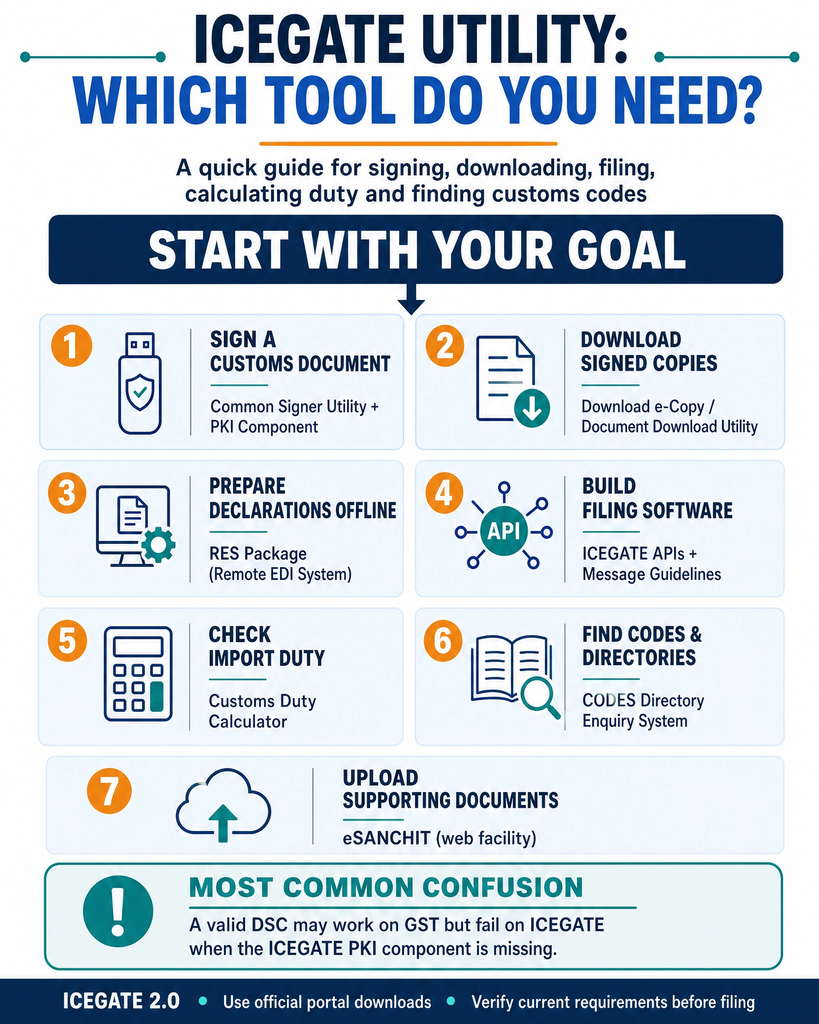
Start here. This table resolves the ambiguity in one step.
Your Goal
Utility You Need
Detect your DSC token and sign a customs document
Common Signer Utility, one download that also installs the PKI component
Download a signed Shipping Bill, LEO gate pass or Bill of Entry
Document Download utility, the Download e-Copy widget
Prepare a Bill of Entry or Shipping Bill offline
RES package from NIC
Build your own filing software
Message Implementation Guidelines, or the published ICEGATE API contracts
Check duty on a tariff code
Customs Duty Calculator
Look up port codes, country codes or tariff heads
Customs Online Directory Enquiry System (CODES)
Upload supporting documents
eSANCHIT, a facility rather than a downloadable utility
The Signer Utility and PKI Component
This is the tool most people mean when they say “ICEGATE utility”, and the naming is what trips everyone up. Anyone signing on ICEGATE needs it: importers, exporters, customs brokers, shipping lines, airlines, console agents and custodians.
One download, not two. The Digital Signature section of the portal carries a single link labelled Download Signer utility, and it delivers PKIComponent.zip. That package installs the PKI component on your machine, which is what lets your browser and the portal reach the certificate stored inside your USB token. There is no second installer to find. The sequence some guides describe, PKI component first and signer utility second, is not how ICEGATE distributes it.
Where it lives. At the ICEGATE Common Signer Utility, reached from the Digital Signature section of the ICEGATE portal. The signing itself runs as web screens on that host rather than as a desktop application you launch, so the only thing installed locally is the component.
Who supplies it. The component is built on (n)Code Solutions technology, which is why ICEGATE’s own help documentation is titled around the “(n)Code Signer utility”. That is the vendor’s name for the component, not ICEGATE’s name for the signing service, and it is the root of most of the confusion.
How to confirm it is running. After a successful install, a blue N symbol appears in the Windows system tray. No symbol means no component, and every other troubleshooting step is premature until that is fixed.
It is machine-specific. Every workstation used for signing needs its own installation, which explains most “it worked on the other computer” reports.
Requirements. A valid Class 3 DSC and the token drivers for your specific token. Class 2 certificates are not an option: the Controller of Certifying Authorities discontinued issuance of Class 2 certificates from January 2021, so any Class 2 certificate you still hold has long expired. The current utility is applet-less and works with Chrome, Edge and Firefox; Internet Explorer is not supported. The (n)Code help documentation still lists a Java 1.8 runtime among the component’s requirements, so it is the applet flow that has gone rather than Java entirely, and on a clean machine the runtime is worth checking before you escalate.
The install walkthrough, browser settings, DSC registration on the portal and the full error list sit in our ICEGATE PKI setup guide. If the certificate itself is the problem rather than the component, we issue Class 3 Digital Signature Certificates configured for customs filing.
The Document Download Utility
Widely under-used, and the answer to a question people ask their brokers repeatedly.
What it does. It lets registered users download official signed copies of customs documents. On ICEGATE 2.0 it appears as the Download e-Copy widget on the dashboard.
What you can pull. Six document types, not the four most guides list:
Shipping Bill after Assessment
Shipping Bill after Let Export Order (LEO)
Gate pass for LEO
Bill of Entry after Assessment
Bill of Entry after Out of Charge (OOC)
Gate pass for OOC
The two Out of Charge items are the ones commonly omitted, and they are exactly what an importer needs for delivery and for the accounting file. ICEGATE Out of Charge explains what those copies actually evidence.
Who can access it. Authorised CHA, IEC and SEZ users, post-login only. That means you need a live IEC and an ICEGATE login of your own: see how to register on ICEGATE.
How to search. By date range, or by Job Number together with Location Code and Job Date. Our ICEGATE shipping bill status guide walks through the search screen and the assessed copy download step by step.
Retention. The acknowledgement copy is available for a limited window after filing, and the signed copy for a longer one, after which the system retrieves it from backend storage with a short delay rather than serving it instantly. Pull copies while they are fresh rather than at year end.
This utility removes a standing dependency on your broker for routine document copies. For any business filing regularly, that alone justifies registering. Exporters have a second reason: the signed Shipping Bill and LEO copies are the evidence you fall back on when an IGST refund stalls on an SB error code.
The RES Package
The oldest tool in the set, and still in active use.
What it does. RES stands for Remote EDI System, a desktop application for preparing customs declarations offline and generating a message file for submission to ICEGATE.
What it covers. Preparation of Bills of Entry and Shipping Bills, document modification, directory maintenance, message file creation, checklist printing, and query reply handling for imports.
Where it comes from. ICEGATE’s own guidance states that the RES package is made available by the National Informatics Centre through the Indian Customs EDI System Remote EDI page. Download it from there, not from a mirror.
Who needs it. Customs brokers and larger trade users who file at volume, particularly where in-house systems generate declarations.
The alternative. Trading partners who prefer their own software can build to the Message Implementation Guidelines published on ICEGATE instead of using RES. For newer message types, ICEGATE now also publishes API contract documents, covered below.
Version alignment matters. RES packages are matched to ICES versions, and using the wrong package produces validation failures that look like data errors but are actually version mismatches.
Offline Working, Web Upload and APIs
Three further routes sit alongside the desktop package.
Save as draft. Certain web forms let you begin work, save, and resume later rather than completing a long declaration in one sitting.
Web upload. Registered users can upload declaration files directly through the portal, covering shipping bill, bill of entry, manifest, consol, transhipment and reply file types.
APIs. ICEGATE now publishes API contract documentation under Integrate with ICEGATE APIs, including a contract document for SCMTR Open API filing and one for Bill of Entry and Shipping Bill Open API filing, alongside API specifications for custodians and for e-seal based solutions. These are published alongside the existing file-based routes rather than announced as replacements for them, but if you file at volume they are where the direction of travel points.
These features matter most to teams handling volume. For a business filing a handful of declarations a month, the standard web forms are simpler.
The Customs Duty Calculator
Often described as a utility, though it is really a lookup tool rather than software you install.
What it does. It returns the duty structure against a tariff code and country of origin, covering Basic Customs Duty, applicable cesses, Social Welfare Surcharge, IGST and any trade remedy duties in force.
Where it lives. The direct tool is the ICEGATE Custom Duty Calculator. It is also reachable through the Services menu. The legacy Trade Guide on Imports, which displays as the Know Your Import Duty Enquiry System, serves the same purpose.
How to search. By CTH (Customs Tariff Head) or by product description. Country of origin materially changes the result once preferential rates are in play, which is why a valid preferential Certificate of Origin is worth more than the rate the calculator shows by default.
What the calculator will not tell you. Four things, each of which changes what you actually pay:
The exchange rate applied. Assessable value converts at the CBIC notified rate for the relevant date, not the market rate. See how the ICEGATE exchange rate works.
Related-party loading. If you import from a related foreign supplier, valuation may be loaded following Special Valuation Branch registration, and no calculator models that.
Concessional and deferred duty. Goods brought in for a specified end use under IGCR clearance, or held in a bonded facility under the MOOWR scheme, carry a duty outcome the standard lookup does not reflect.
Who bears the liability. Where a foreign principal has no Indian entity, an Importer of Record takes on the filing and the duty, which changes the commercial calculation entirely.
Treat the output as indicative. The calculator is a guidance tool, and the binding position for any consignment is the tariff, the notifications in force on the date of the bill of entry, and the assessment itself. Where a classification or an exemption is genuinely contested, an Advance Ruling settles it and a calculator screenshot does not.
Directory and Enquiry Tools
Two further sets of tools are routinely grouped under the “utility” label.
Customs Online Directory Enquiry System (CODES). Reference directories covering country, airline and shipping line codes, sea and air port codes, ITC-HS and standard unit quantity codes, scheme codes and Customs EDI locations, alongside tariff and notification directories on the import side and drawback, cess and district codes on the export side. Import and export policy conditions against the same codes sit on the DGFT portal. Separate error code lists cover the errors thrown while filing, including SCMTR message errors.
Trade Guides. The Trade Guide on Imports and Trade Guide on Exports give commodity-wise duty and compliance information. The compliance side of this connects to Compulsory Compliance Requirements (CCRs), a Risk Management System concept: the RMS holds a consolidated database of requirements arising out of the various allied Acts and flags them for the assessing group. In practice a CCR is often a licence or certificate you need before clearance rather than a customs formality, such as a BIS certificate, a WPC certificate for wireless equipment, or an FSSAI export licence for food consignments.
The error code lists are the most under-used resource on the portal. They convert an opaque rejection into a specific, actionable defect. Several checks in this family run without a login at all: see the nine free ICEGATE public enquiry checks.
Utility Comparison at a Glance
Utility
Install Needed
Login Needed
Cost
Primary User
Common Signer Utility, which installs the PKI component
Yes, per machine
No, to install
No fee published
Anyone who signs
Document Download utility
No
Yes
No fee published
Importers and exporters
RES package
Yes, desktop app
No, to install
No fee published
Brokers and high-volume filers
Web upload and APIs
No
Yes
No fee published
Volume filers and integrators
Customs Duty Calculator
No
No
No fee published
Anyone costing an import
CODES directory enquiry
No
No
No fee published
Anyone filing or classifying
Utilities Frequently Confused With ICEGATE Tools
Wrong-tool troubleshooting is a major time sink.
Tool
Belongs To
Do Not Use It For
emSigner
GST portal
ICEGATE signing
DGFT signing utility
DGFT
ICEGATE signing
Java applet flows
Legacy ICEGATE
Current signer utility
Third-party PKI installers
Unofficial sources
Anything, on security grounds
Container tracking apps
Carriers and aggregators
Customs status
A valid DSC can work perfectly on the GST portal and fail on ICEGATE simply because the ICEGATE PKI component is not installed. The certificate is not the problem. The missing local component is. The DGFT case is slightly different again: DGFT filing needs an IEC-based DGFT digital signature mapped to your IEC, which is a certificate question rather than a component question.
On the last row, ICEGATE container tracking is worth reading before you assume a carrier app tells you anything about customs status. It does not.
What Changed in 2026
ICEGATE has moved considerably this year, and several changes affect day-to-day filing more than the tooling does.
Card and UPI duty payment, from 24 March 2026. Circular No. 13/2026-Customs, read with Notification No. 30/2026-Customs, enabled a Payment Aggregator on ICEGATE e-payment. Duty can now be paid by credit card, debit card and UPI in addition to net banking, and the net banking panel expanded from 23 banks to 41. Payments route through the Electronic Cash Ledger, and the aggregator commission is borne by the user under the Customs (Electronic Cash Ledger) Regulations, 2022. For most readers this is the single most useful change of the year. Our ICEGATE duty payment walkthrough covers the mechanics step by step.
Automation of registration and clearance, from 1 February 2026. Circular No. 06/2026-Customs introduced Automatic Goods Registration for AEO entities, eligible manufacturers and established importers, extended Automatic Out of Charge to all importers on duty payment, brought in online goods registration for exporters, and enabled Auto LEO for facilitated shipping bills. Circular No. 07/2026-Customs, of the same date, introduced e-scheduling of cargo examination and body worn cameras during import cargo examination.
Faceless assessment for SEZ to DTA clearances, from 1 April 2026. Circular No. 18/2026-Customs routes these Bills of Entry through RMS for faceless assessment.
Entry Inward and sail-out standardised, from 15 May 2026. Circular No. 26/2026-Customs de-links physical boarding from cargo clearance, moving it to risk profiling, and moves crew effects and ship stores declarations onto eSANCHIT with IRN-based referencing.
SCMTR is now pan-India. The transitional window under the Sea Cargo Manifest and Transhipment Regulations, extended to 30 June 2026 by Notification No. 31/2026-Customs (N.T.) and Circular No. 16/2026-Customs, has closed. Circular No. 29/2026-Customs of 1 July 2026 covers pan-India implementation. If you are a carrier, agent, freight forwarder, consolidator, NVOCC, console agent or custodian, SCMTR filing obligations now apply in full. Exporters feel this downstream, because manifest and EGM accuracy is what releases an IGST refund.
Manual container documents discontinued, from 11 July 2026. Circular No. 32/2026-Customs ended manual submission of container movement documents and manual bonds for duty-free imported containers, with DG Systems publishing non-re-export reports on the ICEGATE portal instead.
ICEGATE classified as Critical Information Infrastructure, from 2 January 2026. ICEGATE, ECCS and ACES-GST were notified under Section 70 of the Information Technology Act, 2000, restricting system access to designated personnel, need-based vendors and approved auditors.
Legacy links no longer resolve. The old ICEGATE host does not resolve in DNS, so saved links to legacy utility pages fail and older guides that cite them are unusable. CBIC has not published a formal decommissioning notice, so treat this as an operational fact rather than a notified change, and navigate from the current portal.
If your operation still depends on a file-based or email-based route, confirm the current position for your specific document type before assuming nothing has changed.
How JPARKS INDIA Helps
JPARKS INDIA provides ICEGATE registration, DSC setup, signer utility configuration, PKI installation, role mapping, and filing error resolution for importers, exporters, and customs brokers.
From ICEGATE setup to filing error resolution, we help keep your import-export operations moving.
Frequently Asked Questions
Q1. What is the ICEGATE utility?
The phrase covers several tools, including the Common Signer Utility and the PKI component it installs, the Document Download utility, the RES package and the Customs Duty Calculator. Each solves a different problem.
Q2. Which utility do I need to sign documents?
One. The Common Signer Utility package, downloaded from the Digital Signature section of the portal. It installs the PKI component that lets ICEGATE detect your DSC token, and the signing screens then run in the browser.
Q3. Does the signer utility install the PKI component for me?
Yes. The link labelled Download Signer utility delivers PKIComponent.zip, which installs the component. The label and the contents do not match, which is why so many guides describe a two-step install that does not exist.
Q4. What error do I get if the PKI component is missing?
ICEGATE uses more than one wording, including “Error connecting to PKI component. Please check if DSC utility is installed.” and “PKI component not found”. Search the exact text on your screen. Our ICEGATE PKI guide lists the full error set and the fix for each.
Q5. What is the Document Download utility for?
Downloading official signed copies of Shipping Bills after assessment and after LEO, Bills of Entry after assessment and after Out of Charge, and the corresponding gate passes, post-login.
Q6. What is the RES package?
The Remote EDI System, a desktop application for preparing Bills of Entry and Shipping Bills offline before submission.
The Java applet flow is gone, and the current utility is applet-less. The PKI component’s own help documentation still lists a Java runtime among its requirements, so on a clean machine it is worth checking before escalating.
Need this handled for you?
Tell us where you are stuck. We usually reply the same business day.
5.0 ★ · 123 Google reviews · Since 1990
Posted on Google
Vandana Bajaj
Trustindex verifies that the original source of the review is Google.
Very prompt and reliable service by Rahul Kolge and his team. Exceptional and happy experience.
Posted on Google
Supriya Shetye
Trustindex verifies that the original source of the review is Google.
Had a really good experience with JParks India. Rahul sir helped me a lot with my import work and were always active and responsive. Whatever documents or guidance was needed, they handled everything smoothly and explained things clearly. Felt stress-free throughout the process. Very helpful team, definitely recommend them if you’re doing import or export.
Posted on Google
dipali sakpal
Trustindex verifies that the original source of the review is Google.
Very nice people, get the work done in a very short time.
Posted on Google
Satish Bajaj
Trustindex verifies that the original source of the review is Google.
Excellent & Prompt services in all Import Export matters.
Great to work with you
Posted on Google
Bajaj VCPL
Trustindex verifies that the original source of the review is Google.
It was a great experience having work with you.
Posted on Google
Satish Bajaj
Trustindex verifies that the original source of the review is Google.
"Outstanding professiona services, efficient, and gets things done incredibly fast. Highly recommended for anyone needing reliable and prompt assistance
Posted on Google
Nishat fatima
Trustindex verifies that the original source of the review is Google.
excellent service
Posted on Google
farhan sayed
Trustindex verifies that the original source of the review is Google.
JParks Team is Super helpful! Thanks to Rahul and team!
Posted on Google
Sadik Inamdar
Trustindex verifies that the original source of the review is Google.
Good and personal service for import export code
Posted on Google
Maheshwar
Trustindex verifies that the original source of the review is Google.
Had a really good experience with JParks India. Rahul sir helped me a lot with my import work and were always active and responsive. Whatever documents or guidance was needed, they handled everything smoothly and explained things clearly. Felt stress-free throughout the process. Very helpful team, definitely recommend them if you’re doing import or export.
Verified by Trustindex
Trustindex verified badge is the Universal Symbol of Trust. Only the greatest companies can get the verified badge who has a review score above 4.5, based on customer reviews over the past 12 months. Read more
We use cookies to run this site, measure traffic, and track our ads. Essential cookies are always on. Accept all, reject non-essential, or set your preferences.
Cookie Preferences
Manage your cookie preferences below:
Essential cookies enable basic functions and are necessary for the proper function of the website.
Name
Description
Duration
Cookie Preferences
This cookie is used to store the user's cookie consent preferences.
30 days
Google reCAPTCHA helps protect websites from spam and abuse by verifying user interactions through challenges.
Name
Description
Duration
_GRECAPTCHA
Google reCAPTCHA sets a necessary cookie (_GRECAPTCHA) when executed for the purpose of providing its risk analysis.
179 days
Google Tag Manager simplifies the management of marketing tags on your website without code changes.
Name
Description
Duration
cookiePreferences
Registers cookie preferences of a user
2 years
td
Registers statistical data on users' behaviour on the website. Used for internal analytics by the website operator.
session
Statistics cookies collect information anonymously. This information helps us understand how visitors use our website.
Google Analytics is a web analytics service that tracks and reports website traffic. It collects anonymized data on how visitors use the site to help us understand and improve performance.