Why Does the IEC Get Deactivated? Causes, Status Check and Reactivation Guide.
IEC deactivation is one of the most disruptive compliance failures an importer or exporter in India can face. Your Importer Exporter Code (IEC) showed up as inactive on the DGFT portal, and now your shipment is stuck, your bank is refusing the transaction, or your freight forwarder has flagged a problem. If that is where you are right now, you are not alone. Thousands of IEC holders across India face this every year, and in almost every case the cause is simple: the annual updation deadline was missed.
This guide covers exactly why IEC deactivation happens, what the real consequences are, how to check your IEC code active status right now, and the step-by-step DGFT procedure to reactivate a deactivated IEC and get your business moving again.
What Is IEC Deactivation and What Does It Mean for Your Business?
The IEC is a mandatory 10-digit identification number issued by the Directorate General of Foreign Trade (DGFT) under India’s Ministry of Commerce and Industry. Without an active IEC, no individual or business can legally carry out import or export transactions in India.
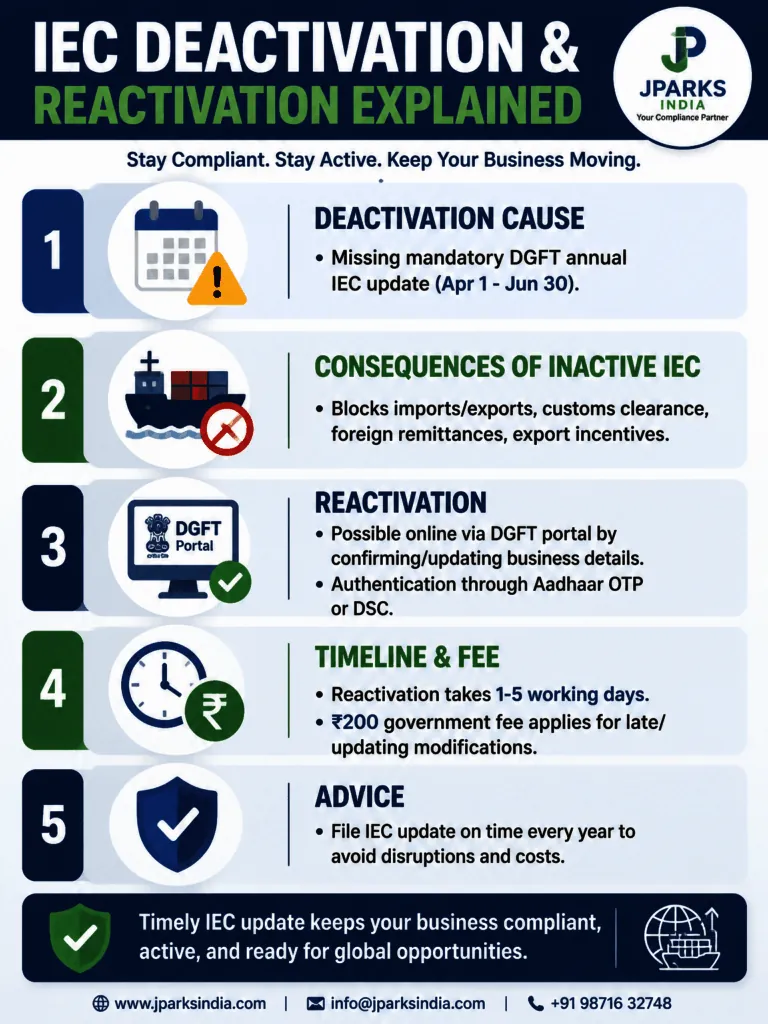
While the IEC is issued as a lifetime code, it does not stay active automatically. As per DGFT Notification No. 58/2015-2020 and the advisory circular issued on 12th February 2021, every IEC holder must complete an annual updation or confirmation on the DGFT portal between April 1 and June 30 each year. This applies even when there are zero changes to your business details. Fail to do this and the DGFT system automatically deactivates your IEC after the June 30 deadline.
Deactivation is not a cancellation. It is a temporary suspension. Your IEC number remains the same and can be restored, but until it is reactivated, your code is blocked for all trade purposes. Even a few days of inactive status mid-shipment can cost you significantly in delays, demurrage charges, and lost business.
Why Did DGFT Introduce the Annual Updation Rule?
Over the years, tens of thousands of IEC codes remained active in the DGFT system for businesses that had shut down, changed their structure, moved premises, or simply stopped trading internationally. This created an inaccurate national trade registry that caused problems for customs, banks, and export incentive schemes administered by the government.
The annual updation mandate was introduced to solve this. By requiring every IEC holder to log in and confirm their details once a year, DGFT forces a self-cleaning of the database. Businesses that do not confirm are automatically deactivated, while those that do confirm keep their records current and accurate. The result is a live, verified registry of active importers and exporters, which makes customs clearance, foreign trade banking, and export incentive distribution cleaner for everyone.
The critical point that most people miss: this rule applies to every IEC holder without exception, whether you shipped ten containers last month or have not made a single transaction this year. Inaction is treated as non-compliance. There is no exemption for dormant codes.
Top 5 Causes of IEC Deactivation in India.
1. Missing the April to June Annual Updation Window.
This is the number one cause by a significant margin. Every IEC holder must log in to the DGFT portal between April 1 and June 30 and either confirm their existing details or update any changes. Even a zero-update submission with no modifications is mandatory. DGFT does not send direct reminders. If you do not act, the system deactivates your IEC automatically once the window closes.
2. The “My Details Have Not Changed” Misconception.
Many business owners assume that if their address, directors, and bank details have not changed, there is nothing to do. This is wrong, and it is responsible for a huge number of preventable deactivations every year. The confirmation itself is the compliance act. Your submission tells the DGFT system your code is still active and your entity is operating. Staying silent tells the system the opposite.
3. Discrepancies and Non-Compliance Flagged by DGFT.
IECs can be flagged for scrutiny when DGFT identifies mismatches between your IEC records and linked systems such as GST, PAN, or customs databases. DGFT periodically publishes Trade Notices listing IECs scheduled for deactivation, giving businesses a final window to update before the action is enforced. If these flags are not addressed promptly, deactivation follows.
4. Old IEC Never Migrated to the Current DGFT Portal.
DGFT has deactivated all IEC codes that were not updated after 2014. If you received your IEC many years ago and never logged in to confirm it on the current digital portal, it is very likely already inactive. This is common among older businesses that obtained IECs under previous systems and assumed the code was still valid because they received it.
5. Suspended IEC Due to KYC or Document Issues.
Beyond deactivation for non-updation, IECs can also be suspended separately if documents on record are invalid, KYC is incomplete, or there is a policy violation. Suspension and deactivation are technically different statuses on the DGFT portal but have the same practical effect: your IEC cannot be used for any trade activity. If your IEC is showing as suspended rather than deactivated, read our guide on what to do if IEC is suspended.
How to Check Your IEC Code Active Status Right Now?
Before doing anything else, verify your current IEC status. This takes under two minutes and requires no login.
Go to dgft.gov.in
Click Services in the top navigation
Select View Any IEC Details
Enter your IEC number and the first three letters of your registered firm name
Complete the captcha and hit Submit
The portal shows your real-time status as Active or Inactive
If the result shows Inactive, your IEC is deactivated and needs to be restored before you can carry out any import or export activity. For a detailed walkthrough with screenshots, see our guide on how to check if your IEC is active. You can also check whether your most recent updation was recorded through our guide on how to check IEC renewal status.
What Happens When Your IEC Is Deactivated?
A deactivated IEC is functionally the same as having no IEC at all. Every system that depends on your IEC, from customs to banking to export incentives, will reject or block you until the code is restored. Here is exactly what breaks:
Area Affected
What Breaks When IEC Is Deactivated
Customs Clearance
No import or export consignment can be cleared at any port, airport, or land border.
Banking & Foreign Remittances
Banks refuse to process international trade payments and foreign currency remittances linked to the deactivated IEC.
Export Incentives
You become ineligible for RoDTEP, MEIS, and other government export incentive schemes. Pending applications may be frozen.
Export Promotion Councils
Registration and access to Export Promotion Council portals are blocked.
Port Demurrage
Goods already lying at ports begin accumulating daily demurrage charges, resulting in direct financial losses with each day of delay.
Udyam & Linked Systems
An inactive IEC status may be reflected across linked registrations, including Udyam, affecting MSME benefits and related services.
Compliance Risk
Attempting import or export transactions with a deactivated IEC constitutes a DGFT policy violation and may lead to penalties or increased scrutiny during audits.
DGFT IEC Deactivation and Reactivation Procedure: Step-by-Step Guide
Reactivation is done entirely online on the DGFT portal. No office visit is needed, no physical documents need to be couriered anywhere. Here is the exact procedure:
Go to dgft.gov.in and log in using your registered credentials (PAN-linked user ID and password).
Navigate to Services → IEC Profile Management → Update/Modify IEC.
Review your details: business name and address, directors or partners, bank account, contact information, and product or service categories.
If nothing has changed, simply confirm the details as-is (zero-update submission). If changes are needed, update the relevant fields.
Upload supporting documents if making modifications (PAN, Aadhaar, bank certificate, or address proof as applicable).
Authenticate using either your DSC (Digital Signature Certificate) or Aadhaar-based OTP. Proprietors can use Aadhaar OTP directly without a DSC.
Submit the application. After successful submission, the IEC is automatically reactivated and the updated status is transmitted to the ICEGATE Customs system.
Processing time: Typically 1 to 5 working days after submission, though many cases are resolved within 24 hours.
Zero-update confirmation within April 1 to June 30 (no changes)
₹0
Contact us
Reactivation after June 30 deadline (late updation)
₹200
₹1,970 all-inclusive
24-hour turnaround
Included
Included
Hidden Charges
None
No hidden charges
The ₹200 government fee applies whenever you are filing after the compliance window has closed or making any modifications to your registered IEC details. JParks charges an all-inclusive professional fee of ₹1,970, which covers the government fee, GST, end-to-end filing, DGFT portal authentication, follow-up, and a guaranteed 24-hour turnaround. See our full IEC renewal and reactivation service page for details.
What Happens to ICEGATE After IEC Reactivation?
Once DGFT reactivates your IEC, the updated Active status is automatically transmitted to the ICEGATE system, which is the customs clearance portal. From that point, your IEC will pass customs verification when cargo is being cleared at ports.
If you are activating an IEC for the first time or registering on ICEGATE fresh after a migration, there is a separate activation step needed on the ICEGATE portal itself. See our guide on how to activate IEC on ICEGATE. For general first-time activation of a new IEC code, see how to activate IEC code.
How to Prevent IEC Deactivation Every Year?
Dealing with a deactivated IEC mid-business is avoidable. It takes less than 30 minutes once a year to stay compliant. Here is the exact approach:
Set a calendar reminder for April 1 every year. The window opens April 1 and closes June 30. Do not wait till June.
File by the end of April, not June. Last-minute submissions sometimes face DGFT portal congestion. Filing early gives you time to troubleshoot any technical issues.
Log in and confirm even if nothing has changed. The zero-update submission is mandatory. Silence is treated as non-compliance.
Keep your DGFT login credentials accessible. Many businesses waste days just recovering portal access. Store your credentials securely and test your login before April.
Update your IEC details whenever your business changes. Address shifts, new directors, bank account changes, all of these should be reflected on the DGFT portal promptly. Learn how in our guide on how to update your IEC.
Know how long your IEC stays valid. Read our page on how long IEC is valid for a clear picture of the lifetime validity rules and what annual updation means for you.
If you would rather hand this off entirely, JParks handles IEC annual updation for businesses across India every year. We file before the deadline, handle the authentication, and send you confirmation the same day.
Conclusion: Do Not Let IEC Deactivation Stall Your Trade.
IEC deactivation is one of the most common and most avoidable disruptions in import-export compliance in India. The rule is clear: every IEC holder must log in to the DGFT portal between April 1 and June 30 each year and confirm or update their details, whether or not anything has changed. Miss that window and your code is automatically deactivated, blocking customs clearance, banking transactions, and export incentives until you complete the process.
The good news is that reactivation is straightforward and fully online. The same updation process that caused the deactivation to happen in the first place is the same process that restores your IEC. The only question is how quickly you act, because every day of deactivation is a day your trade operations are at risk.
If your IEC is already deactivated or you want to ensure it never lapses again, JParks handles the entire process for you with a guaranteed 24-hour turnaround.
Frequently Asked Questions.
Q1. Why does the IEC get deactivated?
The most common reason is missing the DGFT annual updation window between April 1 and June 30. Every IEC holder must confirm or update their details on the DGFT portal during this period, even if nothing has changed. Failing to do so results in automatic deactivation after June 30. Deactivation can also happen if DGFT identifies discrepancies in your IEC records, flags non-compliance, or your IEC has never been migrated to the current digital portal system.
Q2. What is the DGFT IEC annual updation April to June deactivation and reactivation procedure?
Every year between April 1 and June 30, all IEC holders must log in to dgft.gov.in, go to Services → IEC Profile Management → Update/Modify IEC, confirm or update their details, and authenticate using DSC or Aadhaar OTP. Missing this window results in automatic deactivation. Reactivation follows the same process and can be done at any time after deactivation, with a ₹200 government fee applying for late or modification submissions.
Q3. How do I reactivate a deactivated IEC?
Log in to dgft.gov.in, navigate to Services → IEC Profile Management → Update/Modify IEC, review and confirm or update your details, authenticate with DSC or Aadhaar OTP, and submit. The IEC is automatically reactivated after successful submission and the active status is transmitted to the Customs system. No office visit is required. Processing takes 1 to 5 working days. See our detailed guide on how to reactivate your IEC.
Q4. How do I check if my IEC code is active or inactive?
Go to dgft.gov.in, click Services, select View Any IEC Details, enter your IEC number and the first three letters of your firm name, complete the captcha, and submit. The portal shows your real-time status as Active or Inactive. For a step-by-step walkthrough, see our guide on how to check if your IEC is active.
Q5. Is IEC deactivation permanent?
No. IEC deactivation is temporary. You can reactivate your IEC at any time by completing the updation on the DGFT portal. Your IEC number does not change during this process, and there is no need to apply for a new code.
Q6. What is the government fee to reactivate a deactivated IEC?
The government fee is ₹0 if you complete the zero-update confirmation within the April to June window with no changes. The fee is ₹200 if you are reactivating after the June 30 deadline or making any modifications to your IEC details such as address, directors, or bank account.
Q7. How do I activate IEC online?
Log in to the DGFT portal, go to IEC Profile Management, complete or confirm your profile details, and authenticate with DSC or Aadhaar OTP. For a brand-new IEC, see our guide on how to activate IEC code. For reactivating a deactivated IEC, the updation process automatically restores active status.
Q8. My IEC status is inactive in Udyam registration. What do I do?
When your IEC is deactivated on the DGFT portal, the inactive status reflects across all linked systems including Udyam registration. Reactivate your IEC through the annual updation process on the DGFT portal first. Once DGFT restores the Active status, the updated status propagates to linked registrations. Contact JParks if you need the reactivation done urgently.
Q9. Do I need to update my IEC even if I have not done any import or export this year?
Yes, without exception. The annual updation is mandatory for all IEC holders regardless of trading activity. Even if your IEC has been completely dormant, you must log in and confirm it between April 1 and June 30 every year. Failing to do so results in automatic deactivation. Read more about the IEC code renewal process.
Q10. Can I retrieve an old IEC that has been deactivated?
Yes. If you have lost your IEC certificate or cannot remember your IEC number, you can retrieve it through the DGFT portal using your PAN. Once retrieved, you can complete the updation process to reactivate it. Our guide on how to retrieve an old IEC code covers this step by step.
Tell us where you are stuck. We usually reply the same business day.
5.0 ★ · 123 Google reviews · Since 1990
Posted on Google
Vandana Bajaj
Trustindex verifies that the original source of the review is Google.
Very prompt and reliable service by Rahul Kolge and his team. Exceptional and happy experience.
Posted on Google
Supriya Shetye
Trustindex verifies that the original source of the review is Google.
Had a really good experience with JParks India. Rahul sir helped me a lot with my import work and were always active and responsive. Whatever documents or guidance was needed, they handled everything smoothly and explained things clearly. Felt stress-free throughout the process. Very helpful team, definitely recommend them if you’re doing import or export.
Posted on Google
dipali sakpal
Trustindex verifies that the original source of the review is Google.
Very nice people, get the work done in a very short time.
Posted on Google
Satish Bajaj
Trustindex verifies that the original source of the review is Google.
Excellent & Prompt services in all Import Export matters.
Great to work with you
Posted on Google
Bajaj VCPL
Trustindex verifies that the original source of the review is Google.
It was a great experience having work with you.
Posted on Google
Satish Bajaj
Trustindex verifies that the original source of the review is Google.
"Outstanding professiona services, efficient, and gets things done incredibly fast. Highly recommended for anyone needing reliable and prompt assistance
Posted on Google
Nishat fatima
Trustindex verifies that the original source of the review is Google.
excellent service
Posted on Google
farhan sayed
Trustindex verifies that the original source of the review is Google.
JParks Team is Super helpful! Thanks to Rahul and team!
Posted on Google
Sadik Inamdar
Trustindex verifies that the original source of the review is Google.
Good and personal service for import export code
Posted on Google
Maheshwar
Trustindex verifies that the original source of the review is Google.
Had a really good experience with JParks India. Rahul sir helped me a lot with my import work and were always active and responsive. Whatever documents or guidance was needed, they handled everything smoothly and explained things clearly. Felt stress-free throughout the process. Very helpful team, definitely recommend them if you’re doing import or export.
Verified by Trustindex
Trustindex verified badge is the Universal Symbol of Trust. Only the greatest companies can get the verified badge who has a review score above 4.5, based on customer reviews over the past 12 months. Read more
We use cookies to run this site, measure traffic, and track our ads. Essential cookies are always on. Accept all, reject non-essential, or set your preferences.
Cookie Preferences
Manage your cookie preferences below:
Essential cookies enable basic functions and are necessary for the proper function of the website.
Name
Description
Duration
Cookie Preferences
This cookie is used to store the user's cookie consent preferences.
30 days
Google reCAPTCHA helps protect websites from spam and abuse by verifying user interactions through challenges.
Name
Description
Duration
_GRECAPTCHA
Google reCAPTCHA sets a necessary cookie (_GRECAPTCHA) when executed for the purpose of providing its risk analysis.
179 days
Google Tag Manager simplifies the management of marketing tags on your website without code changes.
Name
Description
Duration
cookiePreferences
Registers cookie preferences of a user
2 years
td
Registers statistical data on users' behaviour on the website. Used for internal analytics by the website operator.
session
Statistics cookies collect information anonymously. This information helps us understand how visitors use our website.
Google Analytics is a web analytics service that tracks and reports website traffic. It collects anonymized data on how visitors use the site to help us understand and improve performance.