ICEGATE Login: How to Sign In, Fix Errors and Use ICEGATE 2.0
ICEGATE login for importers, exporters and customs brokers happens on the ICEGATE 2.0 portal: open icegate.gov.in, click Login, choose the user type “ICEGATE User”, and enter your ICEGATE ID and password. If you have forgotten either, use “Forgot ICEGATE ID/ Password?” on the same screen. If your registered email or mobile has changed, fix that through your GST record first.
The login screen opens on foservices.icegate.gov.in, which is part of the official portal. Users who registered on the old ICEGATE 1.0 do not need to register again; the same ID works here. ICEGATE mail login (webmail.icegate.gov.in) is a different screen, meant only for @icegate.gov.in mailboxes; it is explained further down.
How do I log in to ICEGATE?
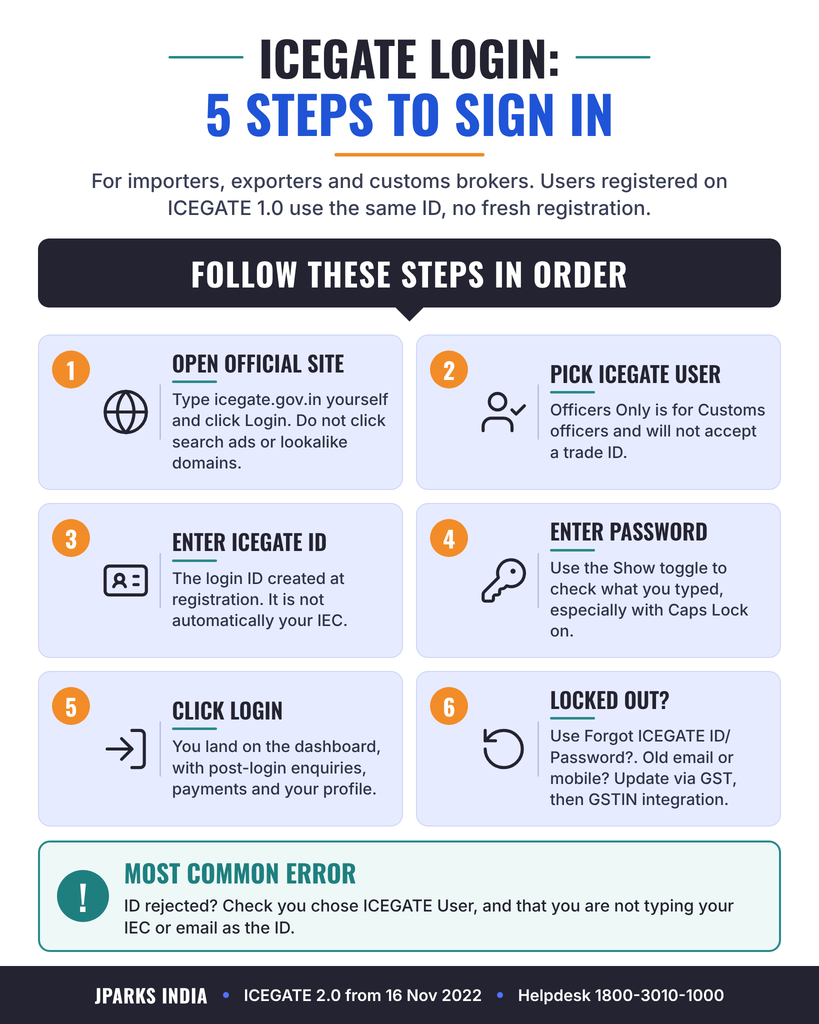
These are the steps for a registered trade user:
Open the official site. Type icegate.gov.in yourself and click Login, or open the ICEGATE login page directly. Do not click search ads or lookalike domains.
Choose the user type. Select “ICEGATE User”. The other option, “Officers Only”, is for Customs officers and will not accept a trade ID.
Enter your ICEGATE ID. This is the login ID created at registration. It is not automatically your IEC.
Enter your password. Use the Show toggle to check what you typed, especially with Caps Lock or a non-English keyboard.
Click LOGIN. You land on the dashboard, where post-login enquiries, payments and your profile sit.
If you are not yet registered, click “New to ICEGATE? Register Now” on the same screen.
What does each field on the ICEGATE login screen mean?
Field or link on the screen
What to enter or do
User Type
“ICEGATE User” for importers, exporters, customs brokers, carriers and other trade users. “Officers Only” is for CBIC officers.
ICEGATE ID
The login ID you created at registration
Password
Your ICEGATE password; “Show” reveals it while typing
Forgot ICEGATE ID/ Password?
Recovery when you have lost the ID or password but still use the registered email and mobile
Forgot Email/Mobile?
Starting point when you no longer have the registered email or mobile
LOGIN
Signs you in
New to ICEGATE? Register Now
Fresh registration for a business or person not yet on ICEGATE
What is my ICEGATE ID?
Your ICEGATE ID is the login name set up when the business registered on ICEGATE. Many businesses never note it down because a customs broker or a former employee did the registration. It is not your IEC, even though the IEC is linked to the account. Our guide on activating your IEC on ICEGATE explains how the two connect.
If you cannot find it, check the registration confirmation email in the mailbox that was used at registration. If that mailbox is gone, read the next two sections.
Forgot your ICEGATE ID or password?
Click “Forgot ICEGATE ID/ Password?” on the login screen and follow the prompts. Recovery depends on the email and mobile number on your ICEGATE profile, so it works only if you still have access to them.
In practice, recovery fails for one of three reasons:
The registered email belongs to someone who has left, and nobody can read it.
The mobile number was a personal number of a former employee or of the broker who registered you.
Someone created a second registration for the same business, so the ID you are trying is not the one linked to your documents.
Do not register again to get around a lost password. A second account for the same IEC creates more confusion than it solves. Recover the original account, or write to the helpdesk with your IEC and business details.
Registered email or mobile changed, or OTP not arriving?
ICEGATE sends OTPs and reset mails to the email and mobile on your profile. When those belong to someone who has left, or to a closed mailbox, start with “Forgot Email/Mobile?” on the login screen and read ICEGATE’s advisory on email ID and contact number updation. It says the change must be processed through your GSTIN, and only then will the new details sync with ICEGATE.
The steps, as set out in that advisory:
Log in to the GST portal with the business’s GST credentials.
Go to Services, then Registration, then Amendment of Registration Core Fields, and click Continue.
Click Edit, enter the new email and mobile number, and upload the supporting documents asked for.
Give the reason and the date of amendment, then click Save, and Save & Continue.
Complete the declaration, select the authorised signatory, enter the place, and click SUBMIT WITH EVC.
Enter the OTP sent to the new email or mobile. An ARN is generated.
Track the ARN under Services, then Registration, then Track Application Status, until the amendment is approved and shows on your GST registration.
Log in to ICEGATE and check that your profile now shows the new email and mobile.
The step people skip is the integration. The GST change is approved, but ICEGATE still shows the old email because the GSTIN was never integrated again.
Some users see a message during ICEGATE registration asking them to update their contact details with DGFT or GSTN. The advisory documents only the GST route, so if your business has no GSTIN, or you are not sure which record ICEGATE picked up, write to the helpdesk before changing your IEC details at DGFT. Courier operators registering under ECCS are different: registration uses the email held in the ECCS directory, which is updated through the ECCS helpdesk.
For OTPs that should be arriving, a few checks help. ICEGATE’s registration manual describes a six-digit OTP sent to the registered email, valid for 600 seconds, with a “Resend OTP” option. Check spam folders, ask your IT team whether mail from icegate.gov.in is blocked, and avoid requesting several OTPs in a row, which makes it hard to tell which code is current.
Common ICEGATE login errors and how to fix them
Problem
Likely cause
What to do
ID and password rejected
Wrong user type selected
Select “ICEGATE User”, not “Officers Only”
ID not recognised
Using the IEC or email as the ID
Find the actual ICEGATE ID from the registration email, or use the recovery link
Password rejected after several tries
Typing error or an old password
Use Show to check; reset through “Forgot ICEGATE ID/ Password?”
Reset mail never arrives
Registered email is old or closed
Update through the GST route, then GSTIN integration
ICEGATE ID rejected on a page titled “CBIC- Webmail”
That is the mailbox login for @icegate.gov.in accounts
Use the portal login at foservices.icegate.gov.in
Page does not load or looks different
Old bookmark to old.icegate.gov.in or a cached page
Type icegate.gov.in again; clear the browser cache
Logged in but documents missing
A second registration for the same business
Log in with the original ID; ask the helpdesk to check
If none of these fit, write to [email protected] or call the 24×7 helpdesk on 1800-3010-1000. Give your ICEGATE ID, IEC, the browser you used and the exact error text. Our ICEGATE helpdesk guide covers tickets and escalation.
Do I need a DSC for ICEGATE login?
The login screen itself asks only for user type, ICEGATE ID and password. A digital signature certificate (DSC) matters at two other points. At registration, ICEGATE’s manual makes a Class 3 individual DSC with signing and encryption mandatory, uploaded through “Click to Update DSC”. After login, you need the DSC to sign documents and submissions you make.
If signing fails after you log in, the problem is usually the DSC token, its validity or the signer software on your computer, not your password. Our ICEGATE utility guide covers the signer setup and its errors, and our Class 3 DSC for ICEGATE page explains which certificate to buy.
ICEGATE mail login: who webmail.icegate.gov.in is for
ICEGATE mail login is the CBIC webmail screen at webmail.icegate.gov.in. The page is titled “CBIC- Webmail”, carries the heading of the Central Board of Indirect Taxes and Customs, says “WELCOME @icegate.gov.in” and asks for an Icegate username and password for a mailbox. It is used by CBIC officers and offices that hold an @icegate.gov.in address. It is not where importers, exporters or customs brokers file or track documents.
Your ICEGATE ID will not open webmail. An ICEGATE ID is a portal account, not a mailbox, and the two use different usernames and passwords.
ICEGATE does not give traders an email account. We found no official source saying importers, exporters or customs brokers receive an @icegate.gov.in mailbox. Mail from ICEGATE goes to the email address on your registration.
You cannot change your registered email from webmail. That runs through your GST record, as set out above.
If a Customs officer or Custom House writes to you from an @icegate.gov.in address, that is normal, and replying is ordinary email. CBIC offices also publish @icegate.gov.in addresses, such as the ICEGATE helpdesk mailbox. Mailbox holders who are locked out are directed by the webmail page itself to [email protected], CBIC’s Saksham Seva helpdesk, for any issue or a mobile number change.
Treat any email asking you to “re-verify” your ICEGATE account on another website as phishing. Genuine ICEGATE pages sit on icegate.gov.in and its subdomains, and never enter an ICEGATE password or DSC PIN on a page that only looks like ICEGATE.
Which ICEGATE login do you need?
What you want to do
Where to go
Login used
File or track Shipping Bills, Bills of Entry, payments, IGCR returns, warehouse applications
ICEGATE portal, user type “ICEGATE User”
ICEGATE ID and password
Read or send mail from an @icegate.gov.in mailbox
CBIC webmail (webmail.icegate.gov.in)
Mailbox username; CBIC officers and offices only
Change the email or mobile ICEGATE sends OTPs and alerts to
GST portal amendment, then GSTIN integration on ICEGATE
GST login, then ICEGATE
Check a Shipping Bill, IGM or challan without an account
ICEGATE Public Enquiries
None
IGCR
The IGCR module inside ICEGATE 2.0; there is no separate IGCR website
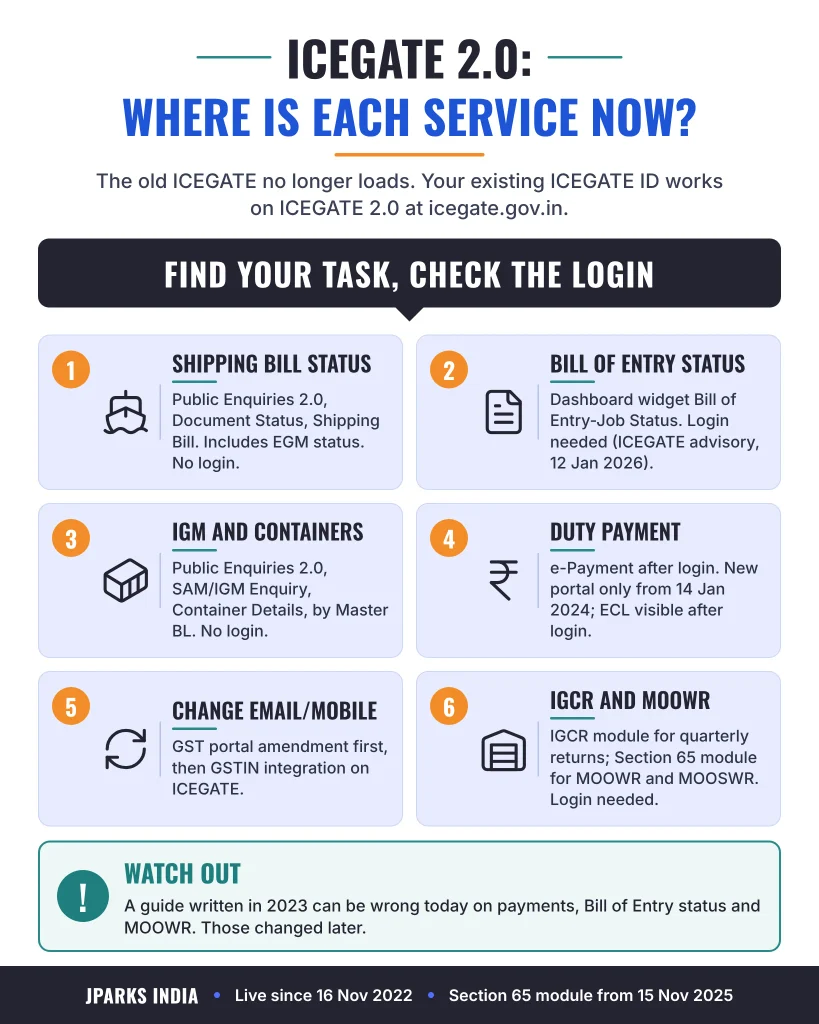
ICEGATE 2.0 is the current version of CBIC’s customs portal at icegate.gov.in. It is not a separate website: login and enquiry screens open on foservices.icegate.gov.in, part of the same portal, so treat any other domain as unofficial. Services moved over in stages, and some arrived years after launch. These are the dates we could tie to official ICEGATE or CBIC documents:
Date
What happened
Source
16 Nov 2022
ICEGATE 2.0 Phase I goes live; ICEGATE 1.0 modules kept on the old site for locations not yet moved
ICEGATE launch advisory, 15 Nov 2022
16 Nov to 29 Dec 2022
Dashboard, notifications and webforms reach users location by location
Same advisory
14 Jan 2024
Customs duty and other payments move fully to the new portal; Electronic Cash Ledger (ECL) available after login
ICEGATE ECL 2.0 advisory, 13 Jan 2024
Jan to Mar 2025 quarter
IGCR returns filed in the new IGCR module
ICEGATE FAQ on IGCR filing
15 Nov 2025
Online module for Section 65 permissions (MOOWR and MOOSWR) goes live
Circular No. 28/2025-Customs
12 Jan 2026
Bill of Entry status placed on the post-login dashboard
ICEGATE advisory on checking BoE status
The practical point: a guide written in 2023 can be wrong today on payments, Bill of Entry status and MOOWR, because those changed later.
Old ICEGATE login: old.icegate.gov.in no longer loads, and your old ID works on the new portal. Our page on the old ICEGATE website shows where each old function moved.
ICEGATE stands for Indian Customs Electronic Gateway. You will also see the longer Indian Customs Electronic Data Interchange (EDI) Gateway, and in older CBEC-era material Indian Customs and Central Excise Electronic Commerce/EDI Gateway. All three name the same portal, which began as an EDI channel for trade software and grew into the full web portal. The homepage now brands itself “Indian Customs National Trade Portal 2.0”.
The portal is run by the Directorate General of Systems and Data Management under CBIC, the Central Board of Indirect Taxes and Customs, Ministry of Finance, New Delhi. ICEGATE is the front end you log in to; ICES, the Indian Customs EDI System, is the back end that processes declarations. Your IEC comes from DGFT, not from ICEGATE.
How JPARKS INDIA can help
Most ICEGATE login problems we see are not technical. The ID was created by someone who has left, the registered email is closed, or the business has two registrations. We find the original ICEGATE ID, check which email and mobile the profile holds, prepare the GST amendment with your CA or GST practitioner, re-run the GSTIN integration, and link a valid Class 3 DSC so signing works after login.
If your business is not yet on ICEGATE, our ICEGATE registration service costs Rs 3,500 + GST (Rs 4,130) and takes 2 to 3 working days. JPARKS INDIA is an EXIM compliance consultancy in Vashi, Navi Mumbai: we handle registrations, while customs clearance stays with your licensed customs broker. Write to [email protected] or call +91 9167379073.
Frequently asked questions
Q1. Is the new ICEGATE login different from the old one?
The screen is different but the account is the same. ICEGATE 2.0 replaced the old portal from 16 November 2022, and CBIC’s manual says users registered on ICEGATE 1.0 do not need a fresh registration. Choose “ICEGATE User” and use your existing ID and password.
Q2. Can I log in to ICEGATE with my IEC number?
Not as a rule. The login asks for your ICEGATE ID, which is the ID set at registration. Your IEC is linked to the account but is a separate code issued by DGFT.
Q3. Is ICEGATE mail login the same as the ICEGATE portal login?
No. ICEGATE mail login at webmail.icegate.gov.in opens a mailbox for @icegate.gov.in accounts, while filing and tracking happen on the ICEGATE portal with an ICEGATE ID. The two use different usernames and passwords, and one does not open the other.
Q4. Can an exporter get an @icegate.gov.in email ID?
No official source we found says so. The icegate.gov.in domain is used by CBIC officers and offices, and ICEGATE sends trade users their mail at the email address on their registration. If someone offers you an “ICEGATE email ID” for a fee, treat it with suspicion.
Q5. Can I check a Shipping Bill without ICEGATE login?
Yes. Use Public Enquiries 2.0, then Document Status, then Shipping Bill, and enter the port, Shipping Bill number, date and captcha; the result includes EGM status. IGM details, challan status and several other checks are also open to anyone. Bill of Entry status, however, needs a login: ICEGATE’s advisory of 12 January 2026 places it on the dashboard’s “Bill of Entry-Job Status” widget.
Q6. Is ICEGATE 2.0 a separate website from icegate.gov.in?
No. ICEGATE 2.0 is icegate.gov.in itself. Login and enquiry screens open on foservices.icegate.gov.in, which is part of the same official portal, so any other domain should be treated as unofficial.
Q7. Is there an ICEGATE mobile app?
Apps using the ICEGATE name appear in app stores. Before installing one, check that the publisher is CBIC or ICEGATE, and use the same ICEGATE ID you use on the website. We have not tested what the apps offer, so for filing and payments rely on the portal.
Q8. Who do I contact if I am locked out of ICEGATE?
Contact the ICEGATE helpdesk on 1800-3010-1000 or [email protected]. Give your ICEGATE ID if you know it, your IEC and GSTIN, and a screenshot of the error. The helpdesk can confirm which registration and contact details are on record.
Tell us where you are stuck. We usually reply the same business day.
5.0 ★ · 123 Google reviews · Since 1990
Posted on Google
Vandana Bajaj
Trustindex verifies that the original source of the review is Google.
Very prompt and reliable service by Rahul Kolge and his team. Exceptional and happy experience.
Posted on Google
Supriya Shetye
Trustindex verifies that the original source of the review is Google.
Had a really good experience with JParks India. Rahul sir helped me a lot with my import work and were always active and responsive. Whatever documents or guidance was needed, they handled everything smoothly and explained things clearly. Felt stress-free throughout the process. Very helpful team, definitely recommend them if you’re doing import or export.
Posted on Google
dipali sakpal
Trustindex verifies that the original source of the review is Google.
Very nice people, get the work done in a very short time.
Posted on Google
Satish Bajaj
Trustindex verifies that the original source of the review is Google.
Excellent & Prompt services in all Import Export matters.
Great to work with you
Posted on Google
Bajaj VCPL
Trustindex verifies that the original source of the review is Google.
It was a great experience having work with you.
Posted on Google
Satish Bajaj
Trustindex verifies that the original source of the review is Google.
"Outstanding professiona services, efficient, and gets things done incredibly fast. Highly recommended for anyone needing reliable and prompt assistance
Posted on Google
Nishat fatima
Trustindex verifies that the original source of the review is Google.
excellent service
Posted on Google
farhan sayed
Trustindex verifies that the original source of the review is Google.
JParks Team is Super helpful! Thanks to Rahul and team!
Posted on Google
Sadik Inamdar
Trustindex verifies that the original source of the review is Google.
Good and personal service for import export code
Posted on Google
Maheshwar
Trustindex verifies that the original source of the review is Google.
Had a really good experience with JParks India. Rahul sir helped me a lot with my import work and were always active and responsive. Whatever documents or guidance was needed, they handled everything smoothly and explained things clearly. Felt stress-free throughout the process. Very helpful team, definitely recommend them if you’re doing import or export.
We use cookies to run this site, measure traffic, and track our ads. Essential cookies are always on. Accept all, reject non-essential, or set your preferences.
Cookie Preferences
Manage your cookie preferences below:
Essential cookies enable basic functions and are necessary for the proper function of the website.
Name
Description
Duration
Cookie Preferences
This cookie is used to store the user's cookie consent preferences.
30 days
Google reCAPTCHA helps protect websites from spam and abuse by verifying user interactions through challenges.
Name
Description
Duration
_GRECAPTCHA
Google reCAPTCHA sets a necessary cookie (_GRECAPTCHA) when executed for the purpose of providing its risk analysis.
179 days
Google Tag Manager simplifies the management of marketing tags on your website without code changes.
Name
Description
Duration
cookiePreferences
Registers cookie preferences of a user
2 years
td
Registers statistical data on users' behaviour on the website. Used for internal analytics by the website operator.
session
Statistics cookies collect information anonymously. This information helps us understand how visitors use our website.
Google Analytics is a web analytics service that tracks and reports website traffic. It collects anonymized data on how visitors use the site to help us understand and improve performance.